
Have you ever thought about building websites or web apps but did not know where to start? You are not alone. Every year, thousands of beginners want to learn web development. However, many stop because they feel confused. They do not know which language to learn first or which skills really matter. The good news is that learning web development is much easier when you follow the right path. A Web Development Course can help you learn every step in the correct order. Instead of wasting time, you can build real skills that prepare you for today’s digital world.
In 2026, businesses of every size need websites, online stores, and web applications. As a result, skilled web developers continue to be in high demand. Whether you want a full-time job, freelance projects, or your own online business, web development offers many opportunities. This guide explains everything a beginner should know before choosing a Web Development Course. You will learn the required skills, important tools, career options, and practical tips to help you become a confident web developer.
What Is Web Development?
Web development is the process of creating websites and web applications that people use through internet browsers. It includes designing web pages, writing code, connecting databases, and making websites fast, secure, and user-friendly.
Today, websites are used for shopping, education, healthcare, banking, entertainment, and business. Because of this, web development has become one of the most valuable technical skills.
A quality Web Development Course teaches both the theory and practical skills needed to build modern websites.
Web Development Includes:
- Front-end development
- Back-end development
- Full-stack development
- Database management
- Website deployment
- Website maintenance
Every part works together to create websites that perform smoothly across all devices.
Why Learn Web Development in 2026?
Technology continues to grow every year. Companies now depend on websites more than ever before. From small businesses to global companies, everyone needs skilled developers.
Learning web development today offers long-term career security and flexibility.
Here are some reasons to start learning:
- High demand across industries
- Good salary opportunities
- Freelance work from anywhere
- Remote job availability
- Continuous career growth
- Ability to build your own business or startup
Most importantly, web development allows you to solve real problems by creating useful digital products.
How a Web Development Course Helps Beginners
Many beginners try learning from random YouTube videos. Unfortunately, this often creates confusion because topics are not organized.
A structured Web Development Course follows a proper learning roadmap. Every lesson builds upon the previous one.
Instead of guessing what to study next, you always know your next step.
Learn the Right Order
You begin with HTML before learning CSS.
You master CSS before moving to JavaScript.
Later, you explore frameworks and backend technologies.
This step-by-step approach reduces confusion.
Build Practical Projects
Reading alone is not enough.
Good courses include projects such as:
- Portfolio website
- Landing page
- Blog website
- To-do application
- Calculator
- Responsive business website
Projects improve confidence and strengthen practical knowledge.
Understand Industry Tools
Modern developers use many professional tools every day.
These include:
- Git
- GitHub
- Visual Studio Code
- Chrome Developer Tools
- Node.js
- React
- Bootstrap
Learning these tools early prepares you for real jobs.
Skills You Will Learn During a Web Development Course
Every beginner starts with basic concepts before moving toward advanced topics.
Below are the most important skills.
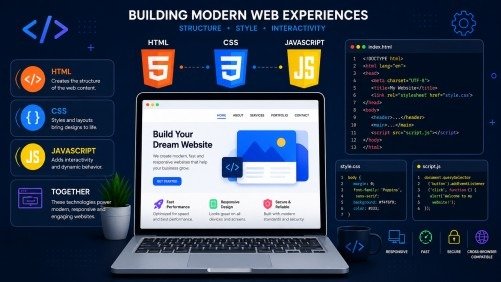
HTML – The Foundation of Every Website
HTML creates the structure of a webpage.
It defines:
- Headings
- Paragraphs
- Images
- Forms
- Tables
- Navigation menus
- Buttons
Without HTML, no webpage can exist.
CSS – Making Websites Beautiful
CSS controls the appearance of websites.
It helps developers add:
- Colors
- Fonts
- Layouts
- Animations
- Spacing
- Responsive designs
CSS transforms a simple webpage into an attractive website.
JavaScript – Bringing Websites to Life
JavaScript makes websites interactive.
Using JavaScript, you can create:
- Image sliders
- Pop-up windows
- Login validation
- Dynamic menus
- Interactive forms
- Live search
Almost every modern website uses JavaScript.
A professional Web Development Course always includes JavaScript because it is one of the most important programming languages today.
Understanding Front-End Development
Front-end development focuses on everything users can see and interact with.
It combines:
- HTML
- CSS
- JavaScript
Later, developers also learn frameworks such as React or Vue to build faster websites.
Front-End Developer Responsibilities
- Design user interfaces
- Build responsive layouts
- Improve website speed
- Create mobile-friendly pages
- Improve accessibility
Good front-end developers always think about user experience.
Understanding Back-End Development
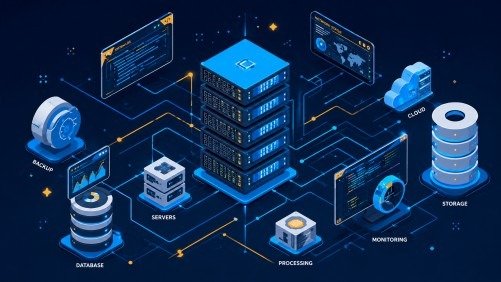
The backend controls everything users cannot see.
It processes requests and manages website data.
Common backend technologies include:
- Node.js
- PHP
- Python
- Java
Backend developers also work with databases.
They build:
- Login systems
- APIs
- Payment systems
- User dashboards
- Content management systems
A complete Web Development Course teaches how frontend and backend work together.
Full-Stack Development Explained
A full-stack developer understands both frontend and backend development.
This means one person can build a complete website from start to finish.
Full-stack developers often work with:
- HTML
- CSS
- JavaScript
- React
- Node.js
- Express.js
- MongoDB
- Git
Because they have multiple skills, many companies prefer hiring full-stack developers.
Essential Tools Every Beginner Should Learn
Learning programming languages is important.
However, professional tools are equally valuable.
Visual Studio Code
This is one of the world’s most popular code editors.
It helps developers write clean and organized code.
Git and GitHub
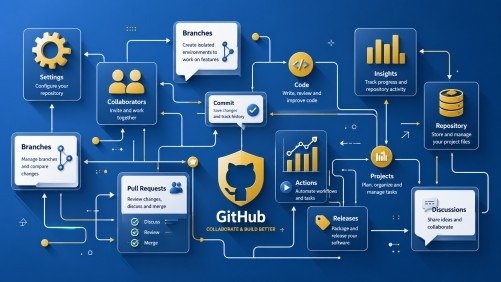
Git tracks every code change.
GitHub stores projects online.
Together they make teamwork easier.
Browser Developer Tools
Every modern browser includes developer tools.
They help developers:
- Find errors
- Test layouts
- Improve performance
- Debug JavaScript
These tools save hours of development time.
Responsive Web Design Is Essential
Today, people visit websites from phones, tablets, laptops, and desktop computers. Therefore, your website must look good on every screen. This is called responsive web design.
A professional Web Development Course teaches responsive design from the beginning. You learn how to create flexible layouts that automatically adjust to different screen sizes.
Key Responsive Design Skills
- CSS Flexbox
- CSS Grid
- Media Queries
- Mobile-first design
- Responsive images
- Flexible layouts
When your website works well on every device, users enjoy a better experience.
Learn Version Control with Git
Every developer makes changes to code every day.
Git helps you save every change safely.
It also allows developers to:
- Track project history
- Restore previous versions
- Work in teams
- Merge new features
- Avoid losing important files
GitHub allows you to store your projects online. It also helps employers see your coding skills.
Learn Databases and APIs
Modern websites need databases to store information.
For example, an online shopping website stores:
- Customer accounts
- Products
- Orders
- Payments
Popular databases include:
- MongoDB
- MySQL
- PostgreSQL
APIs allow different applications to communicate.
Examples include:
- Payment gateways
- Google Maps
- Weather services
- Login with Google
- Social media sharing
Learning APIs makes your projects much more powerful.
Build Real Projects
Practice is the fastest way to improve.
Instead of only watching videos, start building projects.
A good Web Development Course includes practical assignments that help you apply your knowledge.
Beginner Projects
- Personal portfolio website
- Landing page
- Calculator
- To-do list
- Weather application
Intermediate Projects
- Blog website
- E-commerce homepage
- Student management system
- Quiz application
- Movie search app
Advanced Projects
- Online learning platform
- Chat application
- Job portal
- Food delivery website
- Complete e-commerce store
Every project increases your confidence.
Create a Strong Portfolio
Your portfolio is your online resume.
It shows employers what you can build.
Your portfolio should include:
- About Me section
- Skills
- Projects
- GitHub profile
- Live website links
- Contact page
A clean portfolio creates a strong first impression.
Common Mistakes Beginners Should Avoid
Many beginners make common mistakes that slow their progress. Do not skip HTML because it is the foundation of web development, and focus on understanding the logic instead of memorizing code. Build real projects instead of only watching tutorials, practice consistently every day, and keep learning because web technologies continue to evolve.
Career Opportunities After Learning Web Development
After completing a Web Development Course, many career paths become available.
Popular job roles include:
- Front-End Developer
- Back-End Developer
- Full-Stack Developer
- WordPress Developer
- UI Developer
- Web Designer
- Software Engineer
- Freelance Web Developer
- Technical Support Engineer
Many professionals also start their own agencies or freelance businesses.
Tips to Become a Successful Web Developer
Success does not happen overnight.
However, these habits will help you grow faster.
- Practice coding every day.
- Build real projects regularly.
- Read official documentation.
- Join developer communities.
- Improve problem-solving skills.
- Learn new technologies slowly.
- Keep updating your portfolio.
- Ask for feedback.
- Stay patient.
- Never stop learning.
Small improvements every day create big success over time.
Why Choosing the Right Course Matters
Not every course teaches practical skills.
Choose a Web Development Course that includes:
- Updated curriculum
- Real projects
- Hands-on practice
- Git and GitHub
- Responsive design
- React
- Backend development
- Database learning
- Career guidance
- Portfolio building
A structured course helps you learn faster and prepares you for real jobs.
Frequently Asked Questions
How long does it take to learn web development?
Most beginners develop strong web development skills within 6 to 12 months through consistent learning, regular coding practice, and real-world projects.
Can I learn web development without a degree?
Many successful web developers build their careers through online courses, hands-on practice, and a strong portfolio instead of a formal degree.
Is web development still a good career in 2026?
Web development continues to offer excellent career opportunities as businesses increasingly rely on websites and web applications to grow online.
Which language should beginners learn first?
HTML should be your starting point, followed by CSS and JavaScript, as these technologies form the foundation of modern web development.
Should I learn frontend or backend first?
Frontend development is the best place to begin because it helps you understand how websites look and function before learning server-side technologies.
.
Conclusion
Learning web development is one of the smartest career decisions you can make in 2026. It opens the door to exciting jobs, freelancing opportunities, and business ideas. Instead of learning random topics, follow a structured roadmap and practice consistently.
The right Web Development Course gives you the knowledge, confidence, and practical experience needed to build modern websites from scratch. Focus on learning one skill at a time, complete real-world projects, and keep improving your portfolio. With dedication and continuous practice, you can become a skilled web developer and build a successful career in the ever-growing technology industry.
Meta Description:
Start your Web Development Course in 2026 with this complete beginner’s guide. Learn HTML, CSS, JavaScript, React, Git, projects, and career tips.
- What Is Web Development?
- Why Learn Web Development in 2026?
- How a Web Development Course Helps Beginners
- Skills You Will Learn During a Web Development Course
- Understanding Front-End Development
- Essential Tools Every Beginner Should Learn
- Learn Version Control with Git
- Learn Databases and APIs
- Build Real Projects
- Create a Strong Portfolio
- Common Mistakes Beginners Should Avoid
- Career Opportunities After Learning Web Development
- Tips to Become a Successful Web Developer
- Why Choosing the Right Course Matters
- Frequently Asked Questions
- Conclusion
- Meta Description: