
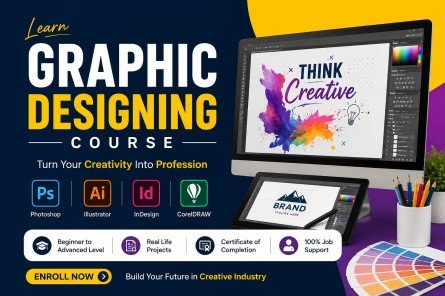
In today’s digital world, graphic design has become one of the most valuable skills for students, freelancers, entrepreneurs, and creative professionals. Whether you want to create social media posts, business logos, website graphics, marketing materials, or digital artwork, learning graphic design can open the door to many exciting career opportunities. A Graphic Designing Course helps beginners understand the basic principles of design while teaching them how to use professional software like Adobe Photoshop, Adobe Illustrator, and Canva.
These tools are widely used by designers around the world to create high-quality visual content. Even if you have no previous experience, you can start learning from scratch with the right guidance and consistent practice. This article explains everything you need to know about choosing the right course, its benefits, features, learning process, common mistakes to avoid, and how you can build a successful career in graphic design.
What is a Graphic Designing Course?
A Graphic Designing Course is a beginner-friendly program that teaches you how to create professional visual content using popular design tools like Adobe Photoshop, Adobe Illustrator, and Canva. Along with learning these tools, you’ll also understand important design concepts such as typography, color theory, layout, composition, and branding to create attractive and effective designs.
The course combines theory with practical projects, allowing you to build real-world design skills and a professional portfolio. By the end of the course, you’ll be prepared to design logos, social media posts, posters, marketing materials, and other creative graphics, helping you start a career, freelance business, or internship in graphic design.
Benefits of a Graphic Designing Course
Learning graphic design provides many personal and professional advantages. Below are some of the biggest benefits of joining a Graphic Designing Course.
1. Learn Professional Design Skills
The course teaches essential design concepts such as typography, color theory, layout design, visual hierarchy, alignment, balance, contrast, and branding. These skills help you create attractive and meaningful designs for different industries.
Instead of randomly placing images and text, you’ll learn how professional designers organize visual elements to capture attention and improve communication.
2. Master Industry-Standard Software
A complete graphic design course covers the most popular design tools used worldwide.
Adobe Photoshop
- Photo editing
- Background removal
- Image retouching
- Poster design
- Social media graphics
- Banner creation
Adobe Illustrator
- Logo design
- Vector illustrations
- Icons
- Business cards
- Packaging design
- Infographics
Canva
- Presentation design
- Social media posts
- Flyers
- Certificates
- Invitations
- Marketing materials
Learning these three applications gives you flexibility to work on different types of creative projects.
3. Build a Strong Portfolio
One of the biggest advantages of enrolling in a Graphic Design Course is the opportunity to build a professional portfolio. Employers and clients often judge designers based on their portfolio rather than their academic qualifications.
During the course, you’ll work on practical projects such as:
- Logo designs
- Posters
- Brochures
- Social media campaigns
- Website banners
- Product advertisements
- Business cards
- Brand identity kits
A strong portfolio demonstrates your creativity and technical skills.
4. High Demand Across Industries
Graphic designers are needed in almost every industry, including:
- Digital marketing agencies
- IT companies
- Advertising agencies
- E-commerce businesses
- Printing companies
- Publishing houses
- Media organizations
- Educational institutions
- Startups
- Corporate companies
As businesses continue expanding their online presence, the demand for skilled designers keeps increasing.
5. Excellent Freelancing Opportunities
Graphic design is one of the most popular freelance professions. After completing your training, you can offer services on platforms like Upwork, Fiverr, Freelancer, and PeoplePerHour.
Freelancers often work on projects such as:
- Logo design
- Social media graphics
- Product packaging
- YouTube thumbnails
- Website graphics
- Marketing banners
- Brand identity design
Freelancing allows you to work from home, choose your clients, and set your own schedule.
6. Creative Career Growth
A Graphic Designing Course helps you turn your creativity into a profession. Instead of treating design as just a hobby, you can develop practical skills that are valuable in today’s job market.
With experience, designers can specialize in:
- UI Design
- UX Design
- Motion Graphics
- Branding
- Digital Illustration
- Print Media
- Advertising Design
- Packaging Design
These specializations often lead to higher salaries and better career opportunities.
7. Improve Communication Through Design
Graphic design is more than creating beautiful images. It is about communicating ideas clearly.
You’ll learn how to design visuals that attract attention, explain information, and encourage people to take action. This skill is valuable in marketing, education, business, and social media.
8. Learn at Your Own Pace
Many online courses allow students to learn at their own pace. You can watch video lessons, complete assignments, and practice software whenever you have time.
This flexibility makes learning easier for students, working professionals, and business owners.
9. Increase Job Opportunities
Companies look for candidates who understand modern design software and branding principles. Completing a Graphic Designing Course improves your resume and helps you qualify for roles such as:
- Graphic Designer
- Visual Designer
- Brand Designer
- Social Media Designer
- Marketing Designer
- Creative Executive
- Illustrator
- Production Artist
With additional experience, you can move into senior design or creative leadership roles.
10. Start Your Own Design Business
Many designers eventually launch their own agencies or personal brands. You can provide branding, logo creation, social media management, print design, and digital marketing design services to businesses around the world.
A successful design business can generate long-term income while allowing you to work independently.
Features of a Graphic Designing Course
Choosing the right Graphic Designing Course is important because it helps you build the right skills and confidence. A good course should combine design theory with practical training so you can work on real-world projects. Below are the key features you should look for in a professional course.
1. Beginner-Friendly Curriculum
A quality course starts with the basics before moving to advanced topics. Beginners learn:
- Introduction to graphic design
- Design principles
- Typography basics
- Color theory
- Layout and composition
- Image editing
- Branding fundamentals
This structured approach makes learning easier for students with no previous experience.
2. Adobe Photoshop Training
Adobe Photoshop is one of the most powerful tools for graphic designers. A complete course teaches you how to use Photoshop effectively for different creative tasks.
Topics usually include:
- Photoshop interface
- Working with layers
- Selection tools
- Masks
- Image retouching
- Background removal
- Color correction
- Filters and effects
- Text editing
- Poster creation
- Social media graphics
- Photo manipulation
Practical projects help you gain confidence while using Photoshop.
3. Adobe Illustrator Training
Illustrator is mainly used for vector graphics. Unlike Photoshop, vector designs can be resized without losing quality.
Students usually learn:
- Illustrator workspace
- Pen Tool
- Shape Builder Tool
- Vector drawing
- Logo creation
- Icons
- Business cards
- Brochure design
- Infographics
- Packaging design
- Typography using vectors
Illustrator is widely used for branding and print design.
4. Canva Training
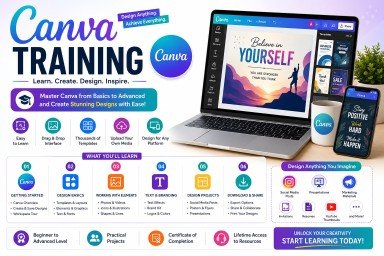
Canva has become one of the easiest design tools for beginners. It allows users to create professional graphics quickly.
You’ll learn to design:
- Instagram posts
- Facebook banners
- YouTube thumbnails
- Presentations
- Flyers
- Certificates
- Invitations
- Resumes
- Marketing materials
Canva is especially useful for content creators, small businesses, and social media managers.
5. Real-World Projects
A good course includes practical assignments that help students apply what they learn.
Example projects include:
- Logo Design
- Company Branding
- Social Media Campaign
- Product Advertisement
- Restaurant Menu
- Business Card
- Event Poster
- Website Banner
Completing these projects improves creativity and strengthens your portfolio.
6. Portfolio Development
Employers want to see your work before hiring you. A professional course helps you create a portfolio showcasing your best designs.
Your portfolio may include:
- Logo designs
- Brand identity
- Social media creatives
- Packaging designs
- Flyers
- Posters
- Brochures
- UI mockups
A strong portfolio increases your chances of getting freelance clients or full-time jobs.
7. Certificate of Completion
Many online platforms provide certificates after course completion. Although skills matter most, certificates can strengthen your resume and LinkedIn profile while demonstrating your commitment to learning.
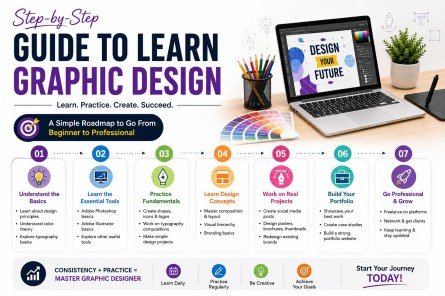
Step-by-Step Guide to Learn Graphic Design
Learning graphic design becomes easier when you follow a structured roadmap. The following steps can help beginners build strong design skills.
Step 1: Understand Graphic Design Basics
Start by learning the fundamentals.
Focus on:
- Balance
- Contrast
- Alignment
- Repetition
- Hierarchy
- White space
- Color theory
- Typography
These principles form the foundation of every successful design.
Step 2: Learn Adobe Photoshop
Photoshop is usually the first software beginners learn.
Practice:
- Cropping images
- Removing backgrounds
- Adjusting colors
- Using layers
- Applying filters
- Creating posters
- Designing social media posts
The more projects you complete, the more comfortable you become with the software.
Step 3: Learn Adobe Illustrator
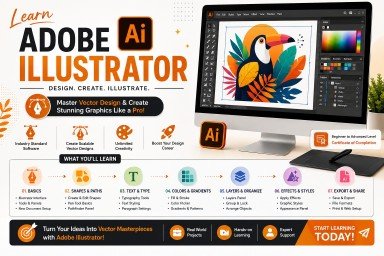
After Photoshop, move to Illustrator.
Practice creating:
- Logos
- Icons
- Vector illustrations
- Business cards
- Infographics
- Packaging designs
Illustrator is essential for branding and print media.
Step 4: Learn Canva
Canva is perfect for creating quick and professional designs.
Practice making:
- Instagram posts
- Facebook ads
- Presentation slides
- Flyers
- Certificates
- Invitations
- Marketing banners
Learning Canva increases your productivity and helps you create attractive content in less time.
Step 5: Practice Every Day
The best designers improve through consistent practice.
Spend at least 30 to 60 minutes each day working on new designs. Try recreating posters, logos, advertisements, or social media graphics to improve your skills.
Step 6: Build Your Portfolio
A portfolio is your strongest marketing tool.
Include your best work, such as:
- Logo projects
- Posters
- Flyers
- Brand identity designs
- Packaging
- Social media campaigns
Keep updating your portfolio as your skills improve.
Step 7: Learn Freelancing Basics
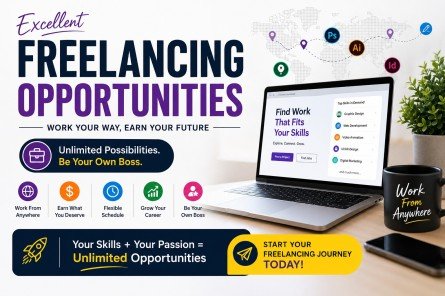
Once you feel confident, create profiles on freelance platforms and showcase your portfolio.
Popular platforms include:
- Fiverr
- Upwork
- Freelancer
- PeoplePerHour
Start with smaller projects, collect positive reviews, and gradually increase your pricing.
Step 8: Continue Learning
Graphic design trends change regularly. Keep improving your knowledge by exploring new tools, watching tutorials, following professional designers, and practicing modern design styles.
Common Mistakes Beginners Should Avoid
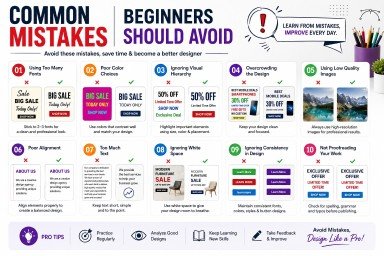
Every beginner makes mistakes while learning graphic design. Understanding these common errors will help you improve faster.
1. Ignoring Design Principles
Many beginners jump directly into software without understanding the basics of design. Learning concepts like balance, contrast, hierarchy, and alignment is just as important as learning Photoshop or Illustrator.
2. Using Too Many Fonts
Using multiple fonts in one design creates confusion and reduces readability. Limit yourself to two or three complementary fonts for a clean and professional appearance.
3. Choosing Poor Color Combinations
Color selection affects how people feel about a design. Avoid using random colors. Instead, use balanced color palettes that match your brand or project.
4. Overcrowding the Design
Adding too many elements makes a design look cluttered. Use white space effectively so important information stands out and the layout remains easy to read.
5. Not Practicing Regularly
Watching tutorials alone won’t make you a designer. Consistent practice is essential for improving creativity and technical skills.
6. Copying Designs Without Learning
Looking at professional work for inspiration is helpful, but copying it exactly limits your creativity. Focus on understanding why a design works and create your own original version.
7. Ignoring Client Requirements
Professional designers create work based on client needs, not personal preferences. Always understand the target audience, project goals, and brand guidelines before starting a design.
8. Forgetting to Build a Portfolio
Many learners complete courses but never organize their work into a portfolio. A strong portfolio is often more important than a certificate when applying for jobs or freelance projects.
By avoiding these mistakes and practicing consistently, you’ll become a more confident and skilled designer over time.
Conclusion
Learning graphic design is a valuable step for anyone who wants to build a creative and rewarding career. A Graphic Designing Course helps you learn Adobe Photoshop, Adobe Illustrator, and Canva while developing essential design skills through practical projects and hands-on experience.
With regular practice, a strong portfolio, and continuous learning, you can pursue freelance opportunities or secure a full-time design job. Keep improving your skills, stay updated with the latest design trends, and you’ll be well on your way to becoming a successful graphic designer.
Frequently Asked Questions
1. What is a Graphic Designing Course?
A Graphic Designing Course teaches you design principles and how to use Photoshop, Illustrator, and Canva to create professional graphics.
2. Can beginners learn graphic design?
Yes, beginners can easily learn graphic design by starting with the basics and practicing regularly using simple projects.
3. Which software is included in this course?
Most courses include Adobe Photoshop, Adobe Illustrator, and Canva for photo editing, vector design, and social media graphics.
4. What jobs can I get after completing the course?
You can work as a Graphic Designer, Logo Designer, Social Media Designer, Brand Designer, or freelance graphic designer.
5. Is graphic design a good career in 2026?
Yes, graphic design is a growing career with strong demand in digital marketing, branding, advertising, and freelancing.
Call to Action
Ready to begin your design journey? Join a professional Graphic Designing Course today and start learning Photoshop, Illustrator, and Canva from scratch.
Build your portfolio, earn valuable skills, and prepare yourself for exciting freelance and full-time career opportunities.
Enroll now and take the first step toward becoming a successful graphic designer.
Meta Description
Graphic Designing Course to learn Photoshop, Illustrator & Canva from scratch. Build design skills, create a portfolio, and start your career.