

Writing good content takes time. You need fresh ideas, clear words, and a strong message. You may also need blog posts, website pages, emails, and social media captions. Doing all this work by hand can be hard. That is where the Best AI Writing Tools can help. These tools can give you new ideas, write first drafts, fix grammar, and make your content easier to read. As a result, you can save time and focus on quality.
However, AI cannot replace your own ideas and skills. You still need to check facts, add useful details, and make each piece of content fit your readers. In this guide, you will learn about popular AI writing tools, their main uses, and how to choose the right one for your needs.
What Are AI Writing Tools?
AI writing tools are online apps that help people create and improve text. They use artificial intelligence to understand your instructions and suggest words, ideas, and sentences.
For example, you can ask an AI tool to write a blog outline, explain a hard topic, or improve a short paragraph. You can also use it to fix spelling and grammar.
Moreover, these tools can help new writers who do not know how to start. They can also support teachers, students, bloggers, and business owners.
7 Best AI Writing Tools in 2026
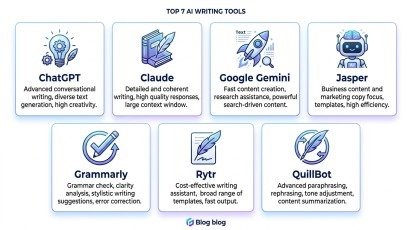
There are many tools to choose from. However, each one has its own strengths. Some are good for long articles, while others work well for short posts and editing.
1. ChatGPT
ChatGPT is a flexible tool for a wide range of writing tasks. You can use it to find ideas, create outlines, write drafts, and improve your text.
For example, bloggers can ask it to create an article plan with clear headings. They can then add their own facts, examples, and views. It can also help write product descriptions, emails, and social media captions.
Another benefit is its simple chat style. You can ask follow-up questions and improve the result step by step.
Best for: Blog posts, content ideas, email drafts, and general writing.
Keep in mind: Always check facts and edit the draft before you publish it.
2. Claude
Claude is useful for long articles and detailed writing tasks. It can help you organize ideas, explain complex topics, and rewrite text in a clear style.
For instance, you can share a long document and ask for a summary. You can also use it to build a blog outline or improve the flow of an article.
In addition, Claude can help you keep a steady tone across a long piece of content. This can be useful when your article has several sections.
Best for: Long-form articles, research summaries, and detailed drafts.
Keep in mind: Review important claims and add your own knowledge to make the content more useful.
3. Google Gemini
Google Gemini can help with writing, brainstorming, and summarizing. It is also useful for people who work with Google tools.
For example, you can use it to draft an email, plan a blog post, or turn notes into a clear document. Depending on your plan and available features, it may also help with work across Google apps.
Furthermore, it can help you find different ways to explain a topic. This makes it useful when your first draft feels unclear.
Best for: Emails, summaries, content ideas, and Google Workspace tasks.
Keep in mind: Check the facts and make sure the final text matches your needs.
4. Jasper
Jasper is built mainly for marketing teams and businesses. It can help create ad copy, website text, email campaigns, and social media content.
One key benefit is brand voice support. A business can set rules for its tone and message. This helps different pieces of content sound more alike.
For example, a shop can use Jasper to draft product descriptions and promotional emails. The team can then edit the text to match its products and customers.
Best for: Marketing copy, brand content, and campaign writing.
Keep in mind: Check the price and features before choosing a paid plan.
5. Grammarly
Grammarly focuses on editing and writing quality. It checks spelling, grammar, punctuation, and clarity. It can also suggest ways to improve your sentences.
For example, you can use it to review a blog post before publishing. It may help you find repeated words or sentences that are hard to read.
As a result, it can make your work clearer and more polished. It is especially helpful for people who write in English as a second language.
Best for: Grammar checks, proofreading, and clear writing.
Keep in mind: Do not accept every suggestion without checking its meaning.
6. Rytr
Rytr is a writing assistant for short content. It can help create captions, email subject lines, product descriptions, and simple marketing copy.
For example, a small business can use it to draft several social media captions for a new product. The owner can then choose the best idea and add details about the offer.
Also, its simple workflow can make it easier for new users to get started.
Best for: Short posts, product text, and quick writing tasks.
Keep in mind: Long articles may need more editing to improve flow and detail.
7. QuillBot
QuillBot is useful when you already have text and want to improve it. Its tools can help paraphrase sentences, summarize information, and check grammar.
For example, you can use it to make a long sentence shorter. You can also summarize your notes before writing a full article.
However, changing words alone does not make content original. You must understand the source, write in your own way, and give credit when needed.
Best for: Rewriting, summaries, and sentence improvement.
Keep in mind: Check that the new version keeps the correct meaning.
How to Choose the Best AI Writing Tools
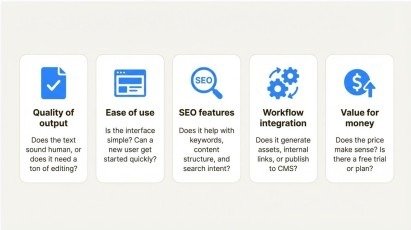
The right tool depends on what you write and how often you write it. Therefore, think about your main tasks before you choose a plan.
Here are a few things to check:
- Your needs: Choose a tool that fits your work, such as blog writing, editing, or marketing.
- Ease of use: Pick an app that feels simple and clear.
- Writing quality: Test its output with a real task.
- Language support: Check that it works well in your chosen language.
- Cost: Start with a free plan when one is available.
- Extra features: Look for useful options, such as grammar checks or brand voice settings.
Most importantly, do not pay for features you will rarely use. Start small and upgrade only when you need more.
How to Use AI for Better Content
AI can make writing faster. However, a good result still needs a clear process. Follow these simple steps to improve your content.
Step 1: Choose a Clear Topic
First, decide what you want to write about. Think about your readers and the questions they may ask.
For example, a blog for beginners could explain how to use a computer, write an email, or learn a new skill.
Step 2: Create an Outline
Next, ask your chosen tool to suggest a simple outline. Use clear headings that follow a natural order.
This helps you cover the main points without adding extra sections that do not help the reader.
Step 3: Write and Improve the Draft
Now, create a first draft. Ask the tool to use short sentences, simple words, and useful examples.
After that, read the text yourself. Remove repeated ideas and add details that the tool may have missed.
Step 4: Check Facts and Grammar
Before publishing, check names, dates, figures, and other important claims. Use trusted sources when you need to confirm facts.
Then, review spelling, grammar, headings, and links. This step helps prevent mistakes and builds trust with your readers.
Step 5: Prepare the Content for SEO
Finally, add your focus keyword in natural places. Write a clear title and meta description. Use useful headings and answer the reader’s main question.
Good SEO is not just about keywords. Your content must also be helpful, easy to read, and relevant to the search.
Common Mistakes to Avoid When Using AI

AI writing tools can save time, but poor use can lower content quality. Avoid these common mistakes.
- Publishing without editing: Always read and improve the draft.
- Using false facts: Check important claims with reliable sources.
- Repeating keywords too often: Use your focus keyword naturally.
- Ignoring your readers: Write to solve a real problem.
- Copying other content: Add original ideas, examples, and useful details.
By avoiding these mistakes, you can create content that feels clear, useful, and trustworthy.
Conclusion
AI has made writing easier for bloggers, students, freelancers, and businesses. The right tool can help you plan articles, improve grammar, and create content in less time. However, no tool can do every task perfectly. Some are better for long articles, while others are more useful for editing or marketing copy. So, test a few options and choose the one that fits your work.
The Best AI Writing Tools should support your skills, not replace your judgment. Use them to save time, check every draft, and add your own ideas. This way, you can create better content that helps your readers and supports your website goals.
Frequently Asked Questions
1. What Are the Best AI Writing Tools in 2026?
The Best AI Writing Tools in 2026 include ChatGPT, Claude, Google Gemini, Jasper, Grammarly, Rytr, and QuillBot. Each tool offers different features for writing tasks.
2. Are the Best AI Writing Tools Free to Use?
Some Best AI Writing Tools offer free plans with basic features. However, advanced features and higher usage limits may require a paid subscription.
3. Can the Best AI Writing Tools Create SEO-Friendly Content?
Yes, the Best AI Writing Tools can help create SEO-friendly outlines, titles, meta descriptions, and article drafts. Always review the content before publishing.
4. Which Best AI Writing Tools Are Suitable for Bloggers?
The Best AI Writing Tools for bloggers include ChatGPT, Claude, and Google Gemini. They can help generate ideas, organize articles, and improve readability.
5. Do the Best AI Writing Tools Replace Human Writers?
The Best AI Writing Tools support human writers but do not fully replace human creativity, experience, fact-checking, or editing.
Meta Description:
Explore the Best AI Writing Tools in 2026. Compare ChatGPT, Claude, Gemini, Jasper, and more to create clear, useful content faster.