

Writing good content takes time. You need to find ideas, plan your topic, write clear sentences, and check your work. For bloggers, students, and marketers, this can be hard to manage every day. However, AI Writing Tools can make the process faster and easier.
These tools help you create blog posts, emails, product descriptions, social media posts, and more. Some also help with grammar, research, and SEO. As a result, you can spend less time on basic tasks and more time improving your ideas.
Still, not every tool is right for every writer. Some are best for blog posts, while others are better for short copy or editing. In this guide, you will learn about 15 useful tools, their main features, and how to choose the right one for your needs.
What Are AI Writing Tools?
AI Writing Tools are apps that use artificial intelligence to help people write and edit content. You can give them a topic, a short prompt, or a draft. Then, they can suggest ideas, build an outline, write text, or improve your words.
For example, a blogger can use a tool to plan an article. A student can use one to check grammar. Similarly, a business owner can draft product descriptions or emails.
However, AI output is not always correct. You should check facts, add your own ideas, and edit the final text before you publish it.
15 Best AI Writing Tools in 2026
The best tool depends on your goals, budget, and writing style. Below are 15 options for different needs, from simple editing to full blog writing.
1. ChatGPT
ChatGPT is a flexible writing assistant for many types of content. You can use it to create outlines, draft blog posts, rewrite sentences, and plan social media content.
It can also explain hard topics in simple words. For example, you can ask it to write a beginner-friendly guide or suggest headings for an SEO article.
Best for: Bloggers, students, and content creators.
2. Jasper
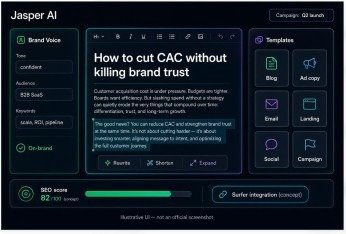
Jasper is designed for marketing teams and businesses. It can help create blog content, ad copy, emails, and brand messages.
In addition, its brand-focused features can help teams keep a steady tone across different pages and campaigns. This is useful when several people work on the same brand.
Best for: Businesses and marketing teams.
3. Copy.ai
Copy.ai focuses on marketing copy and business content. It can help with product descriptions, sales emails, social posts, and campaign ideas.
It is also useful when you need several versions of a short message. This lets marketers compare ideas before choosing the best one.
Best for: Marketers and small businesses.
4. Writesonic
Writesonic offers writing features for blogs, landing pages, ads, and other online content. Depending on the plan, it may also provide research and SEO-related features.
For example, you can use it to plan an article around a topic and build a first draft. You should still check facts and make sure the content meets your readers’ needs.
Best for: Bloggers and content teams.
5. Rytr
Rytr is a simple option for people who want help with everyday writing. It can assist with emails, short articles, product descriptions, and social media captions.
Its straightforward approach can suit beginners who do not need a complex writing platform. However, you may need to edit longer drafts to improve their depth and flow.
Best for: Beginners and freelancers.
6. Grammarly
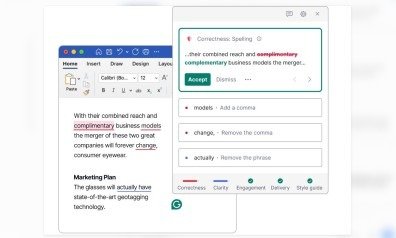
Grammarly helps writers check grammar, spelling, punctuation, and clarity. It can also suggest changes to tone and wording.
For instance, you can use it to make an email sound more polite or remove errors from a blog post. As a result, your writing can become clearer and easier to read.
Best for: Students, professionals, and editors.
7. QuillBot
QuillBot is known for paraphrasing and rewriting text. It can help you express an idea in a clearer way or shorten a long sentence.
It also offers writing support features, though the tools available may depend on your plan. Remember that changing words alone does not make copied work original. Always cite sources when needed and add your own ideas.
Best for: Students and people editing drafts.
8. Wordtune
Wordtune helps you rewrite sentences and improve their tone. You can use it to make a sentence shorter, clearer, or more formal.
This can be helpful when your first draft sounds awkward. Rather than rewriting the whole article, you can improve the lines that need work.
Best for: Professionals and everyday writers.
9. Anyword
Anyword is built mainly for marketing content. It helps users create ad copy, landing page text, emails, and other messages designed for a target audience.
Some plans offer performance-focused features to help marketers compare copy options. However, predictions are not a promise of real results. Testing content with your audience remains important.
Best for: Digital marketers and advertising teams.
10. Surfer SEO

Surfer SEO focuses on search-focused content. It helps writers plan and improve pages by checking topics, terms, and other on-page SEO elements.
For example, a blogger can use it while preparing an article about a software tool. It can help guide the content, but it cannot guarantee a top Google ranking.
Best for: SEO writers and website owners.
11. Frase
Frase brings content research, outlining, and writing support together. It can help you explore a topic, review search results, and prepare a useful article brief.
This can save time during the planning stage. Moreover, it helps writers focus on the questions readers may want answered.
Best for: Bloggers and SEO teams.
12. Notion AI
Notion AI works within the Notion workspace. It can help summarize notes, draft documents, rewrite text, and organize ideas.
This is useful when your research, task lists, and writing drafts are already in Notion. Therefore, you may not need to move between several apps during your work.
Best for: Teams, students, and project planners.
Main benefit: It connects writing support with your notes and work.
13. Microsoft Copilot
Microsoft Copilot can help with drafting, rewriting, and summarizing content. Its features vary by product and subscription, including the Microsoft apps you use.
For example, it may help you prepare a work document or summarize information. This makes it useful for people who already rely on Microsoft tools.
Best for: Office users and business professionals.
14. Google Gemini
Google Gemini can help with brainstorming, outlines, summaries, and first drafts. It is useful when you need fresh ideas or want to explain a topic in simple language.
Depending on the version and connected apps, it may also support work within Google’s ecosystem. Always review the final text and verify important claims before publishing.
Best for: Bloggers, students, and Google Workspace users.
15. ProWritingAid
ProWritingAid focuses on grammar, style, readability, and writing improvement. It can help writers spot repeated words, long sentences, and unclear passages.
This is especially useful when you have already written a draft and want to improve it. However, the best edits are those that make the writing clearer without removing your natural voice.
Best for: Bloggers, authors, and long-form writers.
How to Choose the Best AI Writing Tool
Choosing the right tool is easier when you know what you need. Instead of paying for several apps, start with the tasks you do most often.
Identify Your Writing Needs
First, decide what kind of content you create. Bloggers may need help with outlines and long articles. Marketers may need ad copy and email drafts. Meanwhile, students may need grammar and clarity support.
Once you know your main goal, you can compare tools that fit that task.
Check Your Budget
Next, check the price and features of each plan. Some tools offer free access with limits, while others need a paid subscription for advanced features.
Start with a free option if it meets your needs. Then, upgrade only when a paid feature saves enough time or adds real value to your work. Prices and plan limits can change, so check the official website before paying.
Review Writing Quality

A tool may produce text quickly, but speed alone is not enough. Read a sample and check its accuracy, clarity, and tone.
Also, make sure the tool can follow your instructions. Good content should answer the reader’s question rather than repeat the same ideas.
Look for Useful SEO Features
If you write for websites, look for features that support topic planning, headings, search intent, and on-page SEO. However, no tool can guarantee rankings.
Use your own research and experience to make each article useful. In addition, write a clear title and meta description that match the page content.
Tips for Using AI Writing Tools Effectively
AI can support your writing process, but the best results come from clear instructions and careful editing.
- Give clear prompts: Explain your topic, audience, tone, and goal.
- Use a strong outline: Plan your headings before drafting the article.
- Check facts: Verify names, figures, prices, and other important details.
- Edit the draft: Remove repeated ideas and add examples from your own knowledge.
- Improve readability: Use clear words, short sentences, and natural transitions.
- Review SEO: Make sure your title, headings, and content match the reader’s search intent.
Most importantly, do not publish a draft without reviewing it. Your knowledge and judgment help make the final article more useful and trustworthy.
Conclusion
The right writing assistant can save time and help you create better content. ChatGPT is a flexible option for many writing tasks, Jasper and Copy.ai suit marketing work, and Grammarly and ProWritingAid help improve drafts. Meanwhile, Surfer SEO and Frase support SEO-focused content planning.
Before choosing, consider your main task, budget, and preferred workflow. Try a suitable free plan where available, compare the results, and pay only for features you truly need. Remember, AI should support your writing, not replace your judgment. When you combine helpful tools with careful research, clear ideas, and human editing, you can create content that serves your readers well.
Frequently Asked Questions
1. What are the best AI Writing Tools in 2026?
The best choice depends on your needs. ChatGPT suits many writing tasks, Grammarly helps improve drafts, and Surfer SEO supports on-page content work. Compare features before choosing.
2. Can I use AI Writing Tools for free?
Yes, some services offer free plans or limited free access. However, features, usage limits, and access may change. Check each tool’s official website for its current offer.
4. Will Google penalize content written with AI?
AI use alone does not mean a page will be penalized. Google focuses on helpful, reliable content made for people. Avoid spam and focus on accuracy, originality, and reader value.
5. Do AI writing tools replace human writers?
No. They can speed up drafting and editing, but human writers bring experience, judgment, and original insight. Reviewing and improving the final draft remains important.
META DISCRIPTION
Discover 15 best AI Writing Tools in 2026 for blogs, SEO, marketing, and editing. Compare their features and choose the right tool for your needs.