
Artificial intelligence is changing the way people write content, create images, make videos, and complete daily tasks. Today, students, freelancers, bloggers, and business owners can use AI to save time and improve their work. Many tools also offer free plans, so beginners can start without spending money.
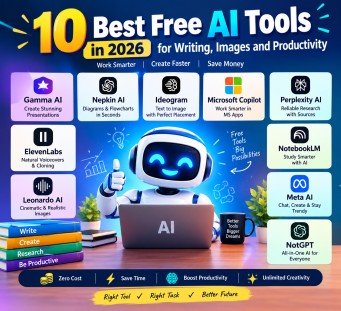
In this guide to the 10 Best Free AI Tools in 2026, you will discover useful tools for writing, presentations, image generation, research, voiceovers, and productivity. Each tool has a different purpose. Some help you create professional designs, while others make studying, writing, and office work easier. You do not need advanced technical skills to use these tools. Most use simple instructions called prompts. Let’s explore the best options and learn how they can help you.
1. Gamma AI: Best for Creating Presentations
Gamma AI is a useful tool for creating presentations, documents, and visual content. It is especially helpful for students, teachers, freelancers, and business owners who need professional-looking slides quickly.
Normally, creating a presentation requires writing content, selecting images, choosing colors, and arranging every slide. Gamma AI can simplify much of this work.
Key Features of Gamma AI
- Creates presentations from simple text prompts.
- Organizes information into clear sections and slides.
- Suggests layouts, images, and design styles.
- Helps freelancers prepare proposals for clients.
- Saves time when creating educational presentations.
How to Use Gamma AI
First, visit the official Gamma website and create an account. Enter your topic and explain what kind of presentation you need. Gamma can generate a draft that you can edit, improve, and customize.
For example, you can enter this prompt:
“Create a 10-slide presentation about digital marketing for beginners. Use simple English, clear headings, relevant images, and practical examples.”
Gamma will help organize your ideas into a presentation. Review the information before sharing it.
Best for: Students, teachers, freelancers, and business presentations.
2. Napkin AI: Best for Diagrams and Flowcharts
Napkin AI helps turn written ideas into visual content. It is useful when you want to explain a complicated topic through a simple diagram instead of a long paragraph.
For example, teachers can explain a lesson with a flowchart, while students can use diagrams to understand difficult concepts. Bloggers can also create visual explanations for their articles.
Key Features of Napkin AI
- Converts text into diagrams and flowcharts.
- Helps create mind maps and visual explanations.
- Makes educational content easier to understand.
- Provides visual elements for presentations and documents.
- Reduces the time needed to design diagrams manually.
How to Use Napkin AI
Write a short explanation of your topic or paste your existing notes into the tool. It can suggest suitable visual formats based on your content.
For example, enter:
“Create a simple flowchart explaining how a website works, from entering a web address to displaying a webpage.”
Choose the design that best explains your idea. You can then edit the visual and use it in your project.
Best for: Students, teachers, bloggers, and professionals who explain ideas visually.
3. Ideogram AI: Best for Images with Text
Creating an image with correctly spelled text can be difficult with many AI image generators. Ideogram AI is designed to help users create images where typography and text placement are important.
It is particularly useful for YouTube thumbnails, posters, social media graphics, and promotional designs.
Key Features of Ideogram AI
- Generates images from text prompts.
- Helps place words and headlines inside designs.
- Supports creative poster and thumbnail concepts.
- Offers different visual styles.
- Helps creators develop designs without advanced graphic design skills.
How to Use Ideogram AI
Open the official Ideogram website and enter a detailed prompt describing your desired image.
For example:
“Create a modern YouTube thumbnail about artificial intelligence. Add the exact headline ’10 Amazing AI Tools’ in large, bold, readable letters. Use a dark background, glowing blue elements, and a clean professional layout.”
Check the spelling and placement after generating the image. AI-generated text can still contain mistakes, so always review the final result.
Best for: YouTubers, designers, bloggers, and social media managers.
4. Microsoft Copilot: Best for Office Work and Writing

Microsoft Copilot is an AI assistant that helps users write, summarize, brainstorm, and complete everyday tasks. Depending on the plan and application, it can also work with Microsoft Word, Excel, PowerPoint, and other Microsoft services.
It is a practical option for people who regularly use office applications.
Key Features of Microsoft Copilot
- Helps draft emails and professional documents.
- Improves sentences and corrects writing.
- Explains spreadsheet formulas.
- Helps organize ideas for presentations.
- Summarizes information and generates suggestions.
How to Use Microsoft Copilot
Open Copilot through its official website or an available Microsoft application. Enter a clear instruction explaining what you need.
For example:
“Write a professional email requesting a meeting with a client. Keep it polite, clear, and under 150 words.”
You can also ask it to explain an Excel formula or suggest improvements to a document.
Remember that features and access can vary by account, subscription, and application. Some advanced Microsoft 365 features require a paid plan.
Best for: Office workers, students, freelancers, and business professionals.
5. Perplexity AI: Best for Research and Finding Sources
Perplexity AI is a research assistant that answers questions using information gathered from online sources. It can provide links and references that help users investigate a topic more efficiently.
This makes it useful for students, researchers, bloggers, and documentary creators who need to collect information before writing.
Key Features of Perplexity AI
- Searches the web for information about a topic.
- Provides answers with source links.
- Helps users explore complex questions.
- Supports research for articles and assignments.
- Makes it easier to find additional reading material.
How to Use Perplexity AI
Visit the official Perplexity website and enter your research question. Read the answer and open the cited sources to check the information.
For example, try this prompt:
“Explain the major benefits of renewable energy in 2026. Include reliable sources, recent statistics where available, and examples from different countries.”
Use the source links to verify dates, statistics, and important claims. AI-generated research can contain errors, so citations should always be checked.
Best for: Researchers, students, journalists, bloggers, and documentary creators.
6. ElevenLabs: Best for AI Voiceovers
ElevenLabs is an AI audio platform that creates realistic-sounding speech from written text. It is useful for creators who want to produce voiceovers without recording every sentence themselves.
You can use AI-generated speech for educational videos, narration, presentations, and other suitable projects.
Key Features of ElevenLabs
- Converts written text into speech.
- Offers different voices and speaking styles.
- Supports voiceovers for videos and presentations.
- Helps creators produce narration more quickly.
- Provides tools for working with audio and speech.
How to Use ElevenLabs
Create an account on the official website, select an available voice, and enter your script. Choose suitable settings and generate the audio.
For example, use this instruction when preparing your script:
“Read this educational script in a clear, friendly, and natural tone. Use moderate speaking speed and pause briefly after each heading.”
Listen to the result before using it in your video. You may need to adjust punctuation or rewrite sentences to improve pronunciation. Always obtain permission before cloning another person’s voice, and follow the platform’s rules for voice cloning and commercial use.
Best for: YouTubers, podcasters, video editors, and online educators.
7. Leonardo AI: Best for Realistic and Cinematic Images
Leonardo AI is an image-generation platform that helps users create detailed visual content from text prompts. It is useful for people who need realistic images, fantasy artwork, cinematic scenes, or creative illustrations.
For bloggers, it can help produce article illustrations. Video creators can use it to develop concepts for thumbnails and visual scenes.
Key Features of Leonardo AI
- Generates images from written prompts.
- Supports different artistic styles.
- Helps create realistic and cinematic visuals.
- Provides tools for refining image concepts.
- Supports creative projects and visual storytelling.
How to Use Leonardo AI
Open the official Leonardo AI website and describe the image you want to create. Include details about the subject, lighting, background, and artistic style.
For example:
“Create a realistic cinematic image of a futuristic city at night. Show glowing buildings, wet streets reflecting neon lights, dramatic lighting, and highly detailed architecture in a wide 16:9 composition.”
Generate the image and refine the prompt if necessary. Check the image carefully before publishing it.
Best for: Bloggers, designers, YouTubers, and digital content creators.
8. NotebookLM: Best for Students and Study Notes
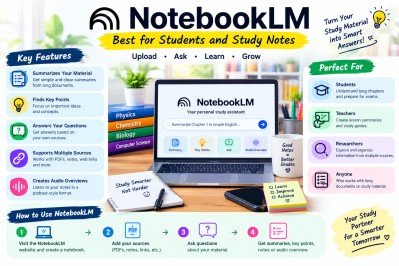
NotebookLM is an AI research and study assistant from Google. It helps users understand information from their own sources, such as PDFs, documents, notes, and supported web content.
It is especially useful for students who need to study long chapters or research papers in limited time.
Key Features of NotebookLM
- Summarizes uploaded study materials.
- Helps identify important points and concepts.
- Answers questions based on provided sources.
- Supports source-based research and note-taking.
- Can create Audio Overviews for supported material.
How to Use NotebookLM
Visit the official NotebookLM website and create a notebook. Add your available study sources, such as a PDF textbook, class notes, or research paper.
Then ask questions about the material.
For example:
“Summarize Chapter 1 in simple English. List the five most important points, explain difficult terms, and create ten practice questions with answers based on the source.”
You can also ask for an overview of the entire document or focus on a particular topic. Check important details against the source, especially when preparing for exams.
Best for: Students, teachers, researchers, and people who regularly read long documents.
9. Meta AI: Best for Everyday AI Assistance
Meta AI is an AI assistant available through supported Meta services, including WhatsApp, Instagram, and Facebook in eligible regions. A separate Meta AI app is also available in some markets.
It can help users ask questions, brainstorm ideas, and generate images where these features are supported.
Key Features of Meta AI
- Answers everyday questions.
- Helps generate ideas for writing and content.
- Creates images from text prompts where available.
- Supports brainstorming and simple writing tasks.
- Can be accessed through supported Meta platforms.
How to Use Meta AI
Open a supported Meta service where Meta AI is available. Start a conversation and enter your request.
For example:
“Give me ten creative Instagram post ideas for a small clothing business. Include a short caption and a simple image concept for each idea.”
Review the suggestions and adjust them to match your audience and brand. Availability of image generation and other features may vary by country, account, and platform.
Best for: Social media users, students, small businesses, and content creators.
10. NoteGPT: Best for Summaries and Learning
NoteGPT offers AI-powered tools for summarizing and understanding information. Depending on the available features, it can help users work with YouTube videos, articles, documents, and other learning materials.
It is useful when you need to understand the main ideas of a long resource without reading or watching every part immediately.
Key Features of NoteGPT
- Summarizes supported videos and written materials.
- Helps extract key points from long content.
- Supports faster revision and note-taking.
- Provides AI tools for organizing information.
- Can help users create study notes from available sources.
How to Use NoteGPT
Visit the official NoteGPT website and choose the relevant tool. Depending on the feature, paste a supported video link, upload a document, or provide your text.
For example:
“Summarize this lesson in simple English. Include the main ideas, important definitions, five key takeaways, and five revision questions.”
Read the summary and check important information against the original material. This is especially important for assignments, research, and exam preparation.
Best for: Students, researchers, freelancers, and people who regularly work with long videos or documents.
Comparison of the 10 Best Free AI Tools in 2026
The following table shows which tool is most suitable for each task. Free access and usage limits can change, so check the official website before relying on a particular feature.
| AI Tool | Main Purpose | Best For |
| Gamma AI | Presentations | Students and freelancers |
| Napkin AI | Diagrams and flowcharts | Teachers and bloggers |
| Ideogram AI | Images with text | Designers and YouTubers |
| Microsoft Copilot | Office work and writing | Professionals and students |
| Perplexity AI | Web research | Researchers and writers |
| ElevenLabs | AI voiceovers | Video creators and podcasters |
| Leonardo AI | Realistic and cinematic images | Designers and creators |
| NotebookLM | Study and source summaries | Students and researchers |
| Meta AI | Everyday AI assistance | General users and businesses |
| NoteGPT | Video and document summaries | Students and learners |
How to Choose the Right AI Tool

You do not need to use every AI tool. The best choice depends on your task, your budget, and the results you want.
- For presentations: Choose Gamma AI to create and organize slides.
- For diagrams: Use Napkin AI to turn written ideas into visuals.
- For posters and thumbnails: Try Ideogram AI when text placement matters.
- For office tasks: Use Microsoft Copilot for writing and supported Microsoft applications.
- For research: Try Perplexity AI to find information and source links.
- For voiceovers: Use ElevenLabs to generate narration.
- For cinematic images: Try Leonardo AI for detailed visual concepts.
- For studying: Choose NotebookLM to understand your source material.
- For everyday questions: Use Meta AI where it is available.
- For summaries: Try NoteGPT for supported videos and documents.
The 10 Best Free AI Tools in 2026 can help you work faster, but no single tool is perfect for every task. Try a few options and compare their output before choosing the one that fits your needs.
Tips for Getting Better Results from AI

Using an AI tool is only the first step. The quality of your instructions also affects the results.
1. Write Clear Prompts
Explain exactly what you need. Instead of writing “Make a presentation,” write “Create an eight-slide presentation about online education for beginners.”
2. Provide Useful Details
Include your target audience, preferred language, tone, length, and format. These details help the AI understand your requirements.
3. Check the Results
AI tools can produce incorrect facts, spelling mistakes, or unsuitable suggestions. Always review the output before publishing, submitting, or sharing it.
4. Protect Your Privacy
Do not upload confidential business records, private client information, or sensitive personal data unless you understand the platform’s privacy protections and have permission to use the information.
5. Check Free Plan Limits
Some platforms offer free credits or limited monthly usage. Advanced models, additional exports, commercial rights, or premium features may require payment.
Frequently Asked Questions (FAQs)
1. What are the best free AI tools in 2026?
Some useful options include Gamma AI, Napkin AI, Ideogram AI, Microsoft Copilot, Perplexity AI, ElevenLabs, Leonardo AI, NotebookLM, Meta AI, and NoteGPT. The best choice depends on your task and the features available on the free plan.
2. Can I use AI tools without paying?
Yes, many AI platforms offer free plans or limited free access. However, some features require a paid subscription, and usage limits may apply.
3. Which AI tool is best for students?
NotebookLM is a strong choice for studying uploaded materials, summarizing chapters, and asking questions about sources. NoteGPT can also help summarize supported videos and documents.
4. Which AI tool is best for creating images?
Leonardo AI is useful for realistic and cinematic visuals, while Ideogram AI is particularly helpful for designs that include text. Both can have free-plan limits.
5. Can I use free AI tools for my business?
Yes, many tools can help with marketing ideas, presentations, research, images, and voiceovers. Before commercial use, check each platform’s licensing terms, privacy rules, and free-plan restrictions.
Conclusion
The 10 Best Free AI Tools in 2026 offer practical ways to improve writing, research, design, studying, and everyday productivity. Gamma AI can help you prepare presentations, Napkin AI can turn ideas into diagrams, and Ideogram AI can support text-based designs. Meanwhile, Perplexity AI is useful for research, ElevenLabs can create voiceovers, and Leonardo AI can generate creative images. These tools can save time when you choose the right one for your task.
For students, NotebookLM and NoteGPT can make long study materials easier to understand, while Microsoft Copilot and Meta AI can support everyday work. However, remember that free access does not always include every feature, and AI-generated information should be checked before use. Start with one or two tools, learn how to write clear prompts, and explore their free features. With the right approach, you can improve your productivity without immediately investing in expensive software.
Meta Description
Discover the 10 Best Free AI Tools in 2026 for writing, images, research, presentations, voiceovers, and productivity, with tips for beginners.
- 1. Gamma AI: Best for Creating Presentations
- 2. Napkin AI: Best for Diagrams and Flowcharts
- 3. Ideogram AI: Best for Images with Text
- 4. Microsoft Copilot: Best for Office Work and Writing
- 5. Perplexity AI: Best for Research and Finding Sources
- 6. ElevenLabs: Best for AI Voiceovers
- 7. Leonardo AI: Best for Realistic and Cinematic Images
- 8. NotebookLM: Best for Students and Study Notes
- 9. Meta AI: Best for Everyday AI Assistance
- 10. NoteGPT: Best for Summaries and Learning
- Comparison of the 10 Best Free AI Tools in 2026
- How to Choose the Right AI Tool
- Tips for Getting Better Results from AI
- Frequently Asked Questions (FAQs)
- Conclusion
- Meta Description