

Your homepage is the first thing most visitors see. Because of this, it can shape how people feel about your website in just a few seconds. A slow, messy, or confusing homepage can push visitors away very fast. However, a clean and smart homepage can build trust, improve user experience, and help your website grow on Google.
Many website owners spend hours making their homepage look beautiful. Yet they forget one important thing. A homepage should not only look good, but it should also help search engines understand the website. If Google cannot understand your homepage clearly, ranking becomes much harder. Therefore, design and SEO must work together from the start.
The good news is that building a powerful homepage is not difficult anymore. WordPress gives you many tools to create a fast, mobile-friendly, and SEO-focused website. In this guide, you will learn how to build a WordPress Homepage That Ranks on Google using simple strategies, smart design choices, and proven SEO methods that actually work.
Why Your Homepage Matters for SEO
Your homepage is like the front door of your website. It tells visitors and search engines what your business is about. In addition, it helps Google understand your main services, content, and brand value.
A strong WordPress Homepage That Ranks on Google can improve website authority, increase organic traffic, reduce bounce rate, and help visitors explore more pages. It also builds trust with users and improves conversions.
On the other hand, a poorly optimized homepage can confuse visitors and hurt your rankings.
Start With Fast and Reliable WordPress Hosting
Website speed plays a huge role in SEO. Google prefers websites that load quickly because users do not like waiting. Therefore, choosing good hosting should be your first step.
A reliable hosting provider improves loading speed, website uptime, security, and overall user experience.
Cheap hosting may save money at first. However, slow speed and downtime can damage your rankings later.
When choosing hosting for a WordPress Homepage That Ranks on Google, always focus on performance instead of price alone.
Choose a Lightweight and SEO-Friendly Theme
Your WordPress theme affects both design and speed. Some themes look attractive but include heavy scripts and unnecessary features. As a result, your homepage becomes slow.
Instead, use a lightweight theme that is mobile responsive, fast loading, SEO optimized, easy to customize, and compatible with SEO plugins.
A clean design also improves readability. Visitors can find information faster, which helps reduce bounce rates.
Moreover, avoid adding too many animations or effects. Simplicity usually performs better on Google.
Create a Clean Homepage Structure
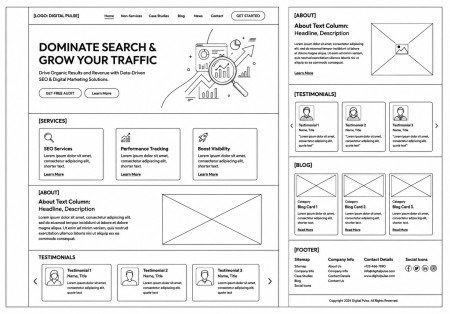
A homepage should guide visitors naturally. If the layout feels confusing, users may leave quickly. Therefore, your homepage structure must stay organized and simple.
A good homepage usually includes the following sections.
Hero Section
The hero section appears first. It should clearly explain who you are, what you offer, and why visitors should care.
Use a strong headline with your focus keyword naturally included.
For example:
Build a WordPress Homepage That Ranks on Google and Attract More Visitors
Add a short supporting paragraph and a clear call-to-action button.
Services or Main Features
After the hero section, explain your main services or features. Keep descriptions short but useful.
This section helps Google understand your website topics. At the same time, visitors quickly learn what your business offers.
About Section
People trust brands they understand. Therefore, add a small section introducing your business, experience, or mission.
This also helps improve content depth on your homepage.
Testimonials or Reviews
Social proof improves trust. Positive reviews can encourage visitors to stay longer and contact you.
Latest Blog Posts
Adding recent articles helps keep your homepage fresh. Google likes updated content because it shows the website stays active.
Optimize Homepage Speed for Better Rankings
A slow homepage can destroy user experience. Even beautiful websites lose traffic if pages take too long to load.
To improve speed, compress images before uploading and use caching plugins like WP Rocket or LiteSpeed Cache. You should also minimize unnecessary plugins because too many plugins increase load time.
Another smart strategy is lazy loading. It delays image loading until users scroll down, which helps the homepage load faster initially.
A fast WordPress Homepage That Ranks on Google creates a better experience for both users and search engines.
Make Your Homepage Mobile Friendly
Most users now browse websites using phones. Because of this, Google uses mobile-first indexing.
If your homepage looks bad on mobile devices, rankings can drop quickly.
To improve mobile optimization, use responsive themes, keep text readable, avoid tiny buttons, optimize images, and test layouts on different screen sizes.
A mobile-friendly WordPress Homepage That Ranks on Google performs better in search results and keeps visitors engaged longer.
Use SEO Plugins Properly
SEO plugins make optimization much easier. They help you manage meta titles, meta descriptions, XML sitemaps, schema markup, readability, and keywords.
Popular SEO plugins include Yoast SEO, Rank Math, and All in One SEO.
These tools guide you during content optimization. However, remember that plugins alone cannot guarantee rankings. Quality content still matters most.
Write SEO-Friendly Homepage Content
Many homepages focus only on visuals. Yet content is extremely important for SEO.
Google needs text to understand your website. Therefore, include clear and helpful homepage content.
Use Your Focus Keyword Naturally
Your focus keyword is:
WordPress Homepage Design Tips
Use it naturally throughout your homepage without stuffing.
Good places include the main heading, introduction, subheadings, meta description, image alt text, and conclusion.
Natural usage improves readability and avoids spam signals.
Keep Content Easy to Read
Simple writing improves user experience. Therefore, use short sentences, avoid complex words, add transition words, and break text into sections.
This helps both users and search engines understand your content better.
Improve Navigation and User Experience
Visitors should find information easily. Confusing navigation frustrates users and increases bounce rates.
A good homepage menu should include Home, About, Services, Blog, and Contact pages.
Also, keep menus simple because too many options can overwhelm visitors.
Additionally, use internal links to guide users toward important pages. Internal linking improves crawling, spreads authority, increases page views, and strengthens SEO structure.
A smooth user experience strengthens your WordPress Homepage That Ranks on Google naturally.
Add Proper Heading Structure
Heading structure helps organize content clearly.
Use H1 for the main title, H2 for major sections, and H3 for smaller subsections.
Proper heading usage improves readability and helps Google understand page hierarchy.
Avoid using multiple H1 headings because it can confuse search engines.
Optimize Images for SEO
Images improve homepage design. However, poorly optimized images can hurt rankings.
To optimize images:
- Use descriptive file names
- Add alt text
- Compress image size
- Use modern formats like WebP
For example, instead of using:
IMG123.jpg
Use:
wordpress-homepage-design.jpg
This gives Google better context about the image.
Create Strong Meta Titles and Descriptions
Your meta title and meta description appear in Google search results. A strong title improves click-through rate.
Example Meta Title
WordPress Homepage Design Tips: Create a Fast and SEO-Friendly Homepage
Example Meta Description
Learn how to create a beautiful, fast, and mobile-friendly WordPress homepage that improves user experience, boosts SEO rankings, and attracts more organic traffic naturally.
Keep titles clear and natural.
Use HTTPS for Better Security
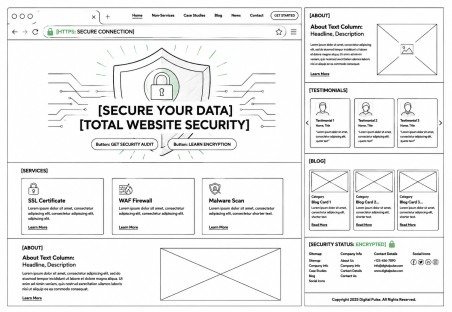
Google prefers secure websites. Therefore, always use HTTPS instead of HTTP.
HTTPS helps build trust, protect visitor data, improve SEO, and increase credibility.
Most hosting providers now offer free SSL certificates.
Focus on High-Quality Content
Google rewards websites that help users genuinely.
Therefore, your homepage content should solve problems, answer questions, explain services clearly, and build trust.
Avoid copying content from other websites because duplicate content harms rankings.
A unique and valuable WordPress Homepage That Ranks on Google has a much higher chance of performing well.
Improve Engagement With Clear Call-to-Actions
Every homepage should guide visitors toward an action.
Examples include:
- Contact Us
- Get Started
- Learn More
- Request a Quote
Clear buttons improve conversions and user engagement.
Keep Updating Your Homepage
SEO is not a one-time task. Google prefers active websites.
Therefore, update your homepage regularly by adding fresh content, updating testimonials, improving design, and linking new blog posts.
Small updates can keep your homepage relevant and competitive.
Common Homepage SEO Mistakes to Avoid
Many websites lose rankings because of simple mistakes.
Avoid problems like slow loading speed, keyword stuffing, poor mobile design, thin content, broken links, too many plugins, confusing navigation, and duplicate content.
Fixing these issues can improve rankings significantly.
Final Thoughts
Creating a beautiful homepage is important. However, creating a homepage that also performs well on Google is even more valuable. A successful WordPress homepage combines smart design, fast speed, quality content, mobile responsiveness, and proper SEO optimization.
The best part is that you do not need complicated tricks to succeed. Instead, focus on user experience, clear structure, and helpful content. Over time, these improvements can help your website grow steadily in Google rankings.
FAQs
1. How can I create a WordPress homepage that ranks on Google?
You can create a WordPress Homepage That Ranks on Google by using fast hosting, SEO-friendly theme, and optimized content with proper structure.
2. What is the most important factor for WordPress homepage SEO?
The most important factor for a WordPress Homepage That Ranks on Google is fast loading speed and mobile-friendly design for better user experience.
3. Which theme is best for a WordPress homepage?
A lightweight and SEO-optimized theme helps build a better WordPress Homepage That Ranks on Google with improved speed and ranking potential.
4. How many keywords should I use on my homepage?
Use your main keyword naturally 3–5 times in a WordPress Homepage That Ranks on Google without keyword stuffing.
5. Why is homepage structure important for SEO?
A proper structure helps a WordPress Homepage That Ranks on Google perform better by improving readability and search engine understanding.
Meta Description
Learn how to create a fast, mobile-friendly, and SEO-optimized WordPress Homepage That Ranks on Google using smart design, proper structure, and proven SEO strategies to increase traffic, improve rankings, and enhance user experience.
- Why Your Homepage Matters for SEO
- Start With Fast and Reliable WordPress Hosting
- Choose a Lightweight and SEO-Friendly Theme
- Create a Clean Homepage Structure
- Optimize Homepage Speed for Better Rankings
- Make Your Homepage Mobile Friendly
- Use SEO Plugins Properly
- Write SEO-Friendly Homepage Content
- Improve Navigation and User Experience
- Add Proper Heading Structure
- Optimize Images for SEO
- Create Strong Meta Titles and Descriptions
- Use HTTPS for Better Security
- Focus on High-Quality Content
- Improve Engagement With Clear Call-to-Actions
- Keep Updating Your Homepage
- Common Homepage SEO Mistakes to Avoid
- Final Thoughts
- FAQs
- Meta Description