
Have you ever written a blog post but no one reads it? It feels frustrating, right? You spend time and effort, but still no traffic comes. This problem is very common for beginners. However, the real issue is not writing itself. The issue is writing without a clear plan. Many people ignore strategy, and as a result, their content does not perform well.
Today, things have changed a lot. Google is smarter than before and focuses only on helpful and clear content. If you want real traffic, you must create SEO-Friendly WordPress Blog Posts. They should match what users are searching for. In addition, your content should be simple and answer real questions clearly. This approach helps both readers and search engines understand your content better.
In this guide, you will learn how to create SEO-Friendly WordPress Blog Posts step by step. You will learn simple methods to write SEO-Friendly WordPress Blog Posts. They will help you rank and attract real visitors.
What Makes a Blog Post SEO-Friendly Today?
An SEO-friendly post is not just about keywords. Instead, it is about helping the reader first. When your content solves a problem, Google trusts it more.
So, SEO-Friendly WordPress Blog Posts should be:
- Easy to read
- Helpful
- Well-structured
- Clear and direct
Because of this, both users and search engines understand your content better.
Start with the Right Topic Idea
Before writing, you must choose a good topic. This step is very important.
First, think about what your audience wants. Then, search your topic on Google. Look at the top results. This will help you understand what works.
Also, choose topics that people are already searching for. This way, your SEO-Friendly WordPress Blog Posts have a better chance to rank.
Understand What People Really Want (Search Intent)
Not all searches are the same. Some people want to learn. Others want to buy.
For example:
- “What is SEO?” → learning
- “Best SEO tools” → comparing
So, your content must match the intent. Otherwise, it will not rank.
Successful SEO-Friendly WordPress Blog Posts focus on user needs. They answer exactly what the user is looking for.
Plan Your Content Before Writing
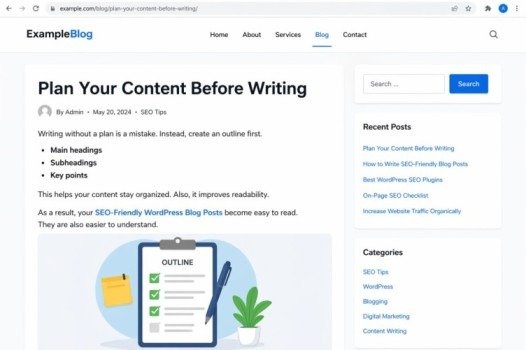
Writing without a plan is a mistake. Instead, create an outline first.
Your outline should include:
- Main headings
- Subheadings
- Key points
This helps your content stay organized. Also, it improves readability.
As a result, your SEO-Friendly WordPress Blog Posts become easy to read. They are also easier to understand.
Write Simple and Clear Content
Always write in simple language. Avoid long and complex sentences.
For example:
- Use short paragraphs
- Use easy words
- Avoid difficult terms
Because of this, more people will understand your content. Also, Google prefers simple content.
That is why simple writing improves SEO-Friendly WordPress Blog Posts performance.
Use Headings to Improve Structure
Headings are very important for your content. They make it easy to scan and understand. Most people do not read every word on a page. Instead, they quickly scan headings to find the information they need. That is why a clear structure is very important for good user experience.
So, you should always use headings in the right way:
- H1 for the main title
- H2 for main sections
- H3 for sub-points or details
This proper structure helps organize your content in a logical way. It also makes your page more readable for both users and search engines. As a result, SEO-Friendly WordPress Blog Posts become easier to understand. They also perform better in search results.
Add Keywords Naturally
Keywords are important, but do not overuse them.
Instead:
- Use them naturally
- Place them in headings
- Add them in the introduction
When done right, your SEO-Friendly WordPress Blog Posts look natural and rank better.
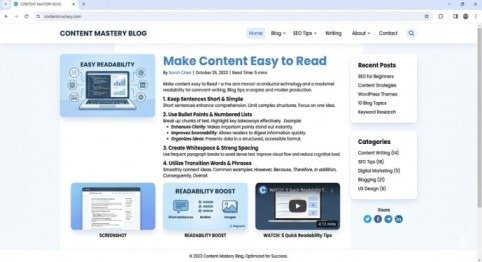
Make Content Easy to Read
Readability is very important for good content. When your content is easy to read, more people stay on your page and understand your message quickly. It also improves the overall user experience.
So, you should always:
- Keep sentences short and simple
- Use bullet points to explain key points
- Add proper spacing between paragraphs
Also, use transition words like:
- However
- Because
- Therefore
- In addition
These words improve the flow of your content and make it more natural to read. They become more engaging and clear. They are also more helpful for readers.
Content with images performs better.
You can add:
- Screenshots
- Infographics
- Videos
This makes your content more interesting. Also, users stay longer on your page.
Because of this, your SEO-Friendly WordPress Blog Posts get better rankings.
Use Internal Linking
Internal links connect your content.
For example:
- Link to your other blog posts
- Guide users to related topics
This improves SEO and user experience.
So, always add links in your SEO-Friendly WordPress Blog Posts where relevant.
Write a Strong Title and Meta Description
Your title is the first thing people notice in search results. So, it must be clear, attractive, and easy to understand. A strong title helps users decide whether they should click on your page or not. In addition, it improves your chances of getting more traffic from Google.
Tips:
- Use your keyword
- Keep it clear and simple
- Add numbers or clear benefits
Also, your meta description is very important. It should briefly explain what your content is about and what users will get from reading it. A good meta description builds interest and encourages users to click on your page.
It helps increase clicks on your SEO-Friendly WordPress Blog Posts. It also improves overall SEO performance.
Keep Your URL Short and Clean
Your URL should always be simple, clear, and easy to read. A clean URL helps both users and search engines understand what your page is about. In addition, short URLs look more professional and are easier to share.
For example:
good: /seo-friendly-blog-posts
bad: /blog123?id=567
Short and meaningful URLs improve user experience. They also make your content easier to remember and trust. As a result, they can support better SEO performance and help your page rank more effectively.
Update Your Content Regularly
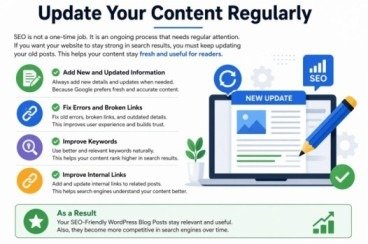
SEO is not a one-time job. It is an ongoing process that needs regular attention. If you want your website to stay strong in search results, you must keep updating your old posts. This helps your content stay fresh and useful for readers.
First, you should add new and updated information whenever needed. Because Google always prefers fresh and accurate content. Also, fix any old errors, broken links, or outdated details to improve user experience. In addition, you can improve your content by adding better keywords. Also, you should improve your internal links to boost SEO performance.
As a result, your SEO-Friendly WordPress Blog Posts stay relevant and useful. Also, they become more competitive in search engines over time.
Focus on Building Trust
Trust is very important.
You can build trust by:
- Giving correct information
- Adding real examples
- Writing honestly
When users trust you, they stay longer. Also, Google ranks your SEO-Friendly WordPress Blog Posts higher.
Promote Your Blog Post
Writing is not enough. You must promote your content.
You can share it on:
- Social media
This brings traffic faster. Also, it helps your SEO-Friendly WordPress Blog Posts grow.
Common Mistakes to Avoid
Many beginners make mistakes.
Avoid:
- Keyword stuffing
- Copy content
- Writing without structure
Instead, focus on quality. This will improve your SEO-Friendly WordPress Blog Posts.
Conclusion
Writing blog posts may seem easy. However, ranking on Google needs the right strategy and effort. If you follow the right steps, your content becomes simple and clear. It helps readers understand your message easily. It also builds trust and keeps visitors engaged longer.
You should always write with a purpose and try to answer real questions. Also, keep updating your content because SEO is always changing. With time, your hard work will show results. In the end, consistency helps your content grow. Smart planning improves your results. It helps your SEO-Friendly WordPress Blog Posts rank higher. It also brings real traffic.
FAQs
1. What are SEO-Friendly WordPress Blog Posts?
SEO-Friendly WordPress Blog Posts are optimized to rank higher on Google. They help attract organic traffic.
2. How do I write SEO-Friendly WordPress Blog Posts?
You can use keywords and a clear structure. Also, create helpful content for readers.
3. Why are SEO-Friendly WordPress Blog Posts important?
They help increase website traffic, improve rankings, and reach the right audience.
4. What is the ideal length for SEO-Friendly WordPress Blog Posts?
The ideal length depends on the topic, but usually 1000–2000 words work well.
5. How many keywords should I use in SEO-Friendly WordPress Blog Posts?
You should use keywords naturally without overstuffing, focusing on quality content.
Mata description
Learn how to write SEO-Friendly WordPress Blog Posts with simple steps to boost rankings, improve readability, and drive traffic. Start optimizing today.
- What Makes a Blog Post SEO-Friendly Today?
- Start with the Right Topic Idea
- Understand What People Really Want (Search Intent)
- Plan Your Content Before Writing
- Write Simple and Clear Content
- Use Headings to Improve Structure
- Add Keywords Naturally
- Make Content Easy to Read
- Use Internal Linking
- Write a Strong Title and Meta Description
- Keep Your URL Short and Clean
- Update Your Content Regularly
- Focus on Building Trust
- Promote Your Blog Post
- Common Mistakes to Avoid
- Conclusion
- FAQs
- Mata description