
Have you ever wondered why your website is not showing in Google search results? One major reason is Google Search Console Errors. These errors stop Google from properly crawling, understanding, and indexing your website pages. When this happens, your content may not appear in search results. This directly reduces your traffic and visibility.
In simple words, Google Search Console Errors are warnings. They show something is not working properly on your website. Sometimes these issues are small, like a broken link or missing page. But in other cases, they can stop your entire website from ranking in Google search.
That is why it is very important to understand these errors clearly and fix them quickly. If you ignore them, your SEO performance can drop over time.
In this guide, you will learn all the major Google Search Console Errors in simple language. You will also learn how to fix them step by step to help your website grow in Google search results.
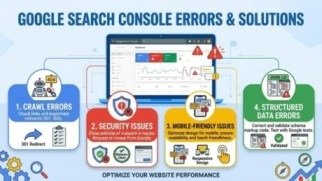
What are Google Search Console Errors?
Google Search Console Errors are problems Google finds when it visits your website. These issues can stop your pages from appearing in search results.
When Google cannot read your pages properly, it shows errors in the Search Console tool. This helps you know what is wrong.
Most Google Search Console Errors are simple to fix. You just need to understand the issue clearly. Then take the right action step by step.
Fixing these errors is important. It helps Google crawl your site better. It helps your website show better in search results. It also makes your SEO performance stronger over time.
Types of Google Search Console Errors
There are many types of Google Search Console Errors, but most of them fall into simple groups. Let’s understand them one by one.
1. Server Errors (5xx)
Server errors happen when your website is not responding.
These Google Search Console Errors mean Google cannot load your site.
Fix:
- Check your hosting
- Reduce server load
- Fix coding issues
If you ignore these Google Search Console Errors, your whole site may go down in search.
2. 404 Errors (Not Found)
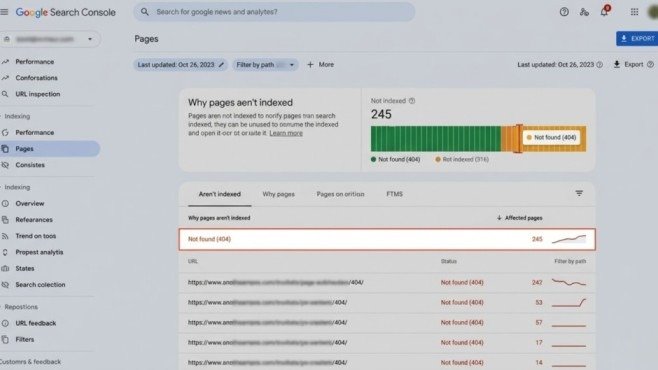
404 errors mean the page does not exist.
These Google Search Console Errors happen when a page is deleted or URL is changed.
Fix:
- Use 301 redirect
- Restore page if needed
- Fix broken links
Not all Google Search Console Errors like 404 are harmful. But important pages should always be fixed quickly.
3. Soft 404 Errors
Soft 404 means the page looks empty but still loads.
These Google Search Console Errors confuse Google.
Fix:
- Add useful content
- Return proper 404 code
- Avoid empty pages
Soft 404 Google Search Console Errors waste crawl budget.
4. Indexing Issues
Sometimes pages are not indexed by Google.
These Google Search Console Errors include “Crawled – not indexed”.
Fix:
- Improve content quality
- Add more value
- Use internal links
Low-quality pages often create Google Search Console Errors in indexing.
5. Robots.txt Issues
Robots.txt controls what Google can see.
Wrong settings can create Google Search Console Errors.
Fix:
- Check robots.txt file
- Remove wrong “Disallow”
- Allow important pages
Many Google Search Console Errors happen due to small robots mistakes.
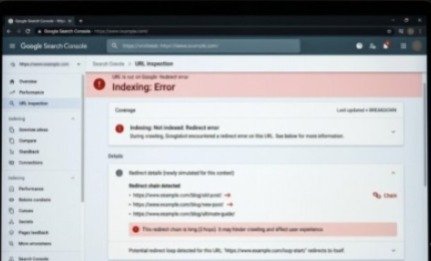
6. Redirect Errors
Redirect errors happen when links go in a loop.
These Google Search Console Errors slow down Google.
Fix:
- Fix redirect chains
- Use direct 301 redirects
- Avoid loops
Clean redirects reduce Google Search Console Errors quickly.
7. No index Tag Issues
No index tells Google not to show a page.
Sometimes it is added by mistake and creates Google Search Console Errors.
Fix:
- Remove no index tag
- Check page settings
- Allow indexing for important pages
Wrong no index rules create hidden Google Search Console Errors.
8. Why Indexing Problems Happen
Indexing problems mean Google does not trust the page yet.
These Google Search Console Errors happen due to weak content.
Fix:
- Write better content
- Add images and details
- Improve user value
Strong content reduces Google Search Console Errors in indexing.
9. Access Blocked Issues
Sometimes Google cannot access your page.
These Google Search Console Errors come from security settings.
Fix:
- Remove login blocks
- Check server rules
- Allow Googlebot access
Access issues are serious Google Search Console Errors.
10. Duplicate Content Issues
Duplicate pages confuse Google.
These Google Search Console Errors happen when same content appears multiple times.
Fix:
- Use canonical tags
- Remove duplicate pages
- Keep one main URL
Duplicate content increases Google Search Console Errors quickly.
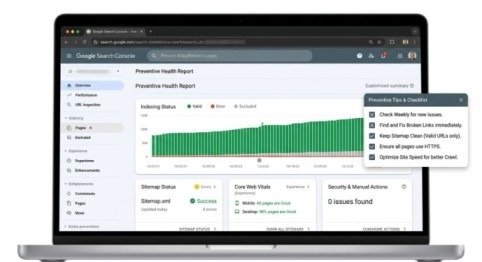
11. How to Prevent Errors
Prevention is better than fixing.
You can reduce Google Search Console Errors by following simple steps:
- Check Search Console weekly
- Fix broken links fast
- Keep sitemap clean
- Use HTTPS
- Improve site speed
Good maintenance reduces Google Search Console Errors over time.
12. Fixing Errors Step by Step Framework
Here is a simple method to handle Google Search Console Errors:
- Find errors in Search Console
- Group them by type
- Fix high priority first
- Request indexing again
This method helps control Google Search Console Errors easily.
Conclusion
Every website owner must understand Google Search Console Errors. These are not just technical issues. They affect traffic, rankings, and visibility.
If you ignore them, your website performance will go down. It will also be hard to recover lost rankings later.
Fix Google Search Console Errors regularly. Your site becomes strong and SEO-friendly.
Fixing errors helps Google crawl and index your pages properly. This improves your search performance.
Small errors can become big problems if you ignore them. So always stay active and check your reports.
Keep monitoring your site again and again. Fix issues step by step. This will help your website grow better and get long-term success in search results.
FAQs
Q1: How to find 404 errors in Google Search Console?
Go to Pages report and check “Not Found (404)” under indexing issues.
Q2: How to fix Google Search Console errors?
Identify the issue, fix it properly, and request indexing in Search Console.
Q3: How to fix 404 errors in Google Search Console?
Use 301 redirects or update broken links to correct URLs.
Q4: How to check indexing issues in Google Search Console?
Open Pages report and review “Why pages are not indexed” section.
Mata description
Fix Google Search Console Errors easily with this simple guide. Learn causes, solutions, and improve your site ranking fast. Start fixing today.