
In today’s online world, having a website is not enough. You also need to make sure Google can properly crawl and index your pages. However, many website owners face a common problem: their pages are crawled but still not indexed.
First of all, this issue can feel confusing and frustrating, especially for beginners. You publish content, but it does not appear on Google search results. As a result, your traffic stays low even after hard work.
Moreover, this problem is often seen inside Google Search Console, which is the main tool used to track website performance. Fortunately, this issue is fixable if you understand it properly.
In this detailed guide, you will learn what crawl status issues are, why they happen, and how to fix them step by step. In addition, we will also cover advanced tips to prevent these issues in the future so your website performs better in search engines.
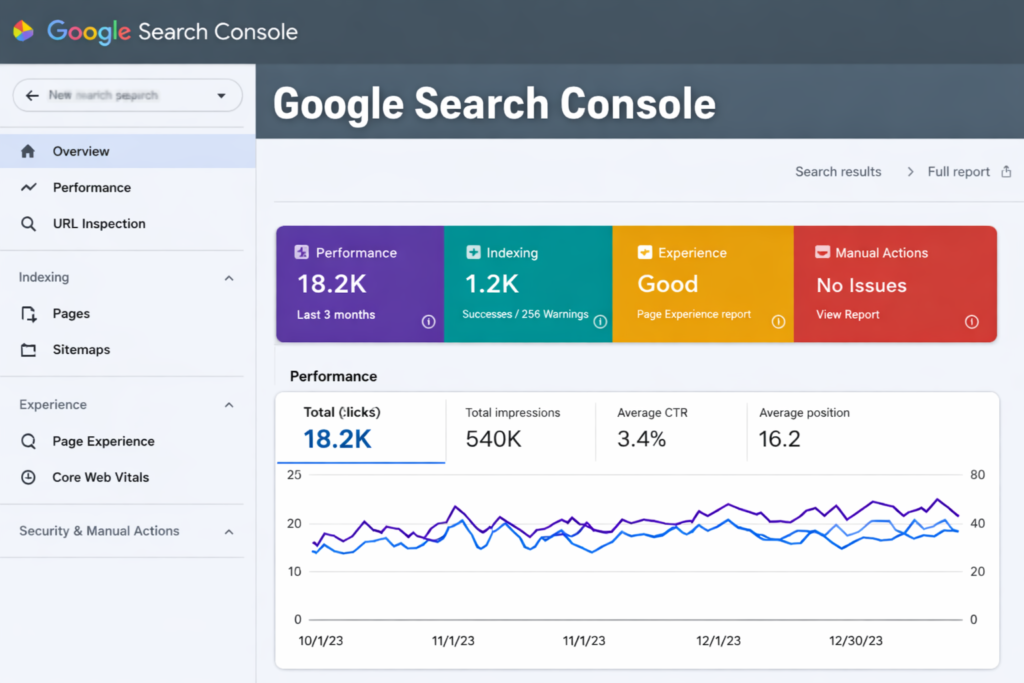
What Are Crawl Status Issues in Google Search Console?
Crawl status issues happen when Googlebot visits your webpage but does not fully index it in search results. In simple words:
- Google sees your page
- But does not include it in search results
When you check Google Search Console, you may see messages like:
- Crawled – currently not indexed
- Discovered – currently not indexed
- Indexed but not shown in results
These messages mean your page is known to Google but not considered strong enough yet.
Why Crawl Status Issues Happen
There are many reasons why this issue appears. Let’s understand them clearly:
1. Low-Quality or Thin Content
If your content is very short, copied, or not helpful for users, Google may decide not to index it. Search engines always prefer content that is detailed, original, and provides clear value. The more useful and in-depth your content is, the higher the chances of proper crawling and indexing.
Google prefers:
- Detailed content
- Original information
- Helpful explanations
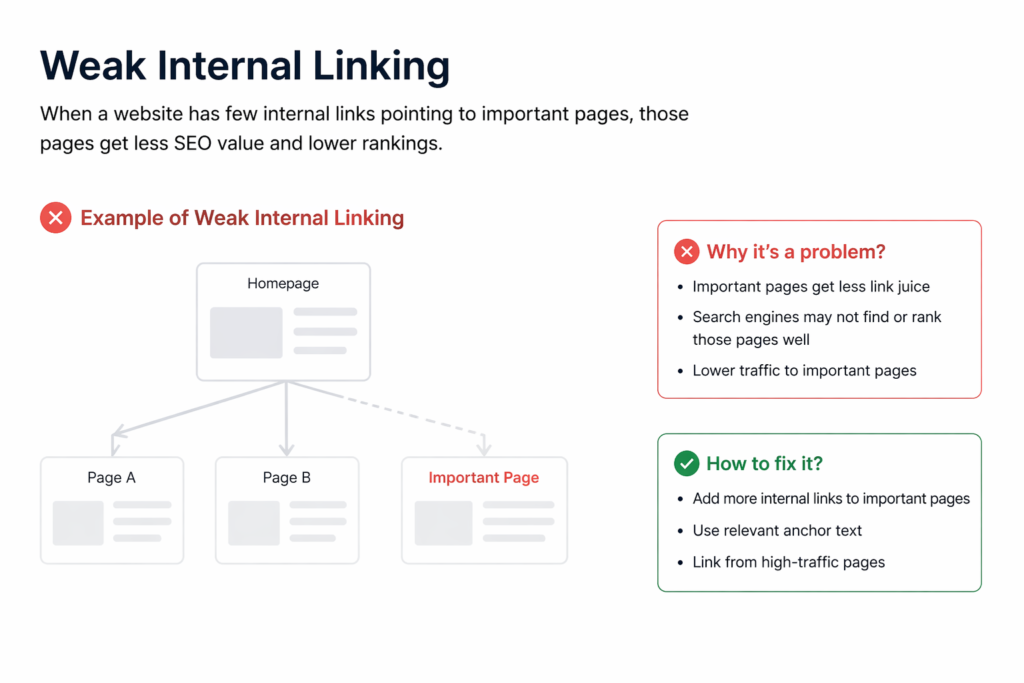
2. Weak Internal Linking
When a page is not properly connected with other important pages on your website, Google may consider it less important or difficult to discover. Strong internal linking helps search engines easily find your pages and understand the structure of your website.
3. Slow Website Performance
A slow website negatively impacts both users and search engines. If your pages take too long to load, Googlebot may not crawl them efficiently, which can delay indexing or reduce crawl priority for your content.
4. Technical SEO Issues
Technical problems such as broken links, server errors, redirect issues, or incorrect configurations can stop Google from crawling your site properly. These issues must be fixed quickly to ensure smooth indexing and better overall SEO performance.
Problems like:
- Broken links
- Server errors
- Redirect issues
can stop proper indexing.
5. Duplicate Content
If your page is similar to other pages, Google may avoid indexing it.
6. Low Website Authority
New websites often face indexing delays because Google does not fully trust them yet.
How to Find Crawl Status Issues in Google Search Console
Follow these simple steps:
Step 1:
Open Google Search Console
Step 2:
Go to:
Indexing → Pages
Step 3:
Scroll to:
“Why pages aren’t indexed”
Step 4:
Click on:
“Crawled – currently not indexed”
Now you will see all affected URLs.
This is where Google Search Console shows all crawl-related problems clearly.
How to Fix Crawl Status Issues (Step-by-Step Guide)
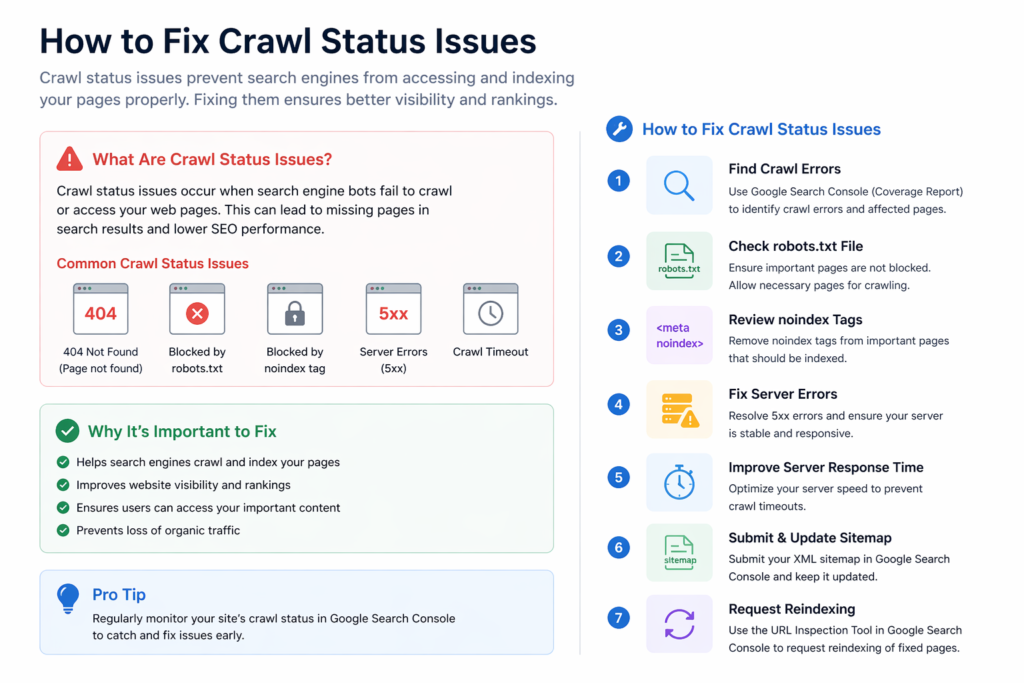
Now let’s fix the issue properly.
1. Improve Content Quality
Your content must be:
- Long and detailed
- Easy to understand
- Unique and helpful
- Written for users, not just Google
High-quality content improves trust inside Google Search Console.
2. Strengthen Internal Linking
Add links from:
- Blog posts
- Homepage
- Related articles
This helps Google discover your pages faster through Google Search Console crawling system.
3. Improve Page Speed
Slow websites get ignored.
Fix it by:
- Compressing images
- Using fast hosting
- Enabling caching
- Removing unnecessary scripts
Fast pages perform better in Google Search Console indexing.
4. Fix Duplicate Content
If your page is similar to others:
- Rewrite content
- Merge pages
- Use canonical tags
This helps Google understand the main version.
5. Request Indexing Manually
After fixing issues:
- Open Google Search Console
- Paste URL in URL Inspection Tool
- Click “Request Indexing”
Now Google will re-check your page.
6. Fix Technical SEO Issues
Check for:
- Broken links
- Redirect chains
- Server errors
- Mobile issues
Fixing them improves crawling in Google Search Console.
7. Build Quality Backlinks
Backlinks help Google trust your page.
Get links from:
- Blogs
- Websites
- Social platforms
More trust = better indexing in Google Search Console.
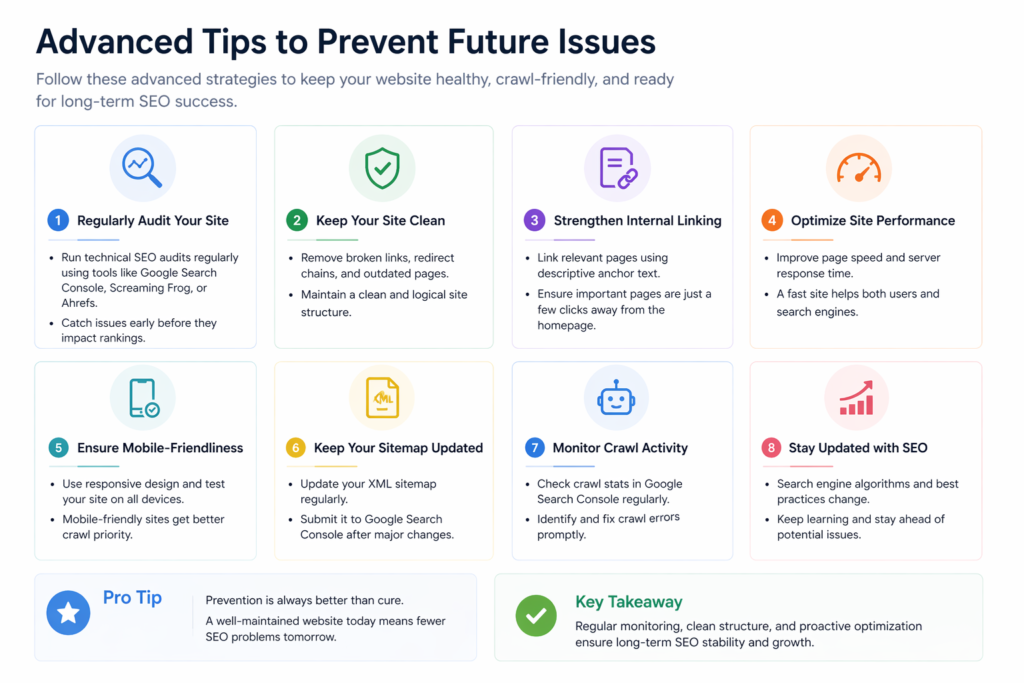
Advanced Tips to Prevent Future Issues
If you want long-term SEO success and stable rankings, you must follow proper preventive strategies that keep your website healthy and fully optimized for search engines.
Publish High-Quality Content Regularly
Fresh, useful, and original content helps Google understand that your website is active and valuable, which improves crawling and indexing speed.
Use XML Sitemap Properly
Always submit your sitemap in Google Search Console and keep it updated so Google can easily discover all important pages of your website.
Avoid Thin Pages
Do not create low-value, empty, or duplicate pages because they reduce your site quality and are often ignored by search engines.
Monitor Google Search Console Weekly
Regularly check indexing, coverage, and crawl reports to quickly identify and fix any issues before they affect your rankings.
Improve Mobile Experience
Make sure your website is fully mobile-friendly because most users and Google indexing are focused on mobile-first performance.
Fix Errors Quickly
Never ignore crawl errors or indexing issues for too long; immediate fixing helps maintain strong SEO health and better search visibility.
Why Google Does Not Index Some Pages
Even after crawling, Google may skip pages because:
- Content has low value
- Page is new
- Not enough backlinks
- Weak internal structure
That’s why Google Search Console is important for tracking SEO health.
Simple Summary
If your page is:
Crawled
Not indexed
Then Google is basically saying:
“We saw your page, but it is not strong enough yet.”
Using Google Search Console, you can fix:
- Content quality
- Technical issues
- Internal linking
- Website structure
Final Conclusion
Fixing crawl status issues is very important for SEO success because when your pages are not indexed, they cannot appear in Google search results. This directly leads to a loss of traffic, visibility, and potential customers. Therefore, understanding and resolving these issues is a key part of maintaining a healthy website and strong online presence.
However, by properly using Google Search Console, you can easily identify problems, fix errors, and improve indexing over time. When you regularly monitor your site and apply SEO best practices, your chances of better rankings increase. Remember, good content combined with strong SEO always leads to faster indexing and better search performance.
FAQs
What is “Crawled – currently not indexed”?
It means Google has visited your page but decided not to include it in search results. This usually happens when the content is not strong or useful enough.
How long does Google take to index pages?
Indexing can take a few days to several weeks depending on your website quality and authority. New or weak sites usually take more time.
Can I force indexing in Google Search Console?
You can request indexing using the URL Inspection tool, but Google will only index it if the page meets quality standards.
Does content quality affect indexing?
Yes, high-quality and useful content is more likely to be indexed. Low-quality or duplicate content is often ignored by Google.
Is Google Search Console free?
Yes, Google Search Console is completely free for all website owners. It helps you monitor indexing, errors, and performance.
Meta Description
Learn how to fix crawl status issues in Google Search Console with easy step-by-step solutions, expert tips, and SEO best practices to improve indexing, ranking, and website visibility.
- What Are Crawl Status Issues in Google Search Console?
- Why Crawl Status Issues Happen
- How to Find Crawl Status Issues in Google Search Console
- How to Fix Crawl Status Issues (Step-by-Step Guide)
- Advanced Tips to Prevent Future Issues
- Why Google Does Not Index Some Pages
- Simple Summary
- Final Conclusion
- FAQs
- Meta Description