
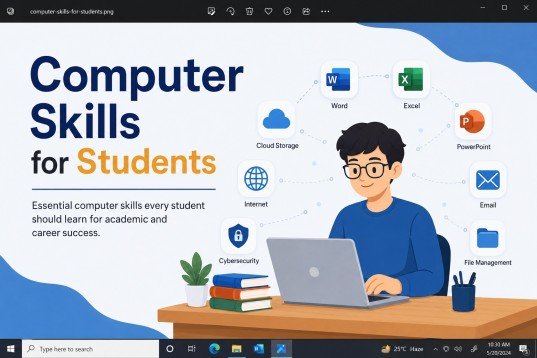
Technology has become an important part of education and everyday life. From completing assignments to attending online classes and applying for jobs, students use computers for many different tasks. That is why learning Computer Skills for Students is no longer optional—it is an essential part of modern education. Strong Digital Skills help students study more efficiently, communicate professionally, and prepare for future careers.
Before graduation, every student should develop a solid understanding of Basic Computer Skills, Office Skills, and practical IT Skills. These abilities not only improve academic performance but also increase confidence in using technology in professional environments. Employers today expect graduates to know how to work with digital tools, manage files, create presentations, analyze data, and communicate online. This guide explains the most important computer skills every student should learn, their benefits, key features, practical learning steps, common mistakes to avoid, and how these skills can open doors to better career opportunities.
What Are Computer Skills for Students?
Computer Skills for Students are the knowledge and practical abilities needed to use computers, software, and digital tools effectively for learning, communication, and work. These skills include everything from operating a computer and managing files to using Microsoft Office applications, browsing the internet safely, participating in online meetings, creating presentations, and learning basic programming.
In today’s digital world, students rely on computers for writing assignments, conducting online research, attending virtual classes, preparing presentations, and collaborating with classmates. Learning these skills before graduation helps students become more productive, organized, and prepared for the workplace.
Computer skills are generally divided into several categories:
- Basic Computer Skills
- Office Skills
- Digital Communication Skills
- Internet and Research Skills
- Data Management Skills
- Programming and Coding Skills
- Cybersecurity Awareness
- Cloud Computing Skills
Mastering these areas allows students to complete academic tasks more efficiently while building confidence in modern technology.
Benefits of Learning Computer Skills Before Graduation
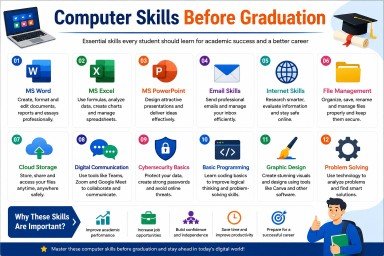
Learning computer skills offers long-term advantages in education, employment, and personal development. Students who become digitally skilled are better prepared to succeed in today’s competitive world.
1. Improves Academic Performance
Computer skills make it easier to prepare assignments, create presentations, conduct online research, and organize study materials. Students can complete projects faster while maintaining higher quality.
2. Increases Employment Opportunities
Many employers require candidates to have strong Digital Skills and Office Skills. Graduates who are comfortable using productivity software, email, and collaboration tools often have better chances of securing internships and full-time jobs.
3. Builds Professional Communication Skills
Knowing how to write professional emails, participate in online meetings, and collaborate using digital platforms prepares students for workplace communication.
4. Enhances Productivity
Using software like Microsoft Word, Excel, and PowerPoint allows students to complete assignments more efficiently. Automation tools and keyboard shortcuts also save valuable time.
5. Develops Problem-Solving Skills
Learning technology encourages logical thinking. Troubleshooting software issues or understanding how applications work improves analytical and problem-solving abilities.
6. Supports Online Learning
Modern education depends heavily on digital platforms. Computer skills help students access online courses, submit assignments, participate in discussions, and communicate with teachers effectively.
7. Encourages Creativity
Graphic design tools, presentation software, video editing applications, and content creation platforms allow students to express ideas creatively while improving technical abilities.
8. Improves Research Skills
Students learn how to find reliable information online, evaluate sources, organize references, and use digital libraries for academic research.
9. Strengthens Time Management
Digital calendars, task management apps, reminders, and productivity software help students manage deadlines and organize their daily schedules effectively.
10. Prepares Students for Future Careers
Almost every profession now requires technology skills. Whether students choose business, healthcare, education, engineering, finance, or digital marketing, computer literacy provides a strong foundation for career growth.
Features of Essential Computer Skills for Students
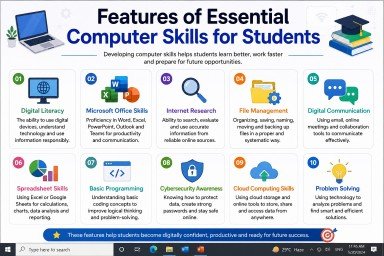
Developing Computer Skills for Students is about more than just learning how to use a computer. These skills combine technical knowledge, digital literacy, and practical experience that students can use throughout their education and future careers. Below are the key features of modern computer skills every student should develop before graduation.
1. Digital Literacy
Digital literacy is the ability to use computers, smartphones, and online platforms confidently and responsibly. It includes understanding how digital technologies work, finding accurate information online, and using technology safely. Students with strong Digital Skills can adapt quickly to new software and online learning environments.
2. Microsoft Office Skills
One of the most valuable Office Skills is proficiency in Microsoft Office applications.
- Microsoft Word for reports and assignments
- Microsoft Excel for calculations, data analysis, and budgeting
- Microsoft PowerPoint for professional presentations
- Microsoft Outlook for email communication
- Microsoft Teams for online meetings and collaboration
These applications are widely used in schools, universities, and workplaces around the world.
3. Internet Research Skills
Students should know how to search efficiently, evaluate trustworthy websites, and collect accurate information for academic projects. Effective online research saves time and improves the quality of assignments.
4. File Management
Organizing files properly is an important Basic Computer Skill. Students should learn how to:
- Create folders
- Rename files
- Move and copy documents
- Compress files
- Back up important data
- Store files in cloud storage
Good file management prevents data loss and makes documents easy to find.
5. Digital Communication
Modern education depends heavily on online communication. Students should be comfortable using:
- Microsoft Teams
- Zoom
- Google Meet
- Google Classroom
Professional communication skills help students interact effectively with teachers, classmates, and future employers.
6. Spreadsheet Skills
Excel and Google Sheets help students organize information, perform calculations, create charts, and analyze data. These skills are useful in business, finance, marketing, engineering, and research.
7. Basic Programming Knowledge
Even if students do not plan to become software developers, learning basic programming improves logical thinking and problem-solving. Languages like Python, JavaScript, and HTML provide an excellent starting point.
8. Cybersecurity Awareness
Students should understand how to protect their personal information online. This includes:
- Creating strong passwords
- Avoiding phishing scams
- Recognizing suspicious emails
- Updating software regularly
- Using antivirus programs
- Protecting personal data
Cybersecurity knowledge is becoming essential in today’s digital world.
Step-by-Step Guide to Learn Computer Skills Before Graduation
Learning computer skills may seem challenging at first, but following a structured approach makes the process much easier. Below is a step-by-step guide that every student can follow.
Step 1: Learn Computer Basics
Begin with the fundamentals of computer operation.
- Understand computer hardware
- Learn the functions of the keyboard and mouse
- Explore Windows or macOS
- Practice opening, saving, and organizing files
A strong foundation makes advanced learning much easier.
Step 2: Master Microsoft Office
Spend time practicing the most commonly used Office applications.
Learn Microsoft Word by:
- Formatting documents
- Creating tables
- Inserting images
- Using headers and footers
Learn Microsoft Excel by:
- Using formulas
- Creating spreadsheets
- Sorting and filtering data
- Building charts
Learn Microsoft PowerPoint by:
- Designing presentations
- Adding animations
- Using templates
- Delivering professional slides
These Office Skills are highly valued by employers.
Step 3: Improve Typing Speed
Typing quickly and accurately saves time during assignments and exams.
Practice daily using online typing platforms.
Focus on:
- Correct finger placement
- Touch typing
- Accuracy before speed
- Consistent daily practice
Step 4: Develop Internet Research Skills
Learn how to search effectively using search engines.
Practice:
- Using search filters
- Finding reliable websites
- Comparing multiple sources
- Avoiding fake information
- Citing references correctly
Research skills improve academic writing and project quality.
Step 5: Learn Digital Communication
Professional communication is an important workplace skill.
Practice:
- Writing formal emails
- Attending online meetings
- Sharing files
- Participating in virtual discussions
- Maintaining professional online etiquette
These Digital Skills improve teamwork and communication.
Step 6: Explore Cloud Storage
Cloud storage keeps documents safe and accessible.
Popular services include:
- Google Drive
- OneDrive
- Dropbox
Students should learn how to upload, organize, share, and back up files securely.
Step 7: Learn Basic Graphic Design
Visual communication is becoming increasingly important.
Free tools like Canva help students create:
- Presentations
- Posters
- Infographics
- Social media graphics
- Certificates
Graphic design enhances creativity and presentation quality.
Step 8: Understand Basic Programming
Start with beginner-friendly programming languages such as:
- HTML
- CSS
- JavaScript
- Python
Programming develops logical thinking and introduces students to software development concepts.
Step 9: Practice Cybersecurity
Protect your digital identity by:
- Using strong passwords
- Enabling two-factor authentication
- Avoiding suspicious downloads
- Updating software regularly
- Backing up important files
Safe online habits reduce security risks.
Step 10: Keep Learning
Technology changes every year.
Continue improving your IT Skills by:
- Taking online courses
- Watching tutorials
- Completing practical projects
- Earning certificates
- Practicing regularly
Continuous learning keeps your knowledge current and increases career opportunities.
Common Mistakes Students Should Avoid
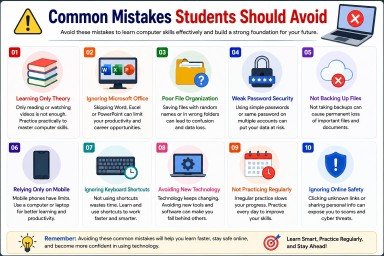
Many students make avoidable mistakes while learning computer skills. Being aware of these mistakes helps improve learning and productivity.
1. Learning Only Theory
Reading about technology is not enough. Practical experience is essential for mastering computer skills.
2. Ignoring Microsoft Office
Some students focus only on social media and overlook Microsoft Office applications. However, employers often require strong Office Skills.
3. Poor File Organization
Saving files with unclear names or in random folders wastes time and can result in lost documents.
4. Weak Password Security
Using simple passwords or reusing the same password across multiple accounts increases security risks.
5. Not Backing Up Important Files
Students should always keep backups using cloud storage or external drives to prevent data loss.
6. Depending Only on Mobile Phones
While smartphones are useful, many academic and professional tasks require a computer. Students should gain confidence using laptops and desktop computers.
7. Ignoring Keyboard Shortcuts
Keyboard shortcuts improve efficiency and help students complete tasks more quickly.
8. Avoiding New Technology
Technology evolves constantly. Students who resist learning new software or tools may struggle in future workplaces.
9. Not Practicing Regularly
Computer skills improve through consistent practice. Spending even 20–30 minutes each day can make a significant difference.
10. Overlooking Online Safety
Clicking unknown links, downloading files from untrusted websites, or sharing personal information online can expose students to cyber threats. Always practice safe browsing habits.
Frequently Asked Questions (FAQs)
1. Why are computer skills important for students?
Computer skills help students complete assignments, conduct research, communicate online, and prepare for future careers with confidence.
2. What are the most important computer skills for students?
Students should learn Microsoft Office, internet research, email communication, file management, typing, and basic programming.
3. How can students improve their digital skills?
Practice daily, complete online courses, watch tutorials, and work on real projects to improve your digital skills.
4. Is programming necessary for every student?
Basic programming is helpful because it improves problem-solving, logical thinking, and career opportunities.
5. Which Microsoft Office application is most important?
Microsoft Word, Excel, and PowerPoint are equally important because each serves a different academic and professional purpose.
Conclusion
Learning Computer Skills for Students is one of the best investments you can make before graduation. Skills like Microsoft Office, digital communication, internet research, file management, and basic programming help students perform better in their studies and prepare for future careers.
Technology continues to shape every industry, making Digital Skills, IT Skills, Basic Computer Skills, and Office Skills essential for success. Start learning today, practice consistently, and continue improving your knowledge to stay ready for future opportunities.
Call to Action
Ready to build your computer skills? Join our professional Computer Skills for Students course and gain practical training with industry-relevant tools. Enroll today and take the first step toward academic and career success.
Meta Description :
Master essential computer skills for students, including digital, IT, and office skills, to succeed in academics and future careers.
- What Are Computer Skills for Students?
- Benefits of Learning Computer Skills Before Graduation
- 1. Improves Academic Performance
- 2. Increases Employment Opportunities
- 3. Builds Professional Communication Skills
- 4. Enhances Productivity
- 5. Develops Problem-Solving Skills
- 6. Supports Online Learning
- 7. Encourages Creativity
- 8. Improves Research Skills
- 9. Strengthens Time Management
- 10. Prepares Students for Future Careers
- Features of Essential Computer Skills for Students
- Step-by-Step Guide to Learn Computer Skills Before Graduation
- Step 1: Learn Computer Basics
- Step 2: Master Microsoft Office
- Step 3: Improve Typing Speed
- Step 4: Develop Internet Research Skills
- Step 5: Learn Digital Communication
- Step 6: Explore Cloud Storage
- Step 7: Learn Basic Graphic Design
- Step 8: Understand Basic Programming
- Step 9: Practice Cybersecurity
- Step 10: Keep Learning
- Common Mistakes Students Should Avoid
- Frequently Asked Questions (FAQs)
- Conclusion
- Call to Action
- Meta Description :