
In today’s competitive job market, the Advanced Excel Course in Pakistan has become one of the most valuable professional training programs for students, job seekers, accountants, business professionals, and entrepreneurs. Microsoft Excel is no longer just a spreadsheet application. It has evolved into a powerful business tool used for data analysis, financial reporting, budgeting, forecasting, dashboard creation, and automation.
Whether you are a fresh graduate looking for your first job or a working professional aiming for career growth, learning advanced Excel can significantly improve your productivity and open new career opportunities.
Organizations across Pakistan are actively searching for candidates with strong Excel Skills because almost every department—including finance, HR, sales, marketing, procurement, logistics, education, and administration—relies on Excel for daily operations.
This complete guide explains everything you need to know about an Advanced Excel Course in Pakistan, including its benefits, features, learning roadmap, common mistakes, and how to choose the right Microsoft Excel Course in 2026.
What is an Advanced Excel Course in Pakistan?
An Advanced Excel Course in Pakistan is a professional training program designed to help learners master Microsoft Excel beyond the basic level.
Instead of simply entering data into worksheets, students learn how to:
- Analyze large datasets
- Create professional reports
- Build dashboards
- Automate repetitive tasks
- Generate business insights
- Improve office productivity
- Make data-driven decisions
Unlike beginner courses that focus only on formatting and simple formulas, Advanced Excel Training teaches practical business applications used in real organizations.
A quality course generally covers:
- Advanced formulas
- Lookup functions
- Pivot Tables
- Power Query
- Charts and Dashboards
- Data Validation
- Conditional Formatting
- Financial Functions
- Data Cleaning
- Automation with Macros
- Introduction to Power Pivot
- Basic VBA concepts
These practical skills make professionals more efficient and valuable in the workplace.
Why Learn Advanced Excel in 2026?
The demand for Excel professionals continues to increase every year.
Companies generate huge amounts of business data and need employees who can organize, analyze, and present information efficiently.
Learning Excel allows professionals to:
- Save valuable working hours
- Reduce manual calculations
- Improve reporting accuracy
- Analyze sales trends
- Prepare financial reports
- Track employee performance
- Manage inventory
- Create business dashboards
- Support management decisions
As businesses continue adopting digital technologies, strong Excel Skills remain one of the most requested technical skills in Pakistan.
Benefits of an Advanced Excel Course in Pakistan
1. Better Career Opportunities
Employers prefer candidates who already possess professional Excel knowledge.
Many job advertisements specifically mention Advanced Excel as a required skill.
These include positions such as:
- Data Analyst
- Accountant
- Finance Officer
- HR Executive
- Admin Officer
- Business Analyst
- MIS Executive
- Supply Chain Executive
- Sales Analyst
2. Higher Salary Potential
Professionals with strong Excel Skills often earn better salaries because they require less supervision and contribute more efficiently.
Companies value employees who can automate reports and simplify complex business processes.
3. Increased Productivity
Advanced Excel reduces hours of manual work.
Instead of performing repetitive calculations, you can automate tasks using formulas, Pivot Tables, and Macros.
This allows employees to focus on solving business problems rather than spending time on repetitive data entry.
4. Professional Reporting
Organizations rely on reports for decision-making.
With Advanced Excel Training, learners can create:
- Interactive Dashboards
- KPI Reports
- Monthly Reports
- Sales Reports
- Financial Statements
- Budget Reports
- Inventory Reports
Professional reports help management understand business performance more effectively.
5. Better Data Analysis
Excel contains hundreds of built-in functions that allow users to analyze business data quickly.
Examples include:
- Sales performance
- Profit analysis
- Customer trends
- Employee attendance
- Budget forecasting
- Expense tracking
Instead of manually calculating everything, Excel performs these calculations within seconds.
6. Internationally Recognized Skill
Microsoft Excel is used worldwide.
Whether you work in Pakistan, the Middle East, Europe, or North America, Excel knowledge remains highly valuable.
A recognized Excel Certification can strengthen your CV and improve your employment prospects.
Features of an Advanced Excel Course
A professional Microsoft Excel Course generally includes the following modules.
Advanced Formulas
Students learn powerful formulas such as:
- IF
- IFS
- SUMIFS
- COUNTIFS
- INDEX
- MATCH
- XLOOKUP
- VLOOKUP
- HLOOKUP
- OFFSET
- INDIRECT
- TEXT Functions
- Date Functions
Pivot Tables
Pivot Tables help summarize thousands of rows of data into meaningful reports.
Learners understand:
- Sales summaries
- Department analysis
- Regional reports
- Dynamic calculations
- Interactive filtering
Charts and Dashboards
Professional dashboards help visualize business performance.
Students learn to create:
- Column Charts
- Line Charts
- Pie Charts
- Combo Charts
- KPI Dashboards
- Interactive Reports
Conditional Formatting
Conditional Formatting automatically highlights:
- Duplicate values
- High sales
- Low performance
- Due dates
- Errors
This makes reports easier to understand.
Data Validation
Data Validation helps reduce errors by restricting incorrect data entry.
Examples include:
- Drop-down lists
- Number restrictions
- Date validation
- Custom validation rules
Power Query
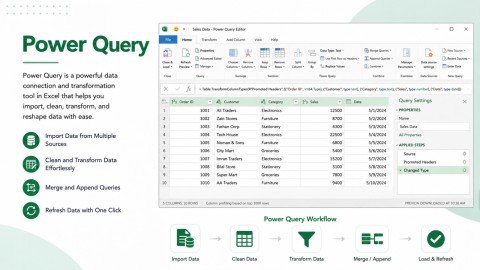
Power Query simplifies data cleaning.
Students learn how to:
- Import files
- Merge datasets
- Remove duplicates
- Clean messy data
- Refresh reports automatically
Macros and Automation
Automation saves significant time.
Students learn how to:
- Record Macros
- Automate repetitive tasks
- Generate reports faster
- Improve workflow efficiency
Financial Functions
Finance professionals benefit from learning:
- PMT
- NPV
- IRR
- Loan calculations
- Investment analysis
- Budget forecasting
Step-by-Step Guide to Learning Advanced Excel
Step 1: Learn Excel Basics
Before starting advanced topics, understand:
- Workbook
- Worksheet
- Rows
- Columns
- Formatting
- Basic formulas
Step 2: Master Formulas
Focus on:
- Logical functions
- Lookup functions
- Text functions
- Date functions
- Mathematical functions
Practice regularly using real business examples.
Step 3: Learn Data Analysis
Understand how to:
- Sort data
- Filter records
- Remove duplicates
- Analyze trends
- Create summaries
Step 4: Practice Pivot Tables
Pivot Tables are among the most important business tools in Excel.
Practice creating reports from large datasets until you become comfortable using them.
Step 5: Build Dashboards
Learn to combine:
- Charts
- Slicers
- Pivot Tables
- KPIs
- Conditional Formatting
Interactive dashboards are highly valued by employers.
Step 6: Learn Power Query
Power Query helps automate data preparation.
Instead of cleaning reports manually every month, Excel can repeat the same cleaning process automatically.
Step 7: Learn Macros
Automation improves productivity.
Even basic Macro knowledge can save hours of repetitive work every week.
Step 8: Complete Practical Projects
Theory alone is not enough.
Practice projects such as:
- Sales Dashboard
- HR Dashboard
- Expense Tracker
- Financial Report
- Inventory Management
- Attendance System
- Budget Planner
Real projects build confidence and improve your portfolio.
Step 9: Earn an Excel Certification
After completing your training, obtain an Excel Certification.
A certification demonstrates your practical knowledge and enhances your professional profile.
Who Should Join an Advanced Excel Course?
An Advanced Excel Course in Pakistan is suitable for:
- Students
- Fresh Graduates
- Accountants
- Finance Professionals
- HR Executives
- Business Analysts
- Office Administrators
- Sales Executives
- Marketing Professionals
- Entrepreneurs
- Freelancers
- Government Employees
- Teachers
- Engineers
- Project Managers
Regardless of your industry, advanced Excel can improve your daily work efficiency.
Common Mistakes Students Should Avoid
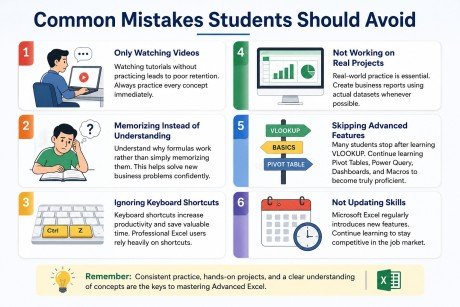
Many learners struggle because they make avoidable mistakes.
Here are the most common ones:
Only Watching Videos
Watching tutorials without practicing leads to poor retention.
Always practice every concept immediately.
Memorizing Instead of Understanding
Understand why formulas work rather than simply memorizing them.
This helps solve new business problems confidently.
Ignoring Keyboard Shortcuts
Keyboard shortcuts increase productivity and save valuable time.
Professional Excel users rely heavily on shortcuts.
Not Working on Real Projects
Real-world practice is essential.
Create business reports using actual datasets whenever possible.
Skipping Advanced Features
Many students stop after learning VLOOKUP.
Continue learning Pivot Tables, Power Query, Dashboards, and Macros to become truly proficient.
Not Updating Skills
Microsoft Excel regularly introduces new features.
Continue learning to stay competitive in the job market.
Career Opportunities After Completing Advanced Excel Training
Completing Advanced Excel Training can lead to various career opportunities, including:
- Data Analyst
- MIS Executive
- Finance Officer
- Accounts Executive
- Budget Analyst
- Payroll Officer
- HR Analyst
- Operations Executive
- Business Intelligence Assistant
- Administrative Officer
- Procurement Officer
- Inventory Controller
- Reporting Executive
- Project Coordinator
Excel is also an excellent skill for freelancers who provide reporting and data management services to clients worldwide.
FAQs
Is Advanced Excel difficult to learn?
No. With regular practice and proper guidance, anyone can learn advanced Excel, even without a technical background.
How long does it take to complete an Advanced Excel Course?
Most professional courses are completed within one to three months, depending on the training schedule and learning pace.
Do I need prior Excel knowledge?
Basic Excel knowledge is helpful, but many courses begin with the fundamentals before progressing to advanced topics.
Is Excel still worth learning in 2026?
Absolutely. Excel remains one of the most widely used business applications across industries and continues to be an essential workplace skill.
Can I get a job after learning Advanced Excel?
Yes. Advanced Excel is a valuable skill for many roles in finance, accounting, administration, HR, operations, sales, data analysis, and business reporting. While Excel alone does not guarantee employment, it significantly improves your employability.
Is an Excel Certification important?
Yes. An Excel Certification demonstrates your skills, strengthens your CV, and can make you a more competitive candidate during recruitment.
Conclusion
Learning an Advanced Excel Course in Pakistan is one of the smartest career investments you can make in 2026. From data analysis and reporting to dashboard creation and workflow automation, advanced Excel empowers professionals to work faster, make informed decisions, and solve real business challenges.
Whether you are a student preparing for your first job, a fresh graduate aiming to stand out, or an experienced professional seeking career advancement, improving your Excel Skills can unlock new opportunities and increase your value in today’s job market. Combined with hands-on practice and an Excel Certification, these skills can help you stay competitive in a rapidly evolving workplace.
Call to Action
Ready to upgrade your Excel skills? Join our Advanced Excel Course in Pakistan and gain practical, job-ready expertise with hands-on training. Enroll today and take the next step toward career growth with professional Excel Certification.
Meta Description
Join the best Advanced Excel Course in Pakistan. Learn Excel Skills, earn Excel Certification, and grow your career in 2026.