
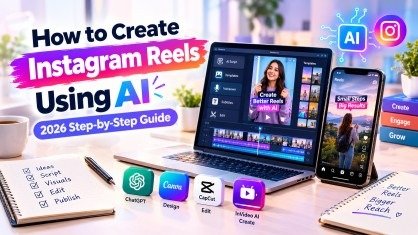
Instagram Reels have become an effective way to reach new audiences, promote products, build a personal brand, and grow a business online. However, creating engaging videos consistently can be challenging, especially for beginners who do not have professional video editing skills or expensive equipment.
This is where artificial intelligence can help. With the right tools, you can generate video ideas, write scripts, create voiceovers, add subtitles, edit clips, and prepare engaging captions without spending hours on every video. Learning how to create Instagram Reels using AI can help content creators, students, freelancers, and business owners produce videos more efficiently. Instead of starting from scratch, you can use AI to simplify repetitive tasks while keeping your content creative and original.
In this guide, you will learn how to plan, create, edit, and optimize Instagram Reels using AI in 2026. We will also explore useful AI tools, practical examples, viral content strategies, common mistakes, and ways to improve your video’s performance.
What Are Instagram Reels and Why Do They Matter in 2026?
Instagram Reels are short-form vertical videos designed to entertain, educate, inspire, and engage viewers. Creators use them to share tutorials, product demonstrations, behind-the-scenes moments, storytelling videos, and quick educational tips.
Reels are particularly useful because they can reach people who do not already follow your account. Their performance depends on several factors, including viewer interest, watch time, sharing, originality, and how effectively the content meets its audience’s needs.
Here are some reasons why Instagram Reels matter in 2026:
- Audience growth: Reels can introduce your content to new viewers.
- Brand awareness: Short videos help people understand your brand quickly.
- Engagement: Useful or entertaining videos can encourage comments, saves, and shares.
- Product promotion: Businesses can demonstrate products and explain their benefits.
- Content repurposing: Blog posts, tutorials, and educational content can be transformed into short videos.
- Creative opportunities: AI tools make video production more accessible to beginners.
Understanding these benefits helps you develop a practical Instagram content strategy rather than posting videos without a clear goal.
Benefits of Creating Instagram Reels Using AI
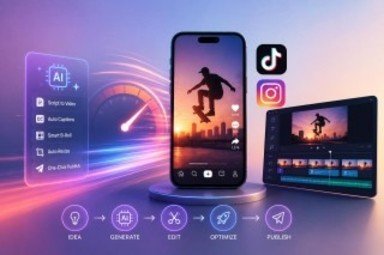
AI does not guarantee viral results, but it can make the video creation process faster and more organized. When used correctly, it helps you focus on ideas, storytelling, and audience engagement instead of spending all your time on repetitive editing tasks.
1. Generate Creative Video Ideas
Coming up with fresh ideas every day can be difficult. AI writing assistants can suggest Reel topics based on your niche, audience, and content goals.
For example, if you create digital marketing content, AI can suggest videos about SEO mistakes, content writing tips, social media strategies, and beginner-friendly AI tools.
2. Write Scripts in Less Time
A clear script gives your video direction. AI can help you write a strong opening hook, organize the main points, and finish with a useful takeaway or call to action.
3. Create Videos Without Advanced Editing Skills
Many AI video editing tools offer templates, automatic captions, voiceovers, and simple editing features. These options allow beginners to produce polished videos without mastering complex software.
4. Save Time on Repetitive Tasks
AI can assist with subtitles, scene planning, background visuals, caption drafts, and alternative hooks. This makes it easier to prepare multiple videos in one session.
5. Test Different Content Ideas
You can use AI to develop several versions of a script or opening line. Testing different approaches helps you understand which content resonates with your audience.
The biggest advantage of Instagram Reels using AI is not automatic virality. It is the ability to create, test, and improve content more consistently.
Best AI Tools for Creating Instagram Reels in 2026
You do not need every AI tool available. Start with a small selection that matches your budget and workflow.
1. ChatGPT — For Ideas, Scripts, and Captions
ChatGPT can help you brainstorm video topics, write short scripts, create hooks, generate captions, and develop calls to action.
Best for: Beginners, content writers, educators, and social media marketers.
2. Canva — For Visual Design and Templates
Canva provides video templates, text animations, design elements, and editing features that can help you create attractive vertical videos.
Best for: Educational Reels, branded content, promotional videos, and text-based videos.
3. CapCut — For Video Editing and Subtitles
CapCut offers video editing features such as transitions, effects, text overlays, and caption tools. Available features can vary by region, platform, and subscription.
Best for: Editing clips, adding subtitles, improving pacing, and creating short-form videos.
4. InVideo AI — For AI-Assisted Video Creation
InVideo AI can help transform text prompts or scripts into video drafts using available footage, voiceovers, and other production elements.
Best for: Explainer videos, educational content, and videos built around a written script.
5. Adobe Express — For Branded Social Videos
Adobe Express offers design and video creation features that can help maintain a consistent visual style across social media content.
Best for: Business promotions, branded videos, and professional-looking social content.
Important: Check each tool’s current pricing, free-plan limits, export quality, and commercial-use terms before choosing it.
How to Create Instagram Reels Using AI: Step-by-Step Guide
Now, let’s walk through the complete process of turning a simple idea into an engaging Instagram Reel.
Step 1: Choose Your Niche and Video Goal
Before opening an AI tool, decide what you want your video to achieve.
Your goal could be to educate your audience, entertain viewers, increase brand awareness, promote a product, or generate leads.
Choose a clear niche, such as:
- Digital marketing and SEO
- Education and online learning
- Technology and AI tools
- Fashion and beauty
- Food and cooking
- Fitness and lifestyle
- Business and entrepreneurship
For example, a digital marketing creator might choose the topic “Three AI Tools That Save Content Creators Time.”
A focused topic makes it easier to create relevant videos and attract the right audience.
Step 2: Research Trending Topics and Successful Reels
Research videos in your niche before creating your own. Look for Reels that perform significantly better than the same creator’s typical content.
Pay attention to:
- The first line or opening visual
- The length and pacing of the video
- The type of information presented
- The use of subtitles and on-screen text
- The storytelling structure
- The questions viewers ask in comments
Do not copy another creator’s video word for word. Instead, identify the structure that makes it engaging and adapt that structure to your own topic.
For example, if a Reel explains three common website mistakes, you could create an original video about three common SEO mistakes.
Step 3: Generate Video Ideas With AI

Once you understand your audience, use an AI writing assistant to brainstorm relevant topics.
Here is a prompt you can copy and use:
AI Prompt:
“Act as an Instagram content strategist. Generate 15 engaging Instagram Reel ideas for a beginner-friendly digital marketing account in 2026. Focus on SEO, content writing, AI tools, and social media marketing. Each idea should solve one specific audience problem and include a catchy hook, a short video concept, and a suggested call to action. Avoid generic ideas and exaggerated viral claims.”
Review the results and select ideas that offer real value to your audience.
Choose topics that are specific enough to explain in a short video. A focused Reel about one useful tip is often easier to follow than a video attempting to cover ten unrelated subjects.
Step 4: Write a Short, Engaging Script
A good script keeps your video focused and gives viewers a reason to continue watching.
For many educational Reels, you can start by testing a simple three-part structure:
Hook: Capture attention immediately.
Value: Deliver the tip, demonstration, or story.
Call to action: Encourage a relevant next step.
Here is an example:
Topic: AI tools for content creators
Hook: “Still spending hours writing social media captions?”
Value: “Use AI to brainstorm ideas, create a first draft, and generate different caption styles. Then edit the result to match your brand voice.”
Call to action: “Save this Reel for your next content planning session.”
Keep the language natural and remove unnecessary explanations. The ideal duration depends on your topic, but a short tutorial might work well in 15–30 seconds if the information fits comfortably.
Step 5: Create Your Video With an AI Reel Maker
After preparing your script, decide how you want the Reel to look.
You can choose from three common approaches:
Option A: Record yourself. Use AI to prepare the script and captions, then record your own footage. This is useful for building trust and developing a recognizable personal brand.
Option B: Use AI-generated visuals. Create suitable scenes or supporting images with an AI image or video generator, then assemble them into a short video.
Option C: Combine stock footage and text. Use licensed stock clips, on-screen text, and voiceover narration to explain your topic.
For example, you could create a Reel showing a laptop, a content calendar, and a video editing timeline while explaining how AI simplifies social media production.
When creating Instagram Reels using AI, make sure the visuals support the message instead of distracting viewers from it.
Step 6: Add an AI Voiceover and Subtitles
Voiceovers and subtitles can make educational videos easier to understand, especially when viewers watch without sound.
You can record your own voice or use a suitable text-to-speech tool. Choose a natural-sounding voice, adjust the pacing, and make sure the pronunciation of technical terms is correct.
Next, add captions using your editing software.
Follow these tips:
- Use readable fonts and sufficient contrast.
- Keep text away from Instagram’s interface elements.
- Break long sentences into shorter lines.
- Check automatically generated captions for errors.
- Synchronize the subtitles with the spoken words.
- Avoid placing too much text on a single screen.
Always review AI-generated audio and captions before publishing. Incorrect words or unnatural narration can reduce the quality of an otherwise useful video.
Step 7: Edit the Reel for Better Retention
Editing determines how smoothly viewers can follow your message.
Use a vertical 9:16 layout, commonly exported at 1080 × 1920 pixels, when appropriate for your source footage and platform requirements.
During editing:
- Remove unnecessary pauses and repetitive information.
- Show the main idea early.
- Use relevant visual changes to support important points.
- Keep subtitles readable.
- Add background music only when it supports the content.
- Balance voiceover and music volume.
- Check the final video before exporting.
Avoid adding transitions, effects, or animations simply because they are available. Every editing choice should help communicate the idea more clearly.
Step 8: Create an SEO-Friendly Caption
Your caption helps explain what the Reel offers and gives viewers additional context.
Use your main topic naturally in the caption, particularly near the beginning when appropriate. Include related terms without repeating the same keyword unnaturally.
For example:
“Want to create better Instagram Reels with less editing time? Discover how AI tools can help you brainstorm ideas, write scripts, add captions, and organize your video workflow. Start with one useful tip and make it your own.”
Finish with a relevant call to action, such as asking viewers to save the tutorial or share their favorite editing tool.
Step 9: Choose Relevant Hashtags and a Cover Image
Hashtags can provide additional topic context, but they cannot guarantee reach. Focus on a small selection of relevant hashtags rather than filling the caption with unrelated popular terms.
Example hashtags:
#InstagramReels #AITools #AIContentCreation #ReelsTips #SocialMediaMarketing
Choose a clear cover image with a short, readable headline, such as “5 AI Tools for Better Reels.”
A good cover helps viewers understand the subject when they visit your profile. Keep the design consistent with your brand and avoid overcrowding it with text.
Step 10: Publish, Analyze, and Improve
After publishing your Reel, review its performance using Instagram Insights where available.
Pay attention to:
- Watch time: How long people watch the video.
- Average watch time: How long viewers typically stay.
- Shares: Whether people find the content worth sharing.
- Saves: Whether viewers want to revisit the information.
- Reach: How many accounts the content reaches.
- Follows: Whether the video attracts relevant new followers.
Compare results across similar videos instead of judging a strategy from a single post.
If viewers leave early, experiment with a clearer opening. If they watch but rarely save the video, consider making the information more practical or reference-friendly.
These improvements help you make better Instagram Reels using AI without relying on guesswork.
Five Content Patterns That Can Make Instagram Reels More Engaging
There is no guaranteed formula for viral content, but certain storytelling structures can help you communicate more effectively.
1. The POV Pattern
Place the viewer in a relatable situation.
Example: “POV: You finally understand why your website isn’t getting traffic.”
This format works well when your audience recognizes the problem immediately.
2. The Authority Hook
Start with a specific lesson or experience.
Example: “Three SEO mistakes beginners should fix before publishing a blog post.”
Only make claims about experience or results that you can support.
3. The Micro-Story
Present a short story with a clear beginning, development, and outcome.
Example: Show a disorganized content calendar, explain the problem, and reveal a simple AI-assisted planning system.
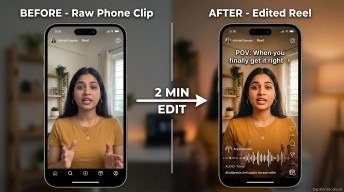
4. The Transformation Reveal
Show a meaningful before-and-after comparison.
Example: Transform a plain video into a polished Reel with subtitles, better pacing, and a clear cover.
5. The Open Loop
Introduce a question and answer it later in the video.
Example: “One small editing mistake can make your tutorial harder to follow. Here’s how to fix it.”
Make sure the video delivers the promised answer. Avoid misleading hooks that create curiosity without providing value.
Best AI Prompt for Creating Instagram Reels
If you want a repeatable process, use this prompt to develop your next video.
Copy-and-use AI prompt:
“Act as an experienced short-form video content strategist. Create an original Instagram Reel about [YOUR TOPIC] for [YOUR TARGET AUDIENCE].
Include:
- Five hook options for the opening.
- One complete 20-second video script.
- A scene-by-scene visual plan.
- Suggested on-screen text and subtitles.
- Voiceover narration.
- A natural, SEO-friendly Instagram caption.
- Five relevant hashtags.
- A clear call to action.
Use simple language, a strong opening, practical information, and a satisfying conclusion. Avoid unsupported claims, copied content, repetitive wording, and exaggerated promises. Make the content original and suitable for my brand.”
Replace the bracketed details with your own topic and audience. Review the output carefully and add your personal experience, examples, or demonstrations before publishing.
Common Mistakes to Avoid When Using AI for Instagram Reels
AI can make production easier, but it cannot replace good judgment. Avoid these common mistakes:
- Posting unedited AI output: Generic scripts and visuals may fail to connect with your audience.
- Using weak hooks: Long introductions can give viewers a reason to scroll away.
- Copying viral videos: Recreate the underlying structure, not someone else’s original work.
- Adding too much text: Overloaded screens make short videos difficult to follow.
- Ignoring video quality: Poor audio, unreadable subtitles, and distracting visuals weaken the experience.
- Using irrelevant hashtags: Choose tags that genuinely describe your content.
- Chasing views alone: Shares, saves, watch time, and meaningful engagement also matter.
- Publishing inconsistently: A realistic content schedule makes testing and learning easier.
- Ignoring originality and disclosure: Review platform rules for AI-generated or altered media and label content when required.
The goal is to use AI as a creative assistant, not as a replacement for your own ideas, expertise, and personality.
How Often Should You Post Instagram Reels in 2026?
There is no universal posting frequency that guarantees success. Your ideal schedule depends on your audience, available time, content quality, and niche.
If you are a beginner, start with three to five useful Reels per week if you can maintain that schedule without sacrificing quality. Treat this as a practical starting point, not an official Instagram ranking requirement.
You can organize your workflow like this:
- Day 1: Research topics and review successful content.
- Day 2: Generate ideas and write scripts with AI.
- Day 3: Record footage or generate suitable visuals.
- Day 4: Edit videos, check captions, and prepare covers.
- Day 5: Publish, respond to comments, and review performance.
Batching similar tasks can save time. After collecting enough performance data, adjust your schedule based on what works for your audience.
Frequently Asked Questions (FAQs)
1. Can I create Instagram Reels using AI for free?
Yes. You can start with free versions of AI writing assistants, video editors, and graphic design tools. However, free plans may limit exports, features, usage, or access to certain AI models.
2. Which AI tool is best for creating Instagram Reels?
The best tool depends on your needs. ChatGPT is useful for ideas and scripts, Canva for visual design, CapCut for editing, and InVideo AI for assisted video generation. Compare their current features before choosing one.
3. Can AI-generated Instagram Reels go viral?
Yes, AI-assisted Reels can reach large audiences, but virality is never guaranteed. Original ideas, relevant storytelling, viewer retention, sharing, and audience interest can all influence performance.
4. How long should an Instagram Reel be?
The ideal length depends on the subject and the value being delivered. A concise tutorial may take 15–30 seconds, while a detailed demonstration may require longer. Prioritize clarity and engagement over an arbitrary duration.
5. Do I need to show my face in AI-generated Reels?
No. You can create faceless Reels with voiceovers, text, screen recordings, animations, or suitable footage. However, showing your face can help some creators build a more personal connection with their audience.
Conclusion
Learning how to create Instagram Reels using AI in 2026 can make short-form video production more manageable for beginners, creators, freelancers, and businesses. From generating ideas and writing scripts to editing videos and preparing captions, AI tools can help simplify many parts of the process.
However, successful content still requires originality, a clear message, relevant visuals, and an understanding of your audience. AI cannot promise viral results, but it can help you experiment with different ideas, publish more consistently, and learn from performance data.
Meta Description:
Learn how to create Instagram Reels using AI in 2026. Discover the best AI tools, step-by-step video creation tips, viral hooks, and SEO strategies to grow your Instagram reach.
- What Are Instagram Reels and Why Do They Matter in 2026?
- Benefits of Creating Instagram Reels Using AI
- Best AI Tools for Creating Instagram Reels in 2026
- How to Create Instagram Reels Using AI: Step-by-Step Guide
- Step 1: Choose Your Niche and Video Goal
- Step 2: Research Trending Topics and Successful Reels
- Step 3: Generate Video Ideas With AI
- AI Prompt:
- Step 4: Write a Short, Engaging Script
- Step 5: Create Your Video With an AI Reel Maker
- Step 6: Add an AI Voiceover and Subtitles
- Step 7: Edit the Reel for Better Retention
- Step 8: Create an SEO-Friendly Caption
- Step 9: Choose Relevant Hashtags and a Cover Image
- Step 10: Publish, Analyze, and Improve
- Five Content Patterns That Can Make Instagram Reels More Engaging
- Best AI Prompt for Creating Instagram Reels
- Common Mistakes to Avoid When Using AI for Instagram Reels
- How Often Should You Post Instagram Reels in 2026?
- Frequently Asked Questions (FAQs)
- Conclusion
- Meta Description: