
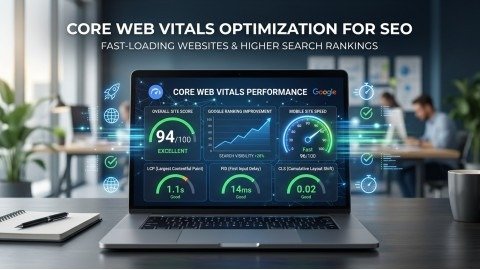
A slow website can destroy your rankings, reduce traffic, and push visitors away within seconds. Even if your content is excellent, users may still leave if pages load slowly or shift while scrolling. Because of this, Google now gives strong importance to page experience signals. That is why Core Web Vitals Optimization has become one of the most important parts of modern SEO.
Today, people expect websites to open fast, respond instantly, and stay stable on every device. When a page feels smooth and quick, visitors stay longer and interact more with the content. On the other hand, slow websites often suffer from high bounce rates, poor engagement, and lower search visibility. Therefore, improving website performance is no longer optional for serious website owners.
The good thing is that improving your website speed does not always require complicated development work. With the right strategy, you can improve loading speed, reduce delays, and create a better experience for users as well as search engines. In this guide, you will learn powerful and practical methods for Core Web Vitals Optimization that can help your website rank higher on Google naturally.
What Is Core Web Vitals Optimization?
Core Web Vitals Optimization means improving the speed, responsiveness, and visual stability of a website. Google uses these performance metrics to understand how real users experience a webpage.
These signals mainly focus on three areas:
- How fast the page loads
- How quickly the page reacts
- How stable the layout remains
If your website performs well in these areas, users enjoy a smoother experience. As a result, Google may reward your pages with better rankings and improved visibility.
Moreover, Core Web Vitals Optimization is not only useful for SEO. It also improves user trust, increases conversions, and helps visitors stay on your website longer.
Understanding the Main Core Web Vitals Metrics
Before improving your website, it is important to understand the three main performance metrics used by Google.
Largest Contentful Paint (LCP)
Largest Contentful Paint measures how quickly the main content of a page becomes visible. Usually, this element is a large image, heading, or banner section.
Google recommends keeping LCP below 2.5 seconds.
If your LCP score is poor, users may think your website is slow or broken. This creates a bad first impression and increases bounce rates.
Slow hosting, heavy images, and render-blocking resources are common reasons behind poor LCP scores.
Interaction to Next Paint (INP)
INP measures how quickly your website reacts when users interact with it. For example, when someone clicks a button, opens a menu, or taps a link, the page should respond instantly.
A good INP score should remain under 200 milliseconds.
Heavy JavaScript files and excessive browser tasks often slow down responsiveness. Therefore, reducing unnecessary scripts is very important for better interaction performance.
Cumulative Layout Shift (CLS)
CLS measures visual stability during page loading. If content suddenly moves while users are reading or clicking, the experience becomes frustrating.
Google recommends keeping CLS below 0.1.
Images without dimensions, delayed ads, unstable fonts, and popups are common reasons for layout shifts.
Why Core Web Vitals Optimization Matters for SEO
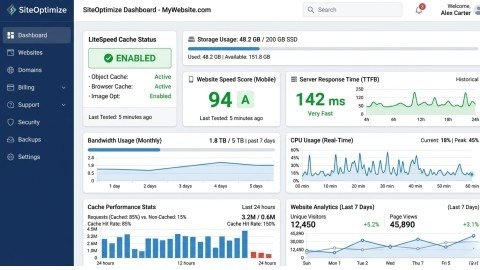
Google wants users to enjoy fast and smooth browsing experiences. Because of this, websites with strong performance often perform better in search results.
A properly optimized website can provide several important benefits. Faster pages improve user satisfaction, reduce bounce rates, and encourage visitors to explore more content. Additionally, responsive websites create trust and help increase conversions.
Most importantly, Core Web Vitals Optimization supports long-term SEO growth. A fast website has a much better chance of competing in modern search rankings compared to slow and unstable websites.
1. Improve Hosting Performance for Faster Speed
Your hosting provider plays a major role in website performance. Even a perfectly designed website can feel slow if the server is weak.
Cheap hosting plans often create problems like slow server response times, downtime, and delayed loading. Therefore, upgrading to better hosting is one of the most effective ways to improve Core Web Vitals Optimization.
A quality hosting provider should offer SSD storage, strong server resources, caching support, and modern PHP versions. Managed WordPress hosting can also help because many technical optimizations are handled automatically.
When server performance improves, page loading becomes faster and users enjoy a smoother experience.
2. Optimize Images Without Reducing Quality
Large images are one of the biggest reasons websites fail performance tests. Heavy media files increase loading times and make pages slower on both desktop and mobile devices.
Because of this, image optimization is extremely important for proper Core Web Vitals Optimization.
Compressed images load faster while maintaining visual quality. Modern image formats like WebP can also reduce file sizes significantly. In addition, resizing images before uploading prevents unnecessary bandwidth usage.
Lazy loading is another useful technique because it delays off-screen images until users scroll near them. As a result, the initial page loads much faster.
Optimized images not only improve speed but also create a better mobile browsing experience.
3. Reduce Heavy CSS and JavaScript Files
Too much CSS and JavaScript can block rendering and slow down website interactions. When browsers process large files, pages may become unresponsive for users.
This directly affects both loading speed and interactivity scores.
To improve Core Web Vitals Optimization, unnecessary CSS and JavaScript should be reduced or removed. Minifying files can also help by decreasing their size. Additionally, non-important scripts should load later instead of blocking the page during startup.
Many websites use plugins and themes that load excessive scripts on every page. Cleaning these unnecessary resources can significantly improve overall performance.
When websites use lighter code, they feel faster and smoother for visitors.
4. Use Smart Caching for Better Performance
Caching helps websites load faster by storing ready-made versions of pages. Instead of generating the same page repeatedly, the server quickly delivers saved files to visitors.
This reduces server workload and improves loading times.
Browser caching also stores files inside the user’s browser so future visits become much faster. Similarly, page caching helps deliver content instantly without heavy database processing.
Proper caching is one of the easiest and most effective ways to improve Core Web Vitals Optimization for WordPress websites.
5. Fix Layout Shifts for Better User Experience
Unexpected content movement can frustrate users and damage the browsing experience. People may accidentally click the wrong button if elements suddenly move during loading.
This problem directly affects CLS performance.
One simple solution is adding width and height dimensions to all images and videos. This allows the browser to reserve proper space before content fully loads.
Website owners should also avoid inserting banners or popups above existing content. Stable layouts help users feel more comfortable while browsing the page.
A visually stable website creates trust and improves overall engagement.
6. Use a CDN to Improve Global Loading Speed
A Content Delivery Network stores website files on servers located around the world. When users visit your website, files load from the nearest server location.
As a result, pages open much faster.
CDNs also reduce server pressure and improve website stability during high traffic periods. This is especially useful for websites with global visitors.
Popular CDN services like Cloudflare and Bunny CDN can greatly improve Core Web Vitals Optimization by reducing loading delays and improving resource delivery.
7. Remove Unnecessary Plugins and Third-Party Scripts
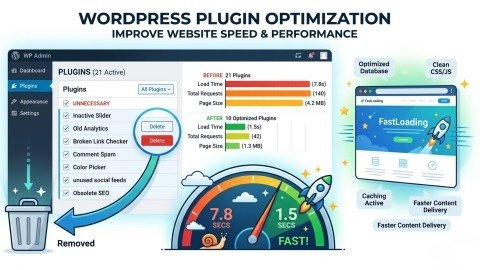
Many websites become slow because they use too many plugins and external tools. Some plugins load large scripts, fonts, and tracking codes that negatively affect performance.
Third-party tools like live chats, sliders, and advertising scripts can also increase loading times.
For better Core Web Vitals Optimization, website owners should regularly audit plugins and remove unnecessary ones. Lightweight alternatives should replace heavy plugins whenever possible.
Fewer plugins usually create faster, cleaner, and more stable websites.
Additional Ways to Improve Website Performance
Besides the main fixes, several smaller improvements can also help your website perform better.
Using modern font-loading techniques can reduce delays caused by custom fonts. Similarly, reducing redirects helps pages load faster because browsers make fewer requests.
Mobile optimization is equally important because most users browse websites using smartphones. Responsive layouts, compressed images, and simplified designs create a much smoother mobile experience.
Regular speed testing is also important. Tools like Google PageSpeed Insights and Lighthouse help identify performance issues before they become serious problems.
Common Reasons Websites Fail Core Web Vitals
Many websites struggle with performance because of avoidable mistakes. Slow hosting, oversized images, poor coding practices, and excessive scripts are among the biggest reasons.
Page builders can also create bloated code that slows websites significantly. While these builders are convenient, they often load many unnecessary resources that hurt performance.
Without proper optimization, even visually attractive websites may fail Core Web Vitals tests.
Final Thoughts
Website speed has become one of the most important parts of modern SEO. Users expect fast, responsive, and stable browsing experiences on every device. Because of this, Core Web Vitals Optimization now plays a major role in improving search rankings and user satisfaction.
The good news is that many performance problems can be fixed with practical improvements like better hosting, optimized images, reduced scripts, and proper caching. These changes not only improve Google rankings but also help visitors stay longer and interact more with your content.
If you consistently apply the strategies explained in this guide, your website can become faster, more user-friendly, and more competitive in search results. In today’s digital world, even small speed improvements can create powerful long-term SEO benefits.
FAQs
What is Core Web Vitals Optimization?
Core Web Vitals Optimization is the process of improving website speed, responsiveness, and visual stability to create a better user experience and improve Google rankings.
Why is Core Web Vitals Optimization important for SEO?
Google uses Core Web Vitals as a ranking factor because fast and stable websites provide a better browsing experience for users.
Which metric is most important in Core Web Vitals?
Largest Contentful Paint (LCP) is very important because it measures how quickly the main content of a webpage becomes visible to users.
How can images affect Core Web Vitals Optimization?
Large and unoptimized images slow down page loading speed, increase layout shifts, and negatively impact website performance scores.
How long does it take to improve Core Web Vitals scores?
Most websites start seeing improvements within a few weeks after applying proper speed optimization and performance fixes.
Meta Description:
Improve your website speed with these 7 powerful Core Web Vitals Optimization fixes. Learn how to boost Google rankings, improve user experience, reduce bounce rate, and increase website performance naturally.
- What Is Core Web Vitals Optimization?
- Understanding the Main Core Web Vitals Metrics
- Why Core Web Vitals Optimization Matters for SEO
- 1. Improve Hosting Performance for Faster Speed
- 2. Optimize Images Without Reducing Quality
- 3. Reduce Heavy CSS and JavaScript Files
- 4. Use Smart Caching for Better Performance
- 5. Fix Layout Shifts for Better User Experience
- 6. Use a CDN to Improve Global Loading Speed
- 7. Remove Unnecessary Plugins and Third-Party Scripts
- Additional Ways to Improve Website Performance
- Common Reasons Websites Fail Core Web Vitals
- Final Thoughts
- FAQs
- Meta Description: