
Artificial Intelligence (AI) is transforming education faster than ever before. In 2026, students no longer rely only on textbooks, lectures, or search engines to learn new concepts. Instead, they are using Best AI Tools for Students to study smarter, complete assignments more efficiently, improve writing, solve complex problems, and manage their daily academic tasks.
Whether you’re a school student, university learner, or preparing for competitive exams, the right AI Tools can save time, boost productivity, and make learning more interactive. From AI-powered tutors to note-taking assistants and writing helpers, students now have access to powerful technologies that support learning both inside and outside the classroom.
This guide explores the Best AI Tools for Students in 2026, including both free and paid options, their benefits, features, practical uses, common mistakes to avoid, and tips for choosing the right tool for your learning needs.
What are AI Tools for Students?
AI Tools for Students are software applications powered by Artificial Intelligence that help learners study, research, write, organize notes, solve problems, and improve productivity.
Unlike traditional educational software, modern AI Learning Tools understand natural language, provide personalized explanations, generate summaries, answer questions, and adapt to different learning styles.
These tools can help students:
- Understand difficult concepts
- Improve writing skills
- Organize study materials
- Generate summaries
- Practice coding
- Create presentations
- Manage assignments
- Learn new languages
- Prepare for exams
Many of these tools are available for free, while premium versions offer additional features such as advanced AI models, collaboration tools, and larger file uploads.
Best AI Tools for Students in 2026
1. ChatGPT
ChatGPT remains one of the most powerful AI assistants for students.
It helps with:
- Homework support
- Essay writing
- Coding practice
- Language learning
- Brainstorming ideas
- Research explanations
- Exam preparation
Free Plan: ✅ Available
Paid Plan: ✅ ChatGPT Plus
Best For:
General learning, programming, writing, and research.
2. NotebookLM
NotebookLM allows students to upload PDFs, lecture slides, research papers, and notes.
It then explains content based on those uploaded documents instead of providing generic internet answers.
Best For:
- Research
- Study notes
- Literature reviews
- Academic reading
3. Perplexity AI
Perplexity AI combines AI responses with reliable citations.
Students can quickly find trustworthy information while seeing the original sources.
Best For:
- Research
- Current affairs
- Academic references
- Fact-checking
4. Claude
Claude is excellent for long documents and detailed writing.
Students often use it for:
- Essay improvement
- Research analysis
- Report writing
- Critical thinking
5. Grammarly
Grammarly has evolved beyond grammar checking.
It now improves:
- Writing clarity
- Tone
- Vocabulary
- Sentence structure
- Professional communication
6. Notion AI
Notion AI helps students organize everything in one place.
You can manage:
- Notes
- Assignments
- Study schedules
- Projects
- Revision plans
7. Khanmigo
Khanmigo acts like a personal tutor.
Instead of giving direct answers, it guides students step by step to solve problems independently.
Best for:
- Mathematics
- Science
- School education
- Guided learning
8. Wolfram Alpha
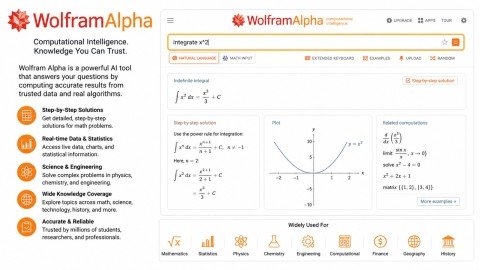
Perfect for STEM students.
It solves:
- Mathematics
- Statistics
- Engineering problems
- Physics
- Chemistry
Unlike many AI chatbots, it also shows complete solutions.
9. Canva Magic Studio
Students use Canva AI to create:
- Presentations
- Posters
- Infographics
- Classroom projects
- Social media graphics
It saves hours of design work.
Benefits of Using AI Tools
Using the Best AI Tools for Students offers several advantages.
Personalized Learning
AI explains concepts according to your learning level.
Beginners receive simple explanations, while advanced learners get more detailed discussions.
Faster Research
Students can summarize lengthy articles, compare sources, and understand complex topics much more quickly.
Better Writing
Many AI Learning Tools improve grammar, sentence structure, vocabulary, and clarity.
This helps students submit professional assignments.
Improved Productivity
Modern Productivity Apps reduce repetitive work.
Students spend less time organizing notes and more time learning.
Better Time Management
AI helps create:
- Study schedules
- Revision plans
- To-do lists
- Assignment reminders
Interactive Learning
Instead of reading long textbooks, students can ask questions and receive instant explanations.
This makes studying more engaging.
Exam Preparation
AI generates:
- Practice questions
- Flashcards
- Quizzes
- Summaries
These features help students revise more effectively.
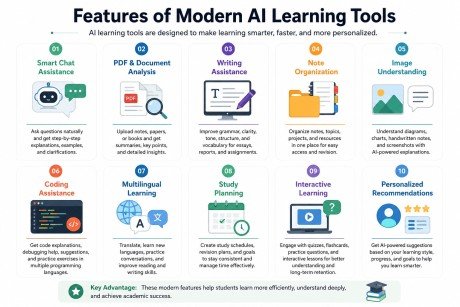
Features of Modern AI Learning Tools
The latest AI Tools include many advanced features.
Smart Chat Assistance
Students can ask questions naturally.
The AI explains concepts step by step.
PDF & Document Analysis
Upload lecture notes, research papers, or books.
The AI summarizes and explains important information.
Writing Assistance
AI helps improve:
- Essays
- Assignments
- Emails
- Reports
- Presentations
Note Organization
Students can organize subjects, assignments, and projects efficiently.
Image Understanding
Many AI tools can explain diagrams, charts, and handwritten notes.
Coding Assistance
Programming students receive:
- Code explanations
- Debugging help
- Practice exercises
Multilingual Learning
Students can translate text and practice multiple languages.
Study Planning
Many Productivity Apps automatically create learning schedules and revision calendars.
Step-by-Step Guide to Using AI Tools Effectively
Step 1: Choose the Right AI Tool
Not every AI tool is designed for the same purpose.
Choose based on your needs.
For example:
- Research → NotebookLM
- Writing → Grammarly
- General Learning → ChatGPT
- Organization → Notion AI
Step 2: Set Clear Learning Goals
Know what you want to achieve.
Examples include:
- Learn Python
- Improve English
- Prepare for exams
- Write assignments
Step 3: Ask Better Questions
Instead of asking:
“Explain Excel”
Ask:
“Explain Pivot Tables in Excel with practical examples.”
Specific questions produce better answers.
Step 4: Verify Information
Always cross-check important facts using textbooks or trusted websites.
AI is helpful but should not replace critical thinking.
Step 5: Practice What You Learn
Do not simply read AI responses.
Practice:
- Coding
- Writing
- Solving problems
- Creating projects
Learning improves through application.
Step 6: Stay Organized
Store notes, bookmarks, and AI-generated summaries in one place.
Review them regularly.
Common Mistakes Students Should Avoid When Using AI
1. Copying Assignments Without Understanding
Many students copy AI-generated answers and submit them as their own work. This can lead to poor grades if teachers ask follow-up questions. AI should help you learn, not do all the work for you. Always read the answer carefully, understand it, and rewrite it in your own words before submitting.
2. Depending Only on AI
AI is a helpful learning assistant, but it cannot replace teachers, textbooks, or your own thinking. If you rely only on AI, your problem-solving and critical thinking skills may become weak. Continue reading books, attending classes, taking notes, and practicing on your own.
3. Asking Vague Questions
The quality of AI answers depends on the quality of your prompt. Short or unclear questions often produce incomplete or inaccurate results. Instead of asking, “Explain math,” ask, “Explain the Pythagorean Theorem with a simple example for Class 10 students.” Clear prompts lead to better answers.
4. Ignoring Fact Checking
AI can sometimes provide outdated or incorrect information. Before using facts, statistics, research data, or references in assignments, verify them using trusted sources such as official websites, textbooks, or academic journals. This helps you avoid sharing incorrect information.
5. Using Too Many AI Tools
There are hundreds of AI tools available, but using too many at once can be confusing. Start with two or three reliable tools, such as ChatGPT for learning, Grammarly for writing, and Canva AI for presentations. Learn how to use them effectively before trying new ones.
6. Forgetting Privacy and Security
Never upload confidential or personal information to AI tools. Avoid sharing passwords, bank details, identification numbers, exam papers, or sensitive school or workplace documents. Always check the privacy policy of an AI tool before uploading important files.
FAQs
Are AI tools free?
Many AI tools offer free versions with optional premium plans.
Which AI tool is best for students?
ChatGPT is one of the most versatile options for learning, writing, coding, and research. However, the best choice depends on your specific goals and study needs.
Can AI replace teachers?
No.AI supports education but cannot replace experienced teachers, classroom discussions, or hands-on learning.
Are AI-generated assignments allowed?
This depends on your school’s or university’s academic policies. Use AI as a learning assistant rather than submitting AI-generated work as your own.
Which AI tool is best for writing?
Grammarly and Claude are excellent choices for improving writing quality and clarity.
How can AI improve productivity?
Modern Productivity Apps help students manage notes, organize assignments, create study schedules, summarize content, and automate repetitive tasks.
Conclusion
The Best AI Tools for Students in 2026 are changing the way people learn, study, and manage academic work. From intelligent assistants like ChatGPT to research-focused platforms such as NotebookLM and organization tools like Notion AI, students now have access to technology that makes learning more efficient and personalized.
However, the real value of these AI Learning Tools comes from using them responsibly. Instead of relying on AI to complete assignments, students should use it to strengthen understanding, practice skills, and improve productivity. When combined with curiosity, critical thinking, and consistent study habits, AI becomes a powerful partner in achieving academic success.
Call to Action
Want to learn how to use AI tools professionally? Join our AI training course and master the latest AI Learning Tools, ChatGPT, and Productivity Apps through practical, hands-on projects. Enroll today and prepare yourself for the future of education and work.
Meta Description
Discover the Best AI Tools for Students in 2026. Compare free & paid AI Learning Tools, ChatGPT, and Productivity Apps to study smarter.