
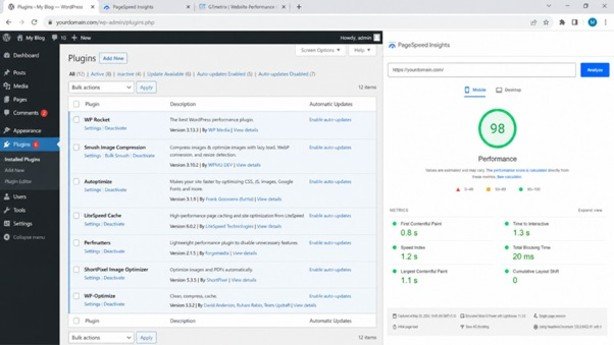
WordPress plugin setup can make a big difference in your website’s speed and performance. Is your WordPress website taking too long to load? If visitors leave before your page opens, you are not alone. A slow website can hurt your search rankings. It can also reduce conversions and create a poor user experience. However, the good news is that you can fix many speed issues with the right WordPress plugin setup.
A fast website does more than load quickly. It keeps visitors engaged, builds trust, and helps your business grow. Moreover, search engines prefer websites that offer a smooth experience. Improve your website’s performance in 2025. It should be one of your top priorities. The right plugin setup can make a big difference. You do not need advanced technical skills to get started.
This guide shares 10 proven ways to improve your website’s performance. It also helps you build a smart WordPress plugin setup. Do not install random plugins. Choose the right plugins and configure them correctly. Let’s get started.
Why a Proper WordPress Plugins Setup Matters?
Many people believe that installing more plugins makes a website better. In reality, the opposite is often true. Too many poorly coded plugins can slow down your website. They can also create security and compatibility issues.
A proper WordPress plugin setup helps you:
- Improve page loading speed
- Boost SEO rankings
- Reduce bounce rates
- Increase user engagement
- Protect your website from security threats
- Lower server resource usage
- Create a better browsing experience
Choose quality plugins instead of installing too many. This helps your website stay fast and reliable.
1. Start with Only Essential Plugins
Every plugin adds extra code to your website. Therefore, installing plugins you never use only increases your website’s workload.
Before adding a new plugin, ask yourself:
- Do I really need this feature?
- Can another plugin already do this job?
- Is there a built-in WordPress option instead?
A clean WordPress Plugins Setup focuses only on tools that provide real value.
Best Practice
Keep only plugins that improve your website. Delete inactive plugins because they can still create security risks.
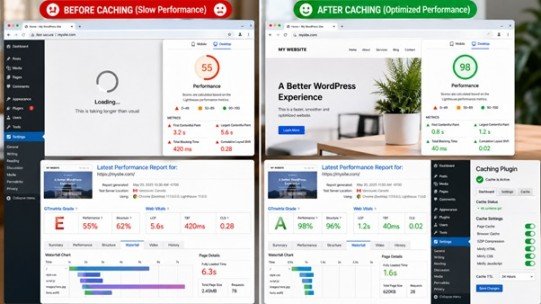
2. Install a Reliable Caching Plugin
Every time someone visits your website, WordPress creates the page dynamically. This process takes time.
A caching plugin stores ready-made versions of your pages. As a result, visitors receive pages much faster.
Popular caching plugins include:
- WP Rocket
- LiteSpeed Cache
- W3 Total Cache
- WP Super Cache
Why Caching Matters
A good caching plugin can:
- Reduce server load
- Improve loading speed
- Increase Core Web Vitals scores
- Enhance visitor experience
For many websites, caching delivers one of the biggest speed improvements.
3. Optimize Images Automatically
Large images are one of the biggest reasons websites become slow.
Do not upload images directly from your phone or camera. Optimize them before or during upload.
Good image optimization plugins include:
- Smush
- Short Pixel
- Magnify
These plugins can:
- Compress images
- Resize large files
- Convert images into Web
- Enable lazy loading
Consequently, your pages’ load much faster while maintaining excellent image quality.
4. Improve SEO with the Right Plugin
Website performance is not only about speed. Search engines also look at technical SEO.
A quality SEO plugin helps search engines understand your website better.
Popular choices include:
- Rank Math
- Yoast SEO
- All in One SEO
A proper SEO plugin allows you to:
- Create XML sitemaps
- Add schema markup
- Optimize titles
- Improve meta descriptions
- Manage redirects
Adding an SEO plugin is an important part of every WordPress Plugins Setup. It improves visibility and user experience.
5. Protect Your Website with a Security Plugin
Website attacks happen every day. Even small websites are common targets.
Therefore, security should never be ignored.
Reliable security plugins include:
- Defender
- Wordfence
- Solid Security
These plugins help by:
- Blocking malware
- Preventing brute-force attacks
- Monitoring suspicious activity
- Adding two-factor authentication
- Protecting login pages
A secure website also performs better because malicious traffic uses valuable server resources.
6. Keep Your Database Clean
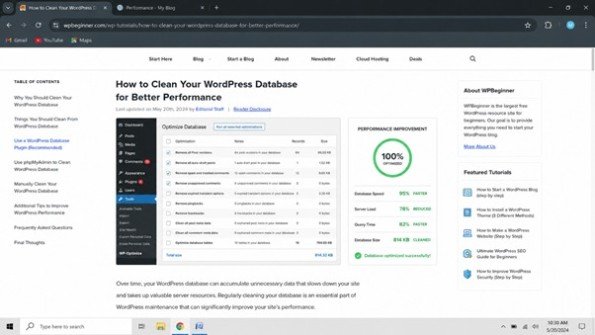
Over time, WordPress stores unnecessary data such as:
- Post revisions
- Spam comments
- Expired transients
- Draft posts
All of this increases database size.
Database optimization plugins like WP-Optimize remove unwanted data safely.
Benefits include:
- Faster database queries
- Better dashboard performance
- Reduced server workload
- Improved overall speed
Regular maintenance keeps your WordPress Plugins Setup working efficiently.
7. Use Backup Plugins Before Problems Happen
Website backups are often ignored until something goes wrong.
Instead of taking risks, install a trusted backup plugin.
Popular options include:
- All-in-One WP Migration
- UpdraftPlus
- Duplicator
Regular backups allow you to:
- Restore your website quickly
- Recover from hacking
- Fix accidental mistakes
- Move websites easily
Backups provide peace of mind while protecting your hard work.
8. Add Performance Monitoring Tools
You cannot improve what you cannot measure. Performance monitoring plugins help identify slow pages and technical issues. They also make your WordPress Plugins Setup more effective.
Useful tools include:
- Site Kit by Google
- Query Monitor
- Health Check
These plugins show valuable information such as:
- Page speed
- Search performance
- Traffic insights
- PHP issues
- Plugin conflicts
Because of this, you can make better optimization decisions.
9. Update Plugins Regularly
Old plugins create problems.
They may contain security vulnerabilities, compatibility issues, or outdated code.
For a healthy WordPress plugin setup, always:
- Update plugins regularly.
- Remove abandoned plugins.
- Check compatibility before major updates.
- Delete plugins you no longer need.
Regular updates improve both security and website performance.
10. Choose Quality Over Quantity
Many beginners install dozens of plugins hoping for better functionality.
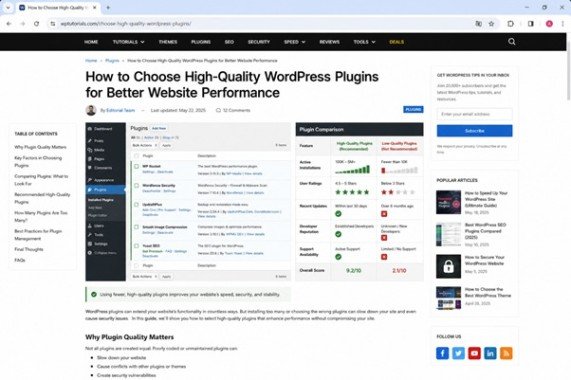
However, fewer high-quality plugins usually perform much better than many low-quality ones.
When selecting plugins, always check:
- Active installations
- User ratings
- Update frequency
- Developer reputation
- Support availability
A carefully planned WordPress Plugins Setup is always better than a crowded one.
Common Mistakes to Avoid
Many website owners make simple mistakes during their WordPress plugin setup. These mistakes can reduce website performance.
Avoid these common issues:
- Installing duplicate plugins
- Ignoring updates
- Using heavy page builders unnecessarily
- Uploading large images
- Keeping inactive plugins
- Choosing poorly maintained plugins
- Forgetting regular backups
Avoiding these mistakes helps your website remain fast and secure.
Recommended Plugin Stack for Most Websites
If you’re unsure where to begin, this simple setup works well for most websites.
Purpose
Recommended Plugin
SEO
Rank Math
Cache
WP Rocket
Images
Smush
Security
Defender
Backup
All-in-One WP Migration
Analytics
Site Kit by Google
Database
WP-Optimize
This balanced setup covers performance, security, and SEO without adding unnecessary weight.
Final Thoughts
A fast website is no longer optional. Visitors expect websites to load quickly. Search engines also reward fast and smooth websites. Fortunately, building a high-performing website does not require dozens of plugins. Instead, you need a smart WordPress Plugins Setup. It focuses on quality, speed, and long-term stability.
Start by installing only the plugins your website truly needs. Then, optimize images, enable caching, strengthen security, and keep everything updated. Small improvements made consistently will produce better results over time.
Review your WordPress Plugins Setup regularly. Follow the strategies shared in this guide. Your website will load faster and provide a better experience for every visitor. Your visitors will enjoy a better experience. Your website will also have a better chance to rank higher in search results.
FAQs
1. What is WordPress Plugins Setup?
WordPress Plugins Setup means installing the right plugins for your website. It helps improve speed, security, SEO, and overall performance.
2. How many plugins should I install on my WordPress website?
There is no fixed number, but you should only install the plugins your website truly needs.
3. Which plugins are best for improving WordPress performance?
WP Rocket, Rank Math, Smush, and Defender are popular choices. Site Kit by Google and WP-Optimize are also excellent options.
4. Can too many plugins slow down my website?
Yes, too many plugins can slow down your website. They can also reduce its overall performance.
5. How often should I update my WordPress plugins?
Check your plugins for updates regularly. Then, install compatible updates to keep your website secure and running smoothly.
Mata description
Improve your website with the right WordPress plugin setup. Discover proven performance tips, boost speed, and optimize your site. Read the guide today!