
What if your client could see your hard work in just 2 minutes—and feel impressed?
Many SEO experts deliver strong results. However, their clients don’t always understand what those results mean. As a result, confusion grows, trust drops, and some clients even leave. This is exactly where SEO Reporting becomes essential. It helps bridge the gap between your work and your client’s understanding.
In simple terms, SEO Reporting shows your efforts in a clear and easy way. Instead of complex data, it presents insights that anyone can understand. Moreover, it highlights growth, explains changes, and shows what steps come next. Because of this, clients feel confident and stay connected with your work.
So, if you want happy clients, more projects, and better income, you must master SEO Reporting. It helps you show clear results and grow your business. When done right, it turns your work into visible value. In this guide, you will learn how to create reports that are simple, powerful, and easy to follow step by step.
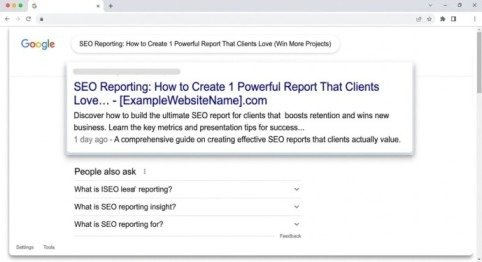
Why Smart Reporting Can Change Your Business
First of all, clients don’t just want rankings. Instead, they want results like leads and sales.
Because of this, SEO Reporting helps you:
- Show clear progress
- Build trust
- Keep clients longer
In addition, when your report is easy to read, clients feel confident. Therefore, they are more likely to continue working with you.
Start with Clear Client Goals
Before you create any report, you must understand your client.
Ask simple questions:
- What do they want? (traffic, leads, sales)
- What is their main goal?
- What work did you do this month?
After that, your SEO Reporting becomes more focused and useful.
Keep Your Report Simple and Short
Many beginners make one mistake.
They add too much data.
However, clients don’t like long reports.
So, keep your report:
- Short (5–7 pages)
- Clear
- Easy to read
As a result, even a busy person can understand it quickly.
Choose Only Important Data
Now, let’s talk about data.
You don’t need everything.
Instead, choose only useful data for your SEO Reporting.
Key Data to Include:
1. Website Traffic
Show:
- Organic visitors
- Top pages
- User behaviour
This helps clients see growth.
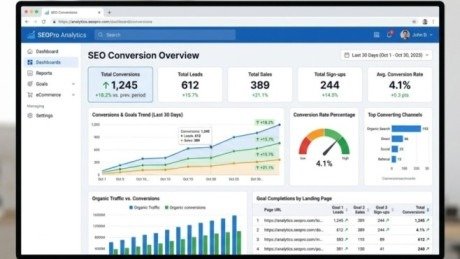
2.Conversions (Very Important)
This is the heart of SEO Reporting.
Here, you show the real results of your work. Because at the end of the day, clients don’t just want traffic—they want growth in their business.
So, include:
- Leads
- Sales
- Sign-ups
SEO Reporting
In addition, explain how your SEO efforts helped increase these results. For example, better rankings or improved content can bring more customers. This shows clients exactly how SEO leads to real business growth.
Because traffic without results has no value. However, when that traffic converts into real actions, it proves your SEO is working. Therefore, always focus on conversions to show true success.
3.Keyword Performance
This section shows how your SEO work is improving search visibility over time. It helps clients see which keywords perform well. It also shows where growth is happening.
Include:
- Ranking changes
- Important keywords
- Visibility
Also, highlight keywords that improved in ranking. Focus on those bringing traffic or potential customers. You can also compare past and current rankings to show clear progress.
Because of this, clients can easily see how their website is improving in search results. Therefore, this section plays a key role in proving your SEO efforts are working.
4. Technical Health
This section shows how well the website is performing behind the scenes. It highlights the technical improvements that support better rankings and user experience.
Also include:
- Website speed
- Errors fixed
- Mobile performance
In addition, explain what issues were found and how you fixed them. For example, you can mention improvements in page load time or fixing broken links.
Because of this, clients understand that SEO is not just about content and keywords. So, this section proves your technical work. It shows how it improves overall website performance.
Always Connect Data to Money
Here is a powerful tip.
Clients care about money.
So, in your SEO Reporting, always explain:
- How traffic brings leads
- How rankings increase sales
For example: “Traffic increased 20%, which can bring more customers.”
Turn Data into a Story
Data alone is boring, and most clients won’t understand it easily. However, when you turn data into a story, it becomes powerful and engaging. Don’t just show numbers. Explain what happened, why it happened, and what it means for the business. This makes your SEO Reporting more clear and useful. Clients stay engaged and understand your results better.

Step-by-Step Report Structure
1. Start with Highlights
Begin your report with the most important points first. This section should quickly show your work’s value. Clients understand results without reading everything.
Include:
- Big wins
- Key results
- Quick summary
In addition, use simple words and short sentences. Highlight major improvements like traffic growth or increased leads. Because of this, clients get a clear idea of progress in seconds. So, this section makes a strong first impression. It also sets a positive tone for the rest of the report.
2. Explain Results in Simple Words
Don’t just show numbers.
Instead, explain:
- What happened
- Why it happened
For example: “Traffic increased because we improved content.”
3. Show Real Examples
Use:
- Before/after results
- Real pages
- Simple visuals
This builds trust quickly.
4. Add Future Plan
Now tell the client:
- What will you do next
- What results they can expect
This makes your SEO Reporting more powerful.
Use Reports to Get More Projects
Here’s something important.
Your report is not just for information.
It is also a selling tool.
A strong SEO Reporting can:
- Increase your income
- Get more work
- Build long-term clients
Add Extra Data at the End
Keep main report clean.
Put extra data in appendix:
- Full keyword lists
- Detailed charts
- Technical reports
So, interested clients can check more details.
Improve Your Reports Every Month
Don’t stop learning.
Instead:
- Ask client feedback
- Try new formats
- Improve design
Because better SEO Reporting = better results.
Common Mistakes to Avoid

Avoid these common mistakes in your report:
- Too much data
- Hard language
- No explanation
- No future plan
Also, don’t use complex charts or hard terms. Keep everything simple and easy to understand. Always keep your report simple and focused on results. Explain what the data means and what actions you will take next. Because of this, your report becomes clear and useful. If you don’t fix these mistakes, clients get confused. Your report fails to show your real value.
Simple Tips for Better Reports
To create strong and effective reports, follow these simple tips:
- Use easy English so every client can understand your message
- Keep sentences short for better readability and clarity
- Add charts and visuals to make data simple and engaging
- Focus on results instead of only showing raw numbers
- Explain everything clearly so clients know what the data means
In addition, always try to make your report clean and easy to scan. Because of this, clients can quickly understand progress without confusion.
Conclusion
At the end of the day, your success depends on how well you communicate your work. SEO Reporting is not just a task—it is your strongest tool to show real value. It shows your results clearly. Clients understand the impact on their business. Because of this, trust grows naturally over time.
Simple and clear reports build client confidence. They make clients trust your work more. They don’t just see numbers—they see progress and future potential. Therefore, instead of sending boring reports, focus on creating something meaningful.
👉 Create reports that clients enjoy reading
👉 Create reports that clearly explain results
👉 Create reports that open doors to new opportunities
In the end, better reporting leads to better relationships and long-term success.
Here are your FAQs in proper question format with one-line answers:
FAQs
1. What are SEO reporting tools?
SEO reporting tools collect and analyse SEO data. They present it in simple, easy-to-read reports.
2. What are the best SEO reporting tools for agencies?
Best tools include Looker Studio and SE Ranking. SEMrush and Ahrefs also give strong insights.
3. What are the essential metrics for an SEO performance report?
Essential SEO metrics include organic traffic, keyword rankings, conversions, backlinks, and website health.
4. How to create automated SEO reports for clients?
Use tools like Looker Studio or SE Ranking. Schedule reports to send automatically.
5. What are the best tools for SEO reporting and analytics?
Top tools include Google Analytics and Google Search Console. You can also use SEMrush and Ahrefs.
Meta description
Boost your results with SEO Reporting and win more clients easily. Learn to create powerful, simple reports that impress and convert. Start now!
- Why Smart Reporting Can Change Your Business
- Start with Clear Client Goals
- Keep Your Report Simple and Short
- Choose Only Important Data
- 2.Conversions (Very Important)
- 3.Keyword Performance
- 4. Technical Health
- Always Connect Data to Money
- Turn Data into a Story
- Step-by-Step Report Structure
- Simple Tips for Better Reports
- Conclusion
- FAQs
- Meta description