
Your website gets 10,000 monthly visitors but you have no idea which keywords bring them or whether Google can even crawl your most important pages.
Understanding what is Google Search Console solves this exact problem. It’s Google’s free platform that shows precisely how your site performs in search—which queries trigger your pages, whether Google indexed your content, and what technical issues might be holding your rankings back.
This complete 2026 guide reveals what is Google Search Console, why it matters for SEO, and how to use Google Search Console effectively to improve your search visibility.
What is Google Search Console?
Google Search Console (GSC) is a free web service from Google that allows website owners, SEOs, marketers, and developers to monitor how their site performs in Google Search results.
Unlike Google Analytics, which tracks what users do after arriving on your site, Search Console focuses specifically on your relationship with Google Search itself. Think of it as the direct communication channel between your website and Google’s search systems.
When you understand what is Google Search Console and how it works, you unlock access to first-party data showing:
- Which queries lead users to visit your website
- How your pages rank for specific keywords
- Whether your content is properly indexed
- Technical issues preventing pages from ranking
- Links pointing to your website
- Mobile usability problems
- Core Web Vitals metrics affecting user experience
Search Console is completely free and available to anyone with a Google account who owns or manages a website.
Why Google Search Console Is Important for SEO in 2026
Learning what is Google Search Console reveals why it’s essential for modern SEO strategy. In 2026, with AI-powered search results and evolving algorithms, relying on guesswork no longer works. You need accurate data directly from Google.
Direct Data from the Source
Third-party SEO tools estimate rankings and traffic. Search Console reports actual data from Google’s systems—the only truly authoritative source for understanding how Google sees your site.
AI Search Impact Visibility
With AI Overviews changing click behavior in 2026, Search Console now shows how AI-driven search features affect your traffic. You can see which queries trigger AI Overviews and how that impacts traditional organic clicks.
Technical Issue Detection
Search Console surfaces problems that damage rankings but remain invisible elsewhere:
- Pages Google cannot crawl
- Indexation errors blocking content
- Mobile usability failures
- Core Web Vitals problems
- Security issues or manual penalties
- Broken structured data
Catching these issues early prevents traffic losses before they compound.
Competitive Advantage
Most website owners never properly configure Search Console or ignore its reports entirely. Understanding what is Google Search Console and using it consistently gives you visibility competitors lack.
Brief History: From Webmaster Tools to Search Console
Google Search Console evolved significantly since its origins.
2001-2005: Google launched basic webmaster portals and the Google Sitemaps tool for XML sitemap submission.
2006: These resources merged into Google Webmaster Tools, the unified platform providing crawl errors, search queries, and link data.
2015: Google rebranded Webmaster Tools as Search Console, acknowledging the platform’s diverse user base extended far beyond traditional webmasters to include marketers, content creators, and small business owners.
2018: Google introduced a completely redesigned interface with 16-month data retention (up from 90 days), the Index Coverage report, and improved mobile tracking.
2019: Domain properties launched, allowing users to monitor entire domains across all subdomains and protocols in a single property.
2025-2026: Search Console added AI Overview tracking, improved Core Web Vitals reporting, and better integration with AI-driven search systems.
Setting Up Google Search Console for Beginners
Understanding what is Google Search Console includes knowing how to set it up correctly. This Google Search Console tutorial walks you through the complete setup process step by step.
Step 1: Access Search Console
Visit search.google.com/search-console and log in with your Google account. This Google Search Console setup takes just 5-15 minutes to complete.
Step 2: Add Your Property
Choose between two property types:
Domain Property (Recommended):
Covers all URLs across all subdomains and protocols (http, https, www, non-www). Requires DNS TXT record verification through your domain registrar.
URL-Prefix Property:
Covers only URLs matching your exact entered prefix. Offers multiple verification methods including HTML file upload, meta tag, Google Analytics, and Google Tag Manager.
Domain properties provide complete site coverage and are generally preferred.
Step 3: Verify Ownership
For domain properties, add the provided DNS TXT record through your domain registrar. For URL-prefix properties, choose your preferred verification method and follow the instructions.
Verification typically takes 5-15 minutes. Once verified, Google begins collecting data for your property.
Step 4: Submit Your Sitemap
Navigate to Sitemaps in the left menu, enter your XML sitemap URL (typically yoursite.com/sitemap.xml), and click Submit. This helps Google discover and crawl your important pages more efficiently.
Key Google Search Console Reports
Now that you understand what is Google Search Console and how to set it up, let’s explore its most valuable reports.
Performance Report
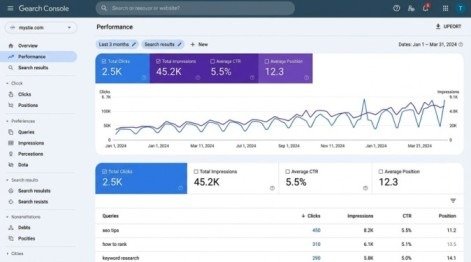
The Performance report shows:
- Total Clicks: How many clicks your site received from Google Search
- Total Impressions: How often your pages appeared in search results
- Average CTR: The rate calculated by dividing clicks by impressions.
- Average Position: Your average ranking across all queries
You can filter data by query, page, country, device, and search type (web, image, video).
Actionable Insight: Sort by impressions descending and filter for pages with CTR below 3%. These represent high-visibility, low-performing opportunities where better titles and meta descriptions could significantly increase traffic without needing to improve rankings.
Index Coverage Report
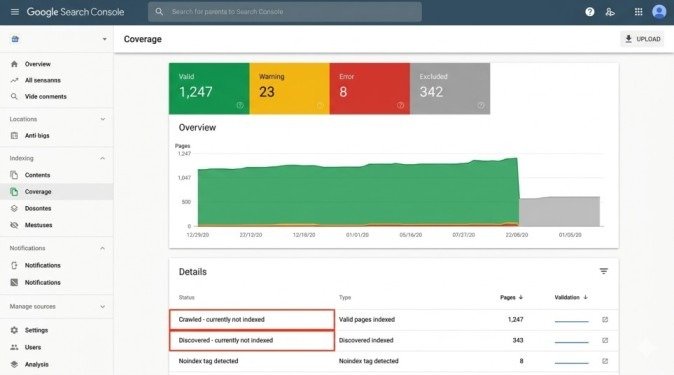
This report shows which pages Google indexed and why others were excluded. Understanding what is Google Search Console’s indexing system helps you ensure all important content gets indexed.
Common exclusion reasons include:
- Crawled – currently not indexed: Google crawled but chose not to index, often signaling thin or low-quality content
- Discovered – currently not indexed: Google knows the page exists but hasn’t crawled it yet
- Blocked by robots.txt: Your robots.txt file prevents Googlebot access
- Noindex tag detected: Page has noindex directive telling Google not to index it
- Duplicate content: Multiple pages with similar content competing
Fix these issues to ensure Google indexes your valuable content.
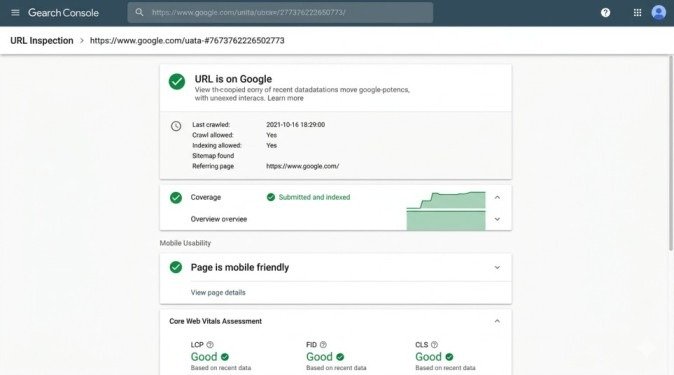
URL Inspection Tool
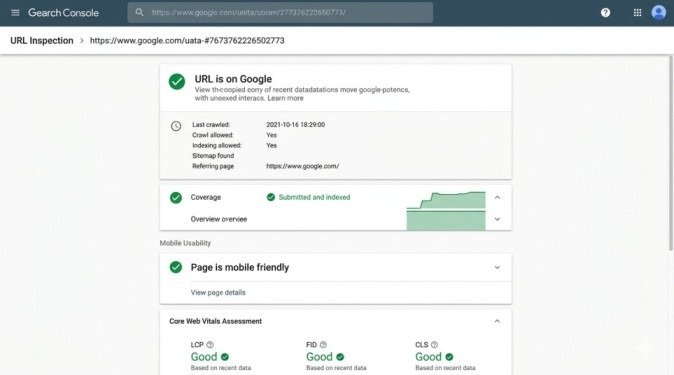
Check any specific URL to see:
- Whether Google indexed it
- When it was last crawled
- What version Google cached
- Whether it’s mobile-friendly
- Any indexing or crawling problems
You can also request indexing for individual URLs after publishing or updating important content.
Core Web Vitals Report
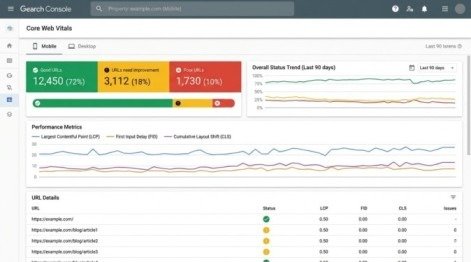
This report shows user experience metrics affecting rankings:
- LCP (Largest Contentful Paint): Loading performance
- FID (First Input Delay): Interactivity
- CLS (Cumulative Layout Shift): Visual stability
Pages failing Core Web Vitals may rank lower in search results. Use this report to identify and fix performance problems.
Links Report
View both external links (from other websites) and internal links (between pages on your site). While less comprehensive than dedicated backlink tools, this provides Google’s direct view of your link profile.
How to Use Google Search Console to Improve SEO
Understanding what is Google Search Console means knowing how to act on its data. This GSC SEO guide shows you practical strategies that work.
Find Keyword Opportunities
Filter Performance data for queries ranking positions 11-20 (page two). These “striking distance” keywords represent quick wins—small optimizations could move them to page one and significantly increase traffic.
Identify Cannibalization
Search for a target keyword in Performance, then check how many different URLs appear. Multiple pages ranking for the same query indicates cannibalization—consolidate or differentiate the content.
Monitor Indexation Health
Check Index Coverage weekly on large sites. Sudden increases in excluded pages signal technical problems worth investigating immediately.
Track Mobile Usability
With mobile-first indexing dominant in 2026, mobile usability errors directly impact rankings. Fix issues flagged in the Mobile Usability report promptly.
Set Up Alerts
Enable email notifications in Settings for manual actions, security issues, and significant indexing changes. Early detection prevents small problems from becoming traffic disasters.
Common Mistakes to Avoid
Verifying Only One Property Type
Many users verify only https://www or only the domain property. Verify both domain and URL-prefix properties to avoid data gaps.
Ignoring Low CTR Keywords
High impressions with low CTR represents wasted visibility. These keywords are the fastest path to more traffic without needing better rankings.
Not Exporting Historical Data
Search Console retains only 16 months of data. Export performance reports quarterly to maintain historical baselines for year-over-year comparisons.
Treating Position as Absolute Ranking
Position represents an average across many searches, locations, and personalization factors. It’s directional data, not a specific ranking for a single search.
Conclusion
Understanding what is Google Search Console transforms it from a confusing dashboard into your most valuable SEO asset. This Google Search Console tutorial for beginners provides the only authoritative source for how Google sees your website—which keywords drive visibility, whether your content is indexed, and what technical issues hold rankings back.
In 2026, with AI-powered search reshaping user behavior and technical SEO more important than ever, Search Console is not optional. Every website serious about organic search needs properly configured Search Console properties, regular monitoring of key reports, and systematic processes for acting on the data.
The difference between websites that grow organic traffic and those that stagnate often comes down to whether they understand what is Google Search Console and use it consistently. The tool exists. The data is free. The insights are actionable.
Start this week. Verify your property. Submit your sitemap. Review your Performance report. Identify one quick win—a low-CTR keyword, an indexation error, or a Core Web Vitals failure—and fix it. Then repeat weekly.
Mastering what is Google Search Console gives you direct visibility into the world’s largest traffic source. Your competitors who ignore it are operating blind. Don’t join them.
Frequently Asked Questions
Is Google Search Console free?
Yes. Google Search Console is completely free with no paid tier. All features are available to every user at no cost.
How long does Google Search Console keep data?
Search Console retains 16 months of performance data. Data older than 16 months is automatically deleted and cannot be recovered.
Can I use Google Search Console without Google Analytics?
Yes. They are independent tools. You don’t need Google Analytics to use Search Console, though connecting them provides richer insights.
How often should I check Google Search Console?
Check critical reports weekly. Review Performance data, Index Coverage, and any new issues. Set up email alerts for urgent problems.
Does Google Search Console help with rankings?
Indirectly, yes. While using Search Console doesn’t directly improve rankings, fixing the technical issues, indexation problems, and performance gaps it reveals does improve rankings over time.
Meta Description
Discover what is Google Search Console and how to use it for SEO! Complete 2026 guide reveals key features, setup steps, and proven strategies to boost rankings and traffic.
- What is Google Search Console?
- Why Google Search Console Is Important for SEO in 2026
- Brief History: From Webmaster Tools to Search Console
- Setting Up Google Search Console for Beginners
- Key Google Search Console Reports
- How to Use Google Search Console to Improve SEO
- Common Mistakes to Avoid
- Conclusion
- Frequently Asked Questions
- Meta Description