
We live in a digital world, so it’s more important than ever to secure your online privacy and protect your personal data from cyber threats. Almost everything we do is online. We shop, chat, work, and even store personal memories on the internet. But with convenience comes risk. Cyber threats are growing every day. Hackers are smarter. Scams are more advanced. Data breaches are common. That is why learning Advanced & Easy Methods to Secure Your Online Privacy Like a Pro is no longer optional — it is necessary.
Your personal information is valuable. Your passwords, emails, bank details, and even social media activity can be used against you. Many people think online privacy is complicated. The truth is simple. You do not need to be a tech expert to stay safe. You just need the right knowledge and smart habits.
In this guide, you will learn practical and advanced steps to protect your data. These methods are easy to follow. Anyone can apply them. From strong passwords to secure networks, from private browsing to identity protection — everything is explained in clear and simple language.
If you care about your security, this article will help you take control. By the end, you will know how to secure your online privacy like a pro and protect your digital life with confidence.
1. Use Strong and Unique Passwords
Passwords are your first line of defense. Weak passwords are easy to guess. Many cyberattacks occur because people reuse the same password. To follow Advanced & Easy Methods to Secure Your Online Privacy Like a Pro, always create strong and unique passwords for every account.
This small step makes a big difference. It protects your personal data from hackers. Never use simple words or personal details.A strong password keeps your online accounts safe.
Create Complex Passwords
- Use at least 12–16 characters
- Mix uppercase and lowercase letters
- Add numbers and special symbols
- Avoid personal information
- Do not reuse passwords
Use a Password Manager
- Stores passwords securely
- Generates strong passwords
- Saves time
- Reduces memory burden
- Improves overall security
2. Enable Two-Factor Authentication (2FA)
Two-Factor Authentication adds extra security to your account. It asks for a second code after your password. Even if someone steals your password, they cannot log in without this code. It is one of the best and easiest ways to secure your online privacy like a pro.
This step makes hacking much harder. It protects your email, social media, and bank accounts.You can use SMS codes or an authentication app.Turning on 2FA only takes a few minutes but gives strong protection.
Types of 2FA
- SMS verification codes
- Authentication apps
- Email verification
- Hardware security keys
- Biometric verification
Why 2FA is Important
- Blocks unauthorized access
- Protects financial accounts
- Secures social media
- Reduces identity theft
- Adds extra login protection
3. Keep Your Software and Devices Updated

Outdated software has security gaps. Hackers look for these weaknesses to break into devices. If your system is not updated, your data can be at risk. That is why updates are very important for online safety.
Regular updates fix security problems quickly.They close hidden loopholes that hackers try to use.They also improve speed and performance.Updated devices work better and stay more secure.
What to Update
- Operating systems
- Mobile apps
- Antivirus software
- Web browsers
- Router firmware
Benefits of Updates
- Fix security bugs
- Improve performance
- Add new features
- Strengthen privacy protection
- Reduce cyber risks
4. Use a Secure and Private Internet Connection
Public Wi-Fi is risky and not always safe. Hackers can easily intercept your data on open networks. Always use secure connections to protect sensitive information. A safe internet connection is a key step in advanced and easy methods to secure your online privacy like a pro. Avoid accessing banking or private accounts on public Wi-Fi.
Turn off auto-connect to unknown networks. Always look for websites with HTTPS for extra safety. Using a secure network protects your passwords, messages, and personal files.
Avoid Public Wi-Fi Risks
- Do not access banking sites
- Avoid sensitive logins
- Turn off auto-connect
- Use HTTPS websites
- Disable file sharing
Secure Your Home Network
- Change default router password
- Use WPA3 encryption
- Hide your network name
- Update router firmware
- Enable firewall protection
5. Protect Your Social Media Privacy Settings
Social media shares a lot of your personal information. Oversharing can put you at risk of identity theft. Adjusting privacy settings is an easy and powerful way to protect yourself. This is one of the key steps in advanced and easy methods to secure your online privacy like a pro. Make your profiles private and limit who can see your posts.
Hide personal details like phone numbers and email addresses. Be careful with location sharing and travel updates.
Review tagged posts and remove anything sensitive.
Adjust Privacy Controls
- Make profiles private
- Limit friend requests
- Hide phone numbers
- Control post visibility
- Review tagged posts
Avoid Oversharing
- Do not share location
- Avoid travel updates
- Protect personal details
- Be careful with quizzes
- Think before posting
6. Be Careful with Emails and Phishing Scams
Phishing attacks are very common online. Hackers send fake emails to trick you into giving personal information.
Recognizing these scams is an important way to secure your online privacy like a pro.
Being cautious can prevent identity theft and financial loss. Look out for suspicious links and attachments in emails. Check the sender’s email address carefully before clicking anything. Avoid urgent or alarming messages that ask for personal info.
Use spam filters and report phishing attempts when possible.
Signs of Phishing
- Suspicious links
- Urgent language
- Unknown senders
- Spelling errors
- Fake attachments
How to Stay Safe
- Verify sender identity
- Avoid clicking unknown links
- Use spam filters
- Report phishing emails
- Install email security tools
7. Use a Reliable VPN Service
A VPN hides your real IP address and location. It encrypts your internet traffic, making it unreadable to hackers.
This protects your personal data from cybercriminals and online trackers.
Using a VPN is an advanced yet easy way to secure your online privacy like a pro. A VPN is very useful on public Wi-Fi or unsecured networks. It keeps your online activities private from snoopers.
You can also access websites safely from anywhere in the world. Many VPNs offer strong encryption and no-logs policies for added security.
Benefits of VPN
- Hides IP address
- Encrypts data
- Protects on public Wi-Fi
- Bypasses geo-restrictions
- Improves anonymity
When to Use VPN
- While traveling
- On public Wi-Fi
- Accessing sensitive data
- Online banking
- Remote work
8. Control App Permissions on Your Devices
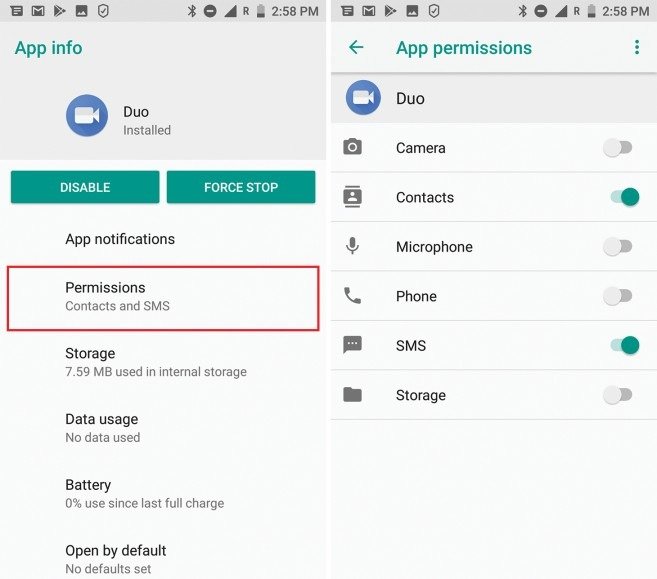
Many apps collect more data than they need. Managing app permissions is important to protect your online privacy.
By controlling what apps can access, you reduce the risk of data misuse.
This is one of the advanced and easy methods to secure your online privacy like a pro. Check which apps can use your location, camera, or microphone. Turn off permissions for apps that don’t need them. Remove apps you no longer use to reduce exposure. Limit background data usage to prevent tracking.
Review App Permissions
- Disable location tracking
- Limit camera access
- Restrict microphone use
- Turn off background data
- Remove unused apps
Why It Matters
- Prevents data misuse
- Protects personal files
- Improves device security
- Reduces tracking
- Enhances privacy control
9. Secure Your Cloud Storage and Backups
Cloud storage is very convenient for storing files and documents. But it must be protected properly to keep your data safe.
Securing cloud accounts is an important part of advanced and easy methods to secure your online privacy like a pro.
Without protection, hackers can access sensitive information stored online.
Always use strong, unique passwords for cloud accounts. Enable two-factor authentication for extra security. Encrypt sensitive files before uploading them to the cloud. Share files carefully and only with trusted people.
Secure Cloud Accounts
- Use strong passwords
- Enable 2FA
- Encrypt sensitive files
- Share files carefully
- Review access logs
Backup Best Practices
- Use automatic backups
- Store offline copies
- Test recovery process
- Avoid public sharing
- Protect backup drives
10. Monitor Your Digital Footprint Regularly

Your digital footprint includes everything you do online. This includes social media, websites you visit, and online accounts.
Monitoring it helps you detect risks early and protect your personal data. Keeping track of your online presence is an advanced and easy method to secure your online privacy like a pro.
Check Online Presence
- Google your name
- Review old posts
- Delete unused accounts
- Remove sensitive content
- Update privacy settings
Use Monitoring Tools
- Identity theft alerts
- Data breach notifications
- Credit monitoring
- Security dashboards
- Dark web scanners
11. Use Encrypted Messaging and Browsers
Encryption protects your messages and calls from being read by others.
Secure browsers block trackers and prevent websites from collecting your data.
These tools greatly improve online privacy protection.
Using them is an advanced and easy way to secure your online privacy like a pro.
Secure Messaging Apps
- End-to-end encryption
- Self-destruct messages
- Secure backups
- Privacy settings
- App lock feature
Private Browsing Tools
- Tracker blockers
- HTTPS enforcement
- Cookie control
- Private search engines
- Incognito mode
12. Educate Yourself About Cybersecurity Trends
Cyber threats change every day. Hackers constantly find new ways to steal data. Staying informed helps you stay ahead and protect yourself. Knowledge is power in securing your online privacy like a pro.
Stay Updated
- Follow cybersecurity blogs
- Watch tech news
- Read security reports
- Join online forums
- Attend webinars
Practice Safe Habits
- Think before clicking
- Verify websites
- Use secure passwords
- Update devices
- Stay alert online
Conclusion
Online privacy is not difficult. You just need smart habits and the right tools. By following these advanced and easy methods to secure your online privacy like a pro, you can protect your data and reduce cyber risks.
Start with small steps. Use strong passwords. Enable 2FA. Stay alert. When you stay informed and careful, your digital life becomes much safer and more secure.
FAQs
1. What is the best way to secure online privacy?
Using strong, unique passwords and enabling 2FA helps protect your accounts. Avoid suspicious links and always use secure, trusted networks.
2.Is a VPN necessary for online privacy?
Yes, a VPN encrypts your internet connection and hides your IP address. It helps keep your data safe, especially on public Wi-Fi.
3. How often should I update my passwords?
Change important passwords every 3–6 months for better security. Regular updates reduce the risk of hacking and data breaches.
4. Can public Wi-Fi steal my data?
Yes, unsecured public Wi-Fi can expose your personal information. Avoid sensitive tasks like banking on public networks.
5. Why is two-factor authentication important?
It adds an extra security layer beyond just your password. Even if your password is stolen, your account stays protected.
Meta Description
Learn advanced & easy methods to secure your online privacy like a pro. Discover powerful tips, strong password strategies, VPN use, and cybersecurity best practices to protect your personal data in 2026.
- 1. Use Strong and Unique Passwords
- 2. Enable Two-Factor Authentication (2FA)
- 3. Keep Your Software and Devices Updated
- 4. Use a Secure and Private Internet Connection
- 5. Protect Your Social Media Privacy Settings
- 6. Be Careful with Emails and Phishing Scams
- 7. Use a Reliable VPN Service
- 8. Control App Permissions on Your Devices
- 9. Secure Your Cloud Storage and Backups
- 10. Monitor Your Digital Footprint Regularly
- 11. Use Encrypted Messaging and Browsers
- 12. Educate Yourself About Cybersecurity Trends
- Conclusion
- Meta Description