
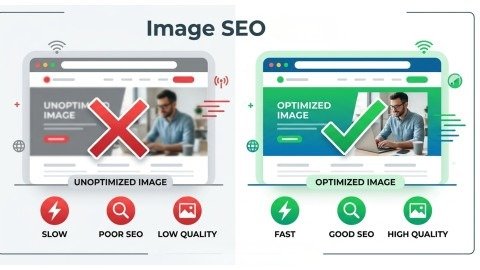
Images play a big role in every website. When a user visits a page, they do not only read text. They also look at images to understand the content better. In fact, images make content more interesting, easier to understand, and more engaging. Because of this, users stay longer on pages that have good visuals.
However, many beginners make a big mistake. They upload images but do not optimize them. As a result, their website becomes slow, and their images do not appear on Google. This means they lose traffic and ranking opportunities. That is why learning Image SEO is very important today. In this guide, you will learn each step clearly and simply. We will use very simple words so it is easy to understand. Also, we will explain each step clearly. By the end, you will know how to use Image SEO to improve your website traffic and ranking.
What is Image SEO?
Image SEO means improving your images so search engines can understand them easily. When you optimize your images, they can appear in Google Image search and normal search results.
For example, when someone searches for a picture, Google shows images first. If your images are optimized, they can show up there. This helps bring more visitors to your website.
In simple words, Image SEO helps your images:
- Rank higher on Google
- Load faster
- Improve user experience
So, it is not just about images. It is also about better SEO performance.
Why Image SEO is Important in 2026
In 2026, SEO is not only about text. Search engines like Google now understand images better than before. Because of this, images play a big role in ranking websites. If your images are not optimized, you may lose a lot of traffic and opportunities.
Today, users like fast and visual content. They do not want to read long text only. They also want to see images that explain things quickly. That is why Image SEO is very important. It helps your website look better, load faster, and rank higher on search engines.
1. More Organic Traffic
First of all, many people search using images. When users want to see something, they go to Google Images. If your images are optimized, they can appear in search results and bring visitors to your website.
Also, optimized images help your page rank better in normal search results. This means you can get traffic from both text and images at the same time.
With good Image SEO, you can:
- Get extra traffic without writing more content
- Show your images in search results
- Improve your overall page ranking
2. Better User Engagement
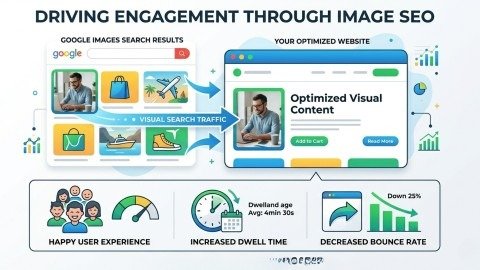
Images make your content more interesting and easier to understand. When users see images, they can quickly understand what the content is about. This keeps them engaged.
If a page has only text, users may leave quickly. But when images are added, users stay longer and explore more.
This leads to:
- Lower bounce rate (users do not leave quickly)
- More time on page
- Better SEO signals for ranking
So, using images properly can improve engagement and help your Image SEO.
3. Faster Website Speed
Website speed is very important for SEO. Large and heavy images can slow down your website. A slow website gives a bad experience, and users may leave before the page loads.
However, when you optimize images, they become smaller in size and load faster. This makes your website smooth and user-friendly.
Optimized images help to:
- Improve page speed
- Give a better user experience
- Increase chances of higher ranking
That is why speed optimization is a key part of Image SEO.
4. Mobile-Friendly Experience
Today, most users visit websites on mobile phones. If your images are not optimized, they may not fit the screen or may load very slowly.
But when you use proper Image SEO, your images adjust to different screen sizes. This helps your website display properly on every device.
As a result:
- Images fit perfectly on mobile screens
- Pages load faster on mobile
- Users have a better experience
This also helps improve your website ranking.
Step-by-Step Image SEO Process
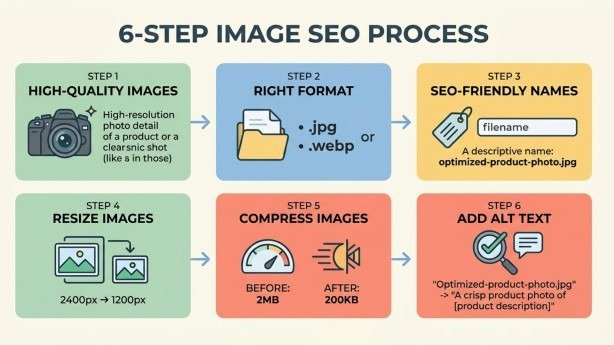
Now, let’s understand how to do Image SEO step by step. These steps are simple and easy to follow. If you apply them correctly, you will see better results.
1. Choose High-Quality and Relevant Images
First, always choose images that match your content. Do not use random or unrelated images. Relevant images help users understand your content better.
Good images make your content look professional. They also build trust and keep users interested.
High-quality images:
- Make content clear
- Improve user trust
- Increase engagement
If possible, use original images. If you use stock images, try to choose unique ones.
2. Select the Right Image Format
Choosing the right format is very important. Different formats are used for different purposes.
Common formats:
- JPEG → best for photos
- PNG → best for graphics and text
- WebP → best for speed and SEO
- SVG → best for logos and icons
WebP is highly recommended in 2026 because it gives good quality with a small file size. This makes it perfect for Image SEO.
3. Use SEO-Friendly File Names
Before uploading an image, always rename the file. A proper file name helps search engines understand the image.
Example:
- ❌ IMG001.jpg
- ✅ image-seo-guide.jpg
Tips for file names:
- Use simple and clear words
- Add keywords naturally
- Avoid random numbers
This small step can make a big difference in your Image SEO.
4. Resize Images Properly
Large images take more time to load. That is why you should resize images before uploading them.
Always choose the right size based on where the image will be used.
Ideal sizes:
- Desktop: 1200px to 1920px
- Mobile: smaller sizes
Remember:
- Very large images → slow loading
- Very small images → poor quality
Keeping the right balance is important for good Image SEO.
5. Compress Images for Faster Loading
After resizing, the next step is compression. Compression reduces the file size without reducing quality too much.
This helps your website load faster and improves user experience.
Benefits of compression:
- Faster loading speed
- Better performance
- Improved SEO ranking
Tools you can use:
- TinyPNG
- Squoosh
- Image Compressor
Fast-loading images always improve your Image SEO.
6. Add Alt Text (Very Important)
Alt text is a short description of your image. It tells search engines what the image is about.
Example:
“A person learning image SEO on a laptop”
Best practices:
- Keep it short and simple
- Describe the image clearly
- Add keyword naturally
Alt text also helps people who cannot see images. So, it improves accessibility as well.
This is one of the most important parts of Image SEO.
Common Mistakes to Avoid
Avoid these mistakes to improve your Image SEO:
- Using large images without resizing
- Not adding alt text
- Using random file names
- Ignoring mobile optimization
- Not compressing images
Fixing these mistakes can quickly improve your results.
Conclusion
Image SEO is a powerful part of modern SEO in 2026. It is not only about making your website look good, but also about improving performance, increasing traffic, and boosting search rankings. When your images are optimized, they help both users and search engines understand your content better.
If you follow the right steps, you can see real results. Start with simple things like choosing the right file name, adding alt text, and compressing images. Then slowly move to advanced techniques like using CDN, structured data, and image sitemaps.
Most importantly, always keep your users in mind. Make your images fast, clear, and useful. Because when users have a good experience, search engines like Google will reward your website with better rankings.
So, take action today and improve your Image SEO step by step to grow your traffic.
FAQs
1. Why is Image SEO important for websites?
Image SEO helps improve search rankings, increases organic traffic, and makes your content more engaging for users.
2. How do optimized images help in SEO?
Optimized images load faster and give better context to search engines, which improves overall page performance.
3. What is the role of alt text in Image SEO?
Alt text describes the image content, helping search engines understand it and improving accessibility for users.
4. Which image format is best for SEO in 2026?
WebP is considered the best format because it provides high quality with a smaller file size for faster loading.
5. Can images improve user experience on a website?
Images make content easier to understand and more attractive, which increases user engagement and time on page.
Meta Description
Learn Image SEO in 2026 with this beginner-friendly guide. Discover how to optimize images, improve website speed, boost rankings, and drive more organic traffic step by step.