
How to write SEO friendly Heading Tag (H1) is one of the most important questions for bloggers and website owners. The H1 tag is the main heading of your page, and it helps both users and search engines understand what your content is about. When someone lands on your page, the H1 is usually the first thing they notice, so it must be clear, simple, and engaging.
From an SEO point of view, the H1 tag sends a strong signal to search engines like Google about your page’s topic. A well-written H1 can improve your ranking, increase your click-through rate, and keep users on your page longer. On the other hand, a weak or confusing H1 can reduce your chances of ranking. In this guide, you will learn how to write a perfect SEO-friendly H1 tag, along with best practices and tips to improve your website performance.
Table of Contents
- What is an H1 Tag
- HTML Heading Structure (H1 to H6)
- Why the H1 Tag is Important in SEO
- H1 Tag vs Title Tag
- How to Write SEO Friendly H1 Tag
- Best Practices for H1 Tag
- Common Mistakes to Avoid
- Pro Tips for High Ranking
- How to Add an H1 Tag
- Final Thoughts
1. What is an H1 Tag
An H1 tag is the main heading of a webpage that defines the core topic of your content. It is written in HTML and usually appears at the top of the page, making it the first thing users see.
Think of the H1 tag as the title of a book. Just like a book title tells you what the book is about, the H1 tag tells both users and search engines what your page is about.
A strong H1 should be clear, relevant, and directly connected to your content. It should not confuse the reader or use unnecessary words. Instead, it should quickly answer the question: “What is this page about?”
Using a proper H1 tag also helps search engines understand your content better, which increases your chances of ranking higher.
2. HTML Heading Structure (H1 to H6)
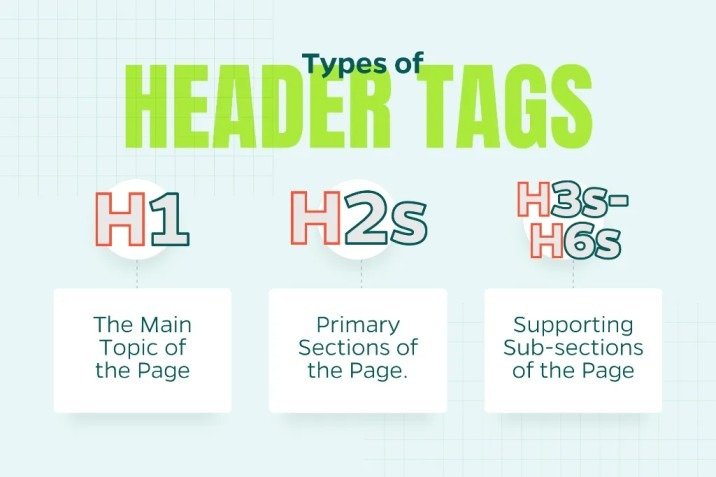
HTML headings are used to organize content in a structured way. There are six levels of headings, starting from H1 to H6. Each level has a different importance.
H1 is the most important heading and represents the main topic. H2 headings are used for main sections, while H3 headings break those sections into smaller parts. The remaining headings (H4 to H6) are used for additional details.
When you use headings correctly, your content becomes easier to read and understand. Visitors can quickly scan your page and find the information they need.
A proper heading structure also improves SEO because search engines prefer well-organized content. It shows that your page is clear, useful, and easy to navigate.
3. Why the H1 Tag is Important in SEO
The H1 tag plays a key role in SEO because it helps search engines understand the main topic of your page. When your H1 is clear and keyword-focused, it sends a strong signal about your content.
Another important benefit is user experience. When users visit your page, they immediately look at the heading to decide if the content is useful for them. A good H1 keeps users engaged and reduces bounce rate.
The H1 tag also supports content structure. It works together with other headings like H2 and H3 to create a clean and organized layout. This makes your content easier to read and follow. In addition, H1 tags improve accessibility. Screen readers use headings to guide users, so a proper H1 helps all types of users understand your content better.
4. H1 Tag vs Title Tag
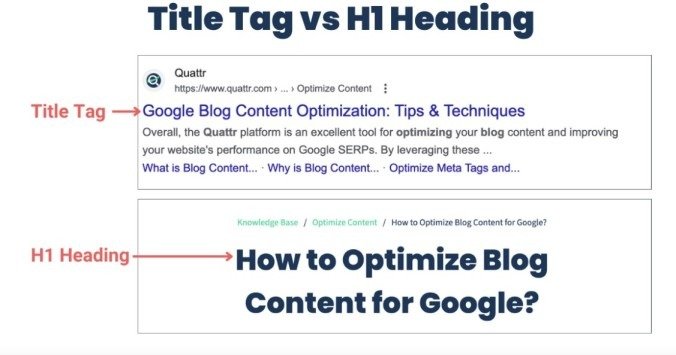
Many beginners think that the H1 tag and title tag are the same, but they are slightly different. The title tag appears in search engine results and browser tabs, while the H1 tag is visible on the webpage itself.
The title tag is mainly used to attract clicks from search results, so it should be catchy and engaging. On the other hand, the H1 tag focuses on clearly explaining the page content to the user.
Even though they have different roles, both should be closely related. If your title tag says one thing and your H1 says something else, it can confuse users and search engines.
For best results, keep them similar but not exactly the same. This creates a balance between SEO performance and user experience.
5. How to Write SEO Friendly H1 Tag
Writing an SEO-friendly H1 tag is simple if you follow a few basic steps. First, always include your main keyword in the heading, preferably at the beginning. This helps search engines quickly understand your topic.
Second, keep your H1 short and clear. Long and complicated headings can confuse readers. Try to keep it within 50 to 60 characters for better readability.
Third, make your H1 attractive. Use simple and powerful words that grab attention. Words like “Easy,” “Best,” or “Complete Guide” can make your heading more engaging.
Finally, make sure your H1 matches the search intent. If users are looking for information, your heading should clearly show that your content will provide answers.
6. Best Practices for H1 Tag
To get the best results from your H1 tag, you should follow some proven practices. Always use only one H1 tag per page. This keeps your content clear and avoids confusion.
Make sure your H1 is unique for every page. Duplicate headings can reduce your SEO performance and make your content look less valuable.
Use your keyword naturally instead of forcing it into the heading. A natural flow is always better for both users and search engines. Also, keep your H1 simple and easy to read. Avoid using complex words or unnecessary phrases. The goal is to communicate your message clearly.
7. Common Mistakes to Avoid
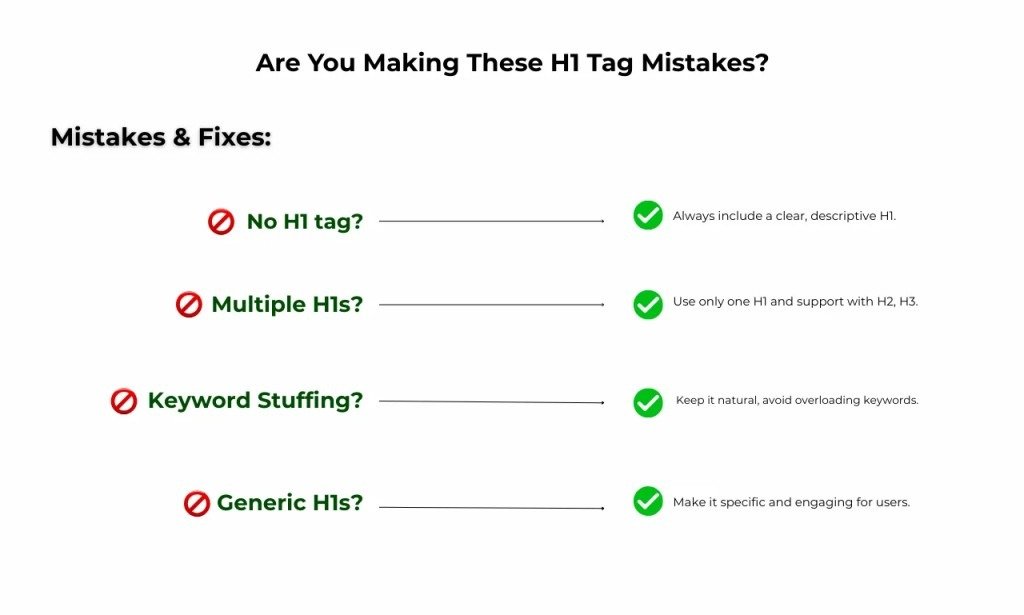
Many people make simple mistakes while writing H1 tags that can harm their SEO. One common mistake is using multiple H1 tags on a single page. This can confuse search engines about the main topic.
Another mistake is keyword stuffing. Adding too many keywords makes your heading look unnatural and spammy.
Some users also write very long or unclear headings. This makes it difficult for readers to understand the content quickly.
Lastly, using a heading that does not match the content can increase bounce rate. Always make sure your H1 accurately represents your page.
8. Pro Tips for High Ranking
If you want to take your H1 tag to the next level, you can use some advanced tips. Adding numbers in your heading can make it more attractive and clickable. For example, “5 Easy Ways to Write H1 Tag” looks more engaging.
Including the current year can also improve relevance, especially for topics that change over time.
You can also use questions in your H1, such as “What is H1 Tag in SEO?” This matches how users search on Google. Using emotional or power words can further improve engagement. Words like “Ultimate,” “Simple,” or “Proven” make your heading more appealing.
9. How to Add H1 Tag
Adding an H1 tag depends on the platform you are using. In WordPress, the page title is usually set as the H1 by default, so you don’t need to do much.
In website builders like Wix, you can simply select the text and choose “Heading 1” from the options.
If you are working with HTML, you can manually add the H1 tag by writing your heading inside the <h1> tag.
No matter which method you use, always make sure your H1 is properly placed and visible at the top of your page.
10. Final Thoughts
The H1 tag may seem like a small part of your content, but it has a big impact on SEO and user experience. It helps search engines understand your page and guides users to the right information.
By writing clear, simple, and keyword-focused H1 tags, you can improve your website ranking and attract more visitors.
Always focus on clarity, relevance, and structure. When your H1 is strong, your entire content becomes more effective.
Start applying these tips today, and you will see a positive change in your SEO performance.
Conclusion
How to Write SEO Friendly Heading Tag (H1) | H1 Tag in SEO is a simple but powerful part of on-page SEO. A clear, keyword-focused H1 helps search engines understand your content and gives users a strong first impression.
If your H1 is short, relevant, and easy to read, it can improve both ranking and user experience. Always follow best practices and avoid common mistakes to get better results.
FAQs
1. How to write SEO friendly Heading Tag (H1)?
Use your main keyword, keep it short, and make it clear and relevant to your content.
2. How many H1 tags should be used on a page?
Only one H1 tag should be used to maintain a clear structure.
3. What is the ideal length of an H1 tag?
The ideal length is around 50–60 characters for better readability.
4. Can H1 and title tag be the same?
Yes, but keeping them slightly different is better for SEO and user experience.
5. Why is H1 important in SEO?
It helps search engines understand your content and improves user engagement.
Meta Description
How to Write SEO Friendly Heading Tag (H1) H1 Tag in SEO with simple tips, best practices, and expert guide. Learn how to create perfect H1 tags to improve ranking and boost website traffic.