
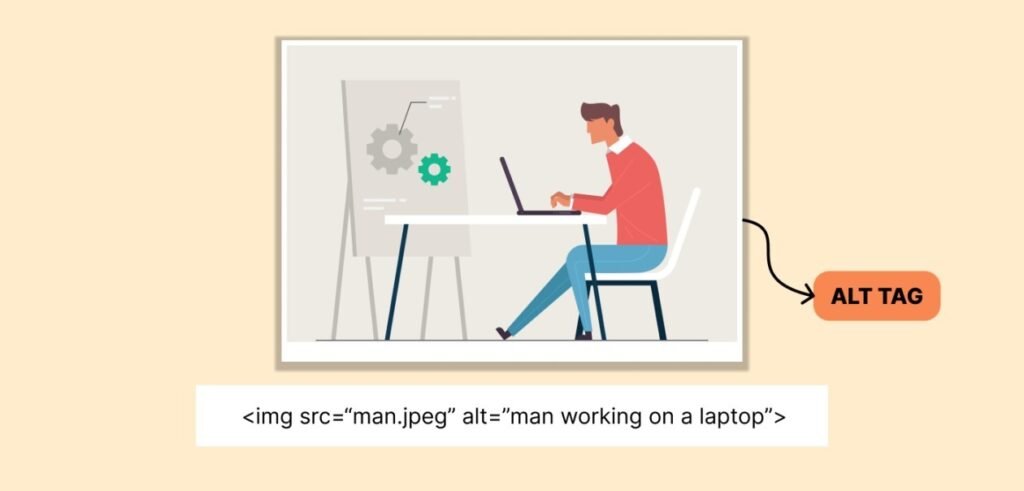
Alt text is a small part of SEO, but it can make a big difference for your website. Many beginners ignore it, but in 2026, it is very important. It helps search engines understand your images and also helps people who cannot see images clearly. When you use alt text the right way, your images can show in Google Image search, and your website ranking can get better. It also helps screen readers explain images, which makes your site easier to use.
The best thing is that alt text is very easy to write. You do not need any special skills or difficult words. Just describe the image in a simple and clear way. In this guide, you will learn how to write alt text, what mistakes to avoid, and how to use it to improve your SEO. By following these simple steps, you can get better results without confusion.
Table of Contents
- What is Alt Text
- Why Alt Text is Important
- How to Write Alt Text (Step-by-Step)
- Best Tips for Writing Alt Text
- Which Images Need Alt Text
- Alt Text Length Guide
- Common Mistakes to Avoid
- Tools for Alt Text
- FAQs
- Conclusion
What is Alt Text
Alt text, also known as alternative text, is a short description that explains what an image is about. It is added to an image’s HTML code and helps search engines understand the image’s content. Since search engines cannot see images like humans, they rely on alt text to know what the image shows. This makes alt text an important part of SEO.
Alt text also appears when an image fails to load due to slow internet or technical issues. In such cases, users can still understand what the image was about. It is also used by screen readers, which read the alt text aloud for visually impaired users. Because of this, alt text is not just an SEO factor but also an important part of making websites accessible and user-friendly.
Why Alt Text is Important
Alt text is important because it helps both search engines and users. Search engines like Google cannot see images, so they read alt text to understand them. When you add good alt text, your images can show in search results, which can bring more visitors to your website. This can also help your page rank better.
Alt text also helps people who cannot see images clearly. Screen readers read the alt text and explain the image, so users can understand the content. It is also useful when images do not load, because users can still read the text. In 2026, user experience is very important, so using proper alt text can improve both SEO and website usability.
How to Write Alt Text (Step-by-Step)
Writing alt text is simple if you follow a clear method. First, you need to look at the image and understand what it is showing. Then, describe the image in a simple and natural way. You do not need to write long sentences or complex descriptions. Just explain the main idea of the image in a few words.
After that, focus only on important details that are relevant to your content. Avoid adding unnecessary information because it can confuse both users and search engines. If your page has a specific topic, your alt text should match that topic. This makes your content more meaningful and improves SEO.
You can also include your keyword in the alt text, but it should feel natural. Do not force keywords into the description. The goal is to keep the text simple, clear, and helpful. When you follow this process, you can easily write effective alt text that works for both SEO and accessibility.
Best Tips for Writing Alt Text
To write better alt text, you need to keep a few simple things in mind. Always start with the most important information so users can quickly understand the image. Use simple and easy words instead of complex language. Your goal is to make the description clear, not difficult.
It is also important to keep your alt text short. Long descriptions can be confusing, especially for users who rely on screen readers. A short phrase or a single sentence is usually enough. At the same time, make sure your description matches the context of your page. If your article is about SEO, your alt text should relate to that topic. Another important tip is to avoid repeating the same words again and again. Keyword stuffing can harm your SEO instead of helping it. Always focus on writing for users first and then think about search engines. When your content is useful and natural, it automatically performs better.
Which Images Need Alt Text
Not all images require alt text, and understanding this is very important. Images that provide useful information should always have alt text. This includes product images, charts, graphs, and any image that adds value to your content. These images help users understand your message, so they need a clear description.
On the other hand, decorative images do not need alt text. These are images that are used only for design purposes and do not provide any important information. In such cases, adding alt text can actually confuse screen reader users. It is better to leave the alt attribute empty for decorative images so they can be skipped.
Knowing which images need alt text helps you avoid unnecessary work and keeps your website clean and user-friendly.
Alt Text Length Guide
When it comes to alt text length, shorter is usually better. You should try to describe the image in a few words or a single short sentence. There is no fixed limit, but keeping it between five to twelve words is a good practice.
The reason for keeping alt text short is that it makes it easier for users to understand quickly. Screen reader users do not want to hear long and complicated descriptions. At the same time, short alt text is also better for SEO because it keeps the content clear and focused.
However, if an image is complex, such as a chart or infographic, you can use a short alt text and provide a detailed explanation elsewhere on the page. This way, you keep your alt text simple while still providing complete information.
Common Mistakes to Avoid
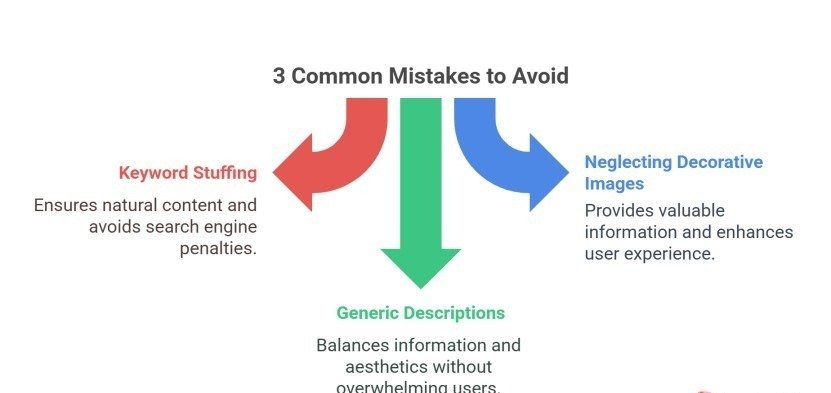
Many people make small mistakes when writing alt text, and this can make it less useful. One common mistake is adding too many keywords in one sentence. This makes the text look unnatural and can hurt your ranking.
Another mistake is writing long descriptions. Long alt text can confuse users and make it hard to understand the main idea of the image. It is always better to keep it short and simple.
Some people also write words like “image of” or “picture of,” but this is not needed because screen readers already know it is an image. Another mistake is not matching the page topic. Your alt text should always relate to your content.
If you avoid these mistakes, you can write better alt text that helps both SEO and users.
Tools for Alt Text
There are many simple tools that can help you write and manage alt text easily. These tools save time and make your work faster. For example, AI tools can suggest alt text for your images, and you can change it to make it better.
If you use WordPress, there are plugins that can check your website and find images without alt text. This helps you fix missing text quickly. Some SEO tools can also show problems with alt text and give simple suggestions.
Even when you use tools, you should always check the alt text yourself. Make sure it is clear and correct. This helps keep your content useful and easy to understand.
Conclusion
Alt text is a small but very useful part of SEO in 2026. It helps search engines know what your images show and also helps people who cannot see images well. Writing short and clear alt text makes your website easier to use and can help it rank higher.
The most important thing is to keep alt text simple and natural. Do not use too many keywords or long sentences. Always make sure it matches the page content. Using these easy steps can make your images and website work better.
FAQs
What is alt text in SEO?
Alt text is a short description of an image that helps search engines understand its content and improve ranking.
How long should alt text be?
Alt text should be short, usually one sentence or a few words.
Can alt text improve ranking?
Yes, it helps images rank in search results and supports overall SEO.
Should I use keywords in alt text?
Yes, but use them naturally and avoid keyword stuffing.
Do all images need alt text?
No, only important images need alt text, not decorative ones.
Meta Description
Learn how to write alt text for images in 2026 with this simple beginner guide. Improve SEO, boost rankings, and create user-friendly image descriptions easily.