
Your staging site accidentally got indexed and now appears in search results with incomplete content, confusing visitors who think your business website looks unprofessional—and you have no idea how to remove a URL from Google Search quickly.
Learning how to remove a URL from Google Search protects your website’s reputation, prevents duplicate content issues, and eliminates security risks from exposed sensitive information. Whether you accidentally indexed development environments, published confidential data, or need to clean up outdated duplicate pages, understanding proper removal methods prevents common mistakes that make problems worse instead of better.
Most website owners panic when discovering unwanted content in Google’s index and immediately block everything with robots.txt—accidentally preventing Google from seeing the noindex tags that actually remove pages. This counterproductive approach leaves pages stuck in the index indefinitely. Others use Google’s Removals Tool thinking it permanently deletes content, only to see pages reappear six months later when temporary suppression expires.
This comprehensive 2026 guide reveals how to remove a URL from Google Search with step-by-step instructions for both temporary and permanent removal methods, clear explanations of when to use each approach, practical guidance for avoiding common removal mistakes, and expert strategies that ensure URLs stay removed rather than returning to the index unexpectedly.
Understanding Temporary vs. Permanent Removal
Before attempting to remove a URL from Google Search, understanding the critical difference between temporary suppression and permanent de-indexing determines whether your removal succeeds long-term or fails after several months.
Temporary Removal (Google Search Console Removals Tool)
The Removals Tool in Google Search Console hides URLs from search results for approximately six months. During this period, Google continues crawling the pages but doesn’t display them to users searching Google. This temporary suppression proves valuable for emergency situations requiring immediate action—data leaks, personally identifiable information exposure, or security vulnerabilities demanding instant concealment while you implement permanent solutions.
Critical limitation:
After six months, if you haven’t applied a permanent removal method, Google automatically lifts the temporary block and pages reappear in search results exactly as before.
Permanent Removal Methods
Permanent removal requires technical changes that tell Google to exclude pages from its index indefinitely. These methods include deleting content and returning 404/410 status codes, adding noindex meta tags or headers, restricting access through authentication, or redirecting to new URLs. Unlike temporary suppression, permanent methods continue working as long as the technical implementation remains active.
Method 1: Temporary Removal Using Google Search Console
When you need to remove a URL from Google Search immediately for security, privacy, or emergency situations, the Removals Tool provides fast temporary suppression.
Step-by-Step Temporary Removal Process
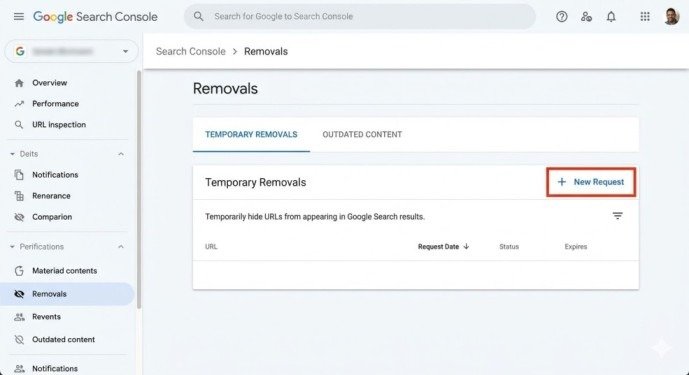
Navigate to Google Search Console and select the property containing the URL you want removed. Click “Removals” in the left sidebar navigation menu. Click the red “NEW REQUEST” button in the Temporary Removals tab.
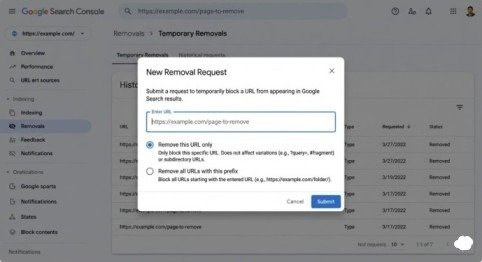
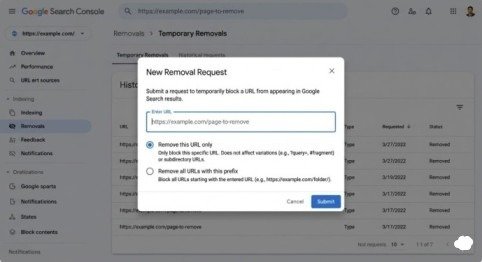
Enter the exact URL you want to hide from search results. Choose between two removal options: “Remove this URL only” hides one specific page, while “Remove all URLs with this prefix” hides entire directories or sections sharing the same URL beginning.
Click “Next” then “Submit” to finalize your removal request. Google typically processes requests within 12-24 hours, though emergency requests sometimes complete within hours.
Important:
The Removals Tool merely hides pages—it doesn’t delete them from Google’s index or prevent future crawling. You must combine temporary removal with permanent methods to prevent pages from reappearing after six months.
Method 2: Permanent Removal by Deleting Content
The most straightforward way to permanently remove a URL from Google Search involves deleting the page entirely and ensuring your server returns appropriate status codes communicating permanent removal to Google’s crawlers.
Implementing 404 or 410 Status Codes
When you delete a page from your server, configure it to return either a 404 (Not Found) or 410 (Gone) HTTP status code. Both codes tell Google the page no longer exists, prompting removal from the search index during the next crawl cycle.
The 410 status code explicitly signals permanent removal, potentially accelerating de-indexing compared to 404. However, Google eventually removes 404 pages through natural index maintenance, making both codes effective for permanent removal—though 410 communicates intent more clearly.
Timeline:
Deleted pages typically disappear from Google’s index within 2-7 days after Google recrawls them and confirms the 404/410 status. Until removal completes, cached versions may temporarily remain accessible through Google’s cache.
Method 3: Permanent Removal Using Noindex Tags
When you need to remove a URL from Google Search but must keep the page accessible to users or specific groups, noindex tags provide the ideal solution. These tags tell search engines to exclude pages from their indexes while allowing normal user access.
Adding Noindex Meta Tags
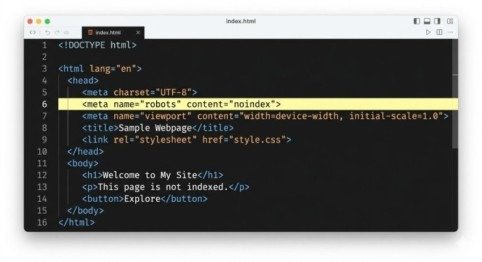
Insert this meta tag in the <head> section of pages you want removed:
<meta name=”robots” content=”noindex”>
This tag instructs all search engines—not just Google—to remove the page from their indexes. Users can still access the page by typing the URL directly or following links, but the page won’t appear in search results.
Using X-Robots-Tag Headers
For non-HTML files like PDFs or when you can’t modify HTML directly, add an X-Robots-Tag header to the HTTP response:
X-Robots-Tag: noindex
This header-based approach works identically to meta tags but applies to any file type and requires server-level configuration rather than HTML editing.
Critical requirement:
Pages must remain crawlable for Google to see noindex tags. Never block noindexed pages with robots.txt—doing so prevents Google from discovering the noindex directive, causing pages to remain indexed indefinitely.
Method 4: Permanent Removal Through Access Restriction
When pages contain sensitive information that neither users nor search engines should access, restricting access provides more secure removal than noindex tags alone.
Password Protection and Authentication
Implement password protection through HTTP authentication, login systems, or IP whitelisting. These methods completely prevent Google from accessing page content, ensuring automatic de-indexing since Google cannot crawl password-protected resources.
This approach works perfectly for internal company portals, member-exclusive content, or staging and development environments that should never appear in search results. Users with proper credentials can still access content while search engines face impenetrable access barriers.
Method 5: URL Consolidation Through Canonicalization
When multiple URL variations display identical or very similar content and you want to consolidate ranking signals to a single preferred version, canonicalization removes duplicate URLs from the index while preserving SEO value.
Implementing Canonical Tags
Add this tag to duplicate pages, pointing to the preferred version:
<link rel=”canonical” href=”https://example.com/preferred-version/”>
This tells Google to index only the canonical URL and consolidate ranking signals from duplicates to the preferred version.
Using 301 Redirects for Permanent Moves
301 redirects automatically send users and search engines from old URLs to new destinations while transferring accumulated SEO value. This removes old URLs from the index as Google recognizes the permanent move and indexes only the redirect destination.
Common Mistakes That Prevent URL Removal
Mistake 1: Blocking Pages in Robots.txt
Many website owners add pages to robots.txt thinking this removes them from Google’s index. It doesn’t. Blocking crawling prevents Google from seeing your noindex tags, canonical directives, or 404 status codes—actually preventing removal rather than enabling it.
If a page is already indexed and you block it in robots.txt, Google knows the URL exists through external links but can’t crawl it to discover removal signals. The page remains indexed indefinitely, showing in search results without a proper title or description.
Mistake 2: Using Noindex AND Canonical Together
These directives send conflicting signals—noindex says “remove this page from the index” while canonical says “index this other page instead of this one.” While Google usually prioritizes canonical in this conflict, the unpredictable outcome risks improper signal consolidation or failed removal.
Choose one directive based on your goal: noindex for complete removal, canonical for consolidation to a preferred URL.
Mistake 3: Expecting Instant Permanent Removal
Permanent removal methods like noindex tags and 404 status codes require Google to recrawl pages before taking effect. This process typically completes within 2-7 days but can extend to several weeks for less frequently crawled pages.
If you need instant removal for emergencies, use the temporary Removals Tool first, then implement permanent methods while the temporary block provides immediate protection.
Mistake 4: Removing Noindex After De-indexing Then Blocking in Robots.txt
Some website owners add noindex tags, wait for Google to remove pages, then delete the noindex tags and block pages in robots.txt thinking this maintains removal. It doesn’t. Once blocked from crawling, Google can’t see that the noindex tag disappeared and may eventually re-index pages based on external link signals alone.
Keep noindex tags in place permanently or use access restriction methods that physically prevent crawling rather than just blocking it.
Removing Content You Don’t Own
DMCA Takedown for Copyright Violations
If another website uses your copyrighted content without permission, file a DMCA takedown request through Google’s Copyright Removal Tool. This legal process requests removal of copyrighted material from search results when the content owner didn’t authorize its use.
EU Right to Be Forgotten
European Union residents can request personal information removal through Google’s EU Privacy Removal form under “right to be forgotten” regulations. This applies to content about you on sites you don’t control when the information is outdated, inaccurate, or no longer relevant.
Monitoring Removal Success
After implementing removal methods, verify success using these techniques:
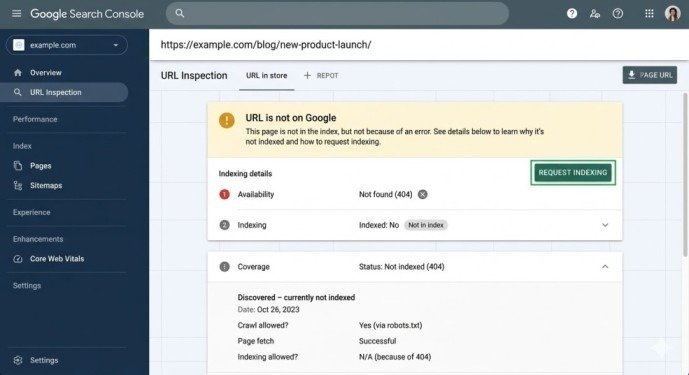
URL Inspection Tool:
Check individual URLs in Google Search Console’s URL Inspection Tool. Successfully removed pages show “URL is not on Google” with appropriate reasons (noindex detected, 404 error, or blocked by robots.txt when intentional).
Site: Operator:
Search Google for site:yourdomain.com/specific-url. If the page appears in results, it remains indexed. No results confirm successful removal.
Regular Audits:
For multiple removals, export the Pages report from Search Console monthly and verify excluded pages remain excluded with correct status reasons.
Best Practices for URL Removal
Combine temporary and permanent methods when emergencies require immediate action. Use the Removals Tool for instant suppression while implementing noindex tags or access restrictions for long-term removal.
Document every removal decision with the reason, method used, and date implemented. This documentation prevents confusion when team members later wonder why pages are blocked or noindexed.
Prioritize removal urgency: security issues and personally identifiable information demand immediate temporary removal plus permanent solutions. Duplicate content and staging environments can use permanent methods without emergency temporary blocking.
Review removal implementations quarterly to ensure methods remain active. Server migrations, theme changes, or CMS updates sometimes accidentally remove noindex tags or reset server configurations, causing previously removed pages to reappear.
Conclusion
Learning how to remove a URL from Google Search requires understanding which method matches your specific situation—temporary suppression for emergencies, permanent removal for unwanted content, or canonicalization for duplicate consolidation. The Removals Tool provides fast temporary hiding, noindex tags enable permanent removal while maintaining user access, deleting content removes pages entirely, and access restrictions secure sensitive information.
The systematic approach combines immediate temporary removal when emergencies demand it, followed by permanent technical implementation ensuring long-term exclusion from search results. Avoiding common mistakes like blocking pages in robots.txt while trying to remove them prevents counterproductive outcomes that make problems worse.
Start this week. Audit your search index using site: operators to identify pages that shouldn’t be indexed—staging environments, development sites, duplicate content, or outdated information. Implement appropriate removal methods for each category, verify success through the URL Inspection Tool, and establish quarterly review processes ensuring removed pages stay removed rather than accidentally reappearing through configuration changes.
Frequently Asked Questions
How long does it take to remove a URL from Google Search?
Temporary removal through the Removals Tool completes within 12-24 hours. Permanent methods like noindex tags or 404 status codes take 2-7 days after Google recrawls affected pages.
Will removing pages hurt my SEO?
Removing low-quality pages, duplicates, and thin content often improves SEO by increasing your site’s average quality score. However, removing high-performing pages obviously decreases traffic. Evaluate each removal decision carefully.
Can I reverse a URL removal?
Yes. For temporary removals, cancel pending requests in the Removals Tool. For permanent methods, remove noindex tags, fix 404 errors, or remove access restrictions, then request indexing through the URL Inspection Tool.
Meta Description
Learn how to remove a URL from Google Search! Complete 2026 step-by-step guide with temporary removals, permanent methods, noindex tags, and common mistakes to avoid.