
You want to build mobile apps with Flutter but you’re stuck on the very first step—you have no idea how to create the first Dart program because every tutorial assumes you already know programming basics.
Learning how to create the first Dart program opens the door to Flutter app development, cross-platform mobile applications, and modern software engineering. Dart, developed by Google, powers Flutter—the framework behind millions of Android and iOS apps. Without understanding fundamental Dart programming, you cannot build Flutter applications effectively or understand how UI widgets connect to business logic.
Most beginners download the Dart SDK, open a text editor, type random code they found online, then face cryptic error messages with no idea what went wrong. They skip crucial setup steps, misunderstand where to place code files, or try running programs without proper compilation. This trial-and-error approach wastes hours when a structured 15-minute tutorial would establish proper foundations.
This comprehensive 2026 guide reveals exactly how to create the first Dart program with step-by-step installation instructions, detailed explanation of every code line in your Hello World program, essential Dart syntax that applies to all programs, and practical examples demonstrating variables, functions, and basic operations that beginners actually use in real applications.
What is Dart and Why Learn It?
Dart is an object-oriented, class-based programming language developed by Google in 2011. It became significantly more popular after Google released Flutter in 2017, establishing Dart as the primary language for Flutter app development.
Why Dart Matters in 2026
Flutter Dominance:
Flutter has become one of the top three mobile app development frameworks globally. Companies like Alibaba, BMW, and Google Ads use Flutter for production applications. Learning Dart positions you to build apps for Android, iOS, web, and desktop from a single codebase.
Modern Language Features:
Dart includes null safety (preventing null reference errors), strong typing with type inference, asynchronous programming support through Futures and async/await, and compilation to native code for exceptional performance.
Beginner-Friendly Syntax:
Dart’s syntax resembles Java, JavaScript, and C#, making it accessible for programmers transitioning from other languages while remaining simple enough for complete beginners.
Step 1: Install Dart SDK
Before you can create the first Dart program, you must install the Dart Software Development Kit (SDK) on your computer. The SDK includes everything needed to write, compile, and run Dart programs.
Windows Installation
Visit dart.dev/get-dart and download the Dart SDK installer for Windows. Run the downloaded installer and follow the installation wizard. The installer automatically adds Dart to your system PATH, enabling command-line access.
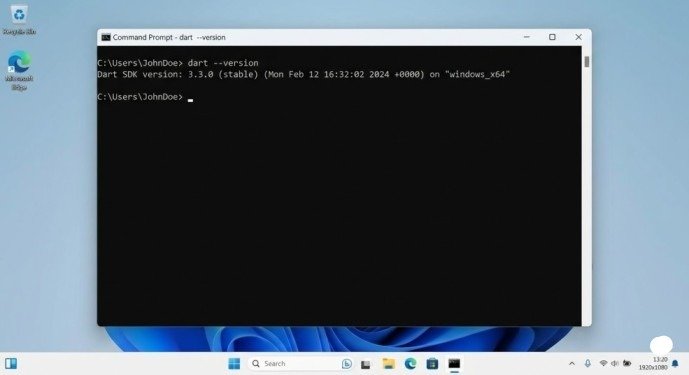
After installation completes, open Command Prompt and verify installation by typing:
dart –version
If you see the Dart version number (e.g., “Dart SDK version: 3.11.0”), installation succeeded.
macOS Installation
macOS users should install Dart using Homebrew for simplest setup. Open Terminal and run:
brew tap dart-lang/dart
brew install dart
Verify installation with dart –version in Terminal.
Linux Installation
Linux users can install via apt package manager. Open Terminal and execute:
sudo apt update
sudo apt install dart
Verify with dart –version command.
Step 2: Choose Your Code Editor
While Dart programs can be written in any text editor, using an Integrated Development Environment (IDE) dramatically improves your coding experience through syntax highlighting, error detection, and code completion.
Recommended Editors for Beginners
Visual Studio Code (VS Code):
The most popular choice among Dart developers. Free, lightweight, and works on all operating systems. Install the official “Dart” extension from the VS Code marketplace for full language support.
Android Studio:
Ideal if you plan to develop Flutter mobile apps eventually. Includes built-in Android emulators and comprehensive debugging tools. Install the Dart plugin from Settings > Plugins.
IntelliJ IDEA:
Professional-grade IDE with excellent Dart support. The Community Edition is free and includes everything beginners need.
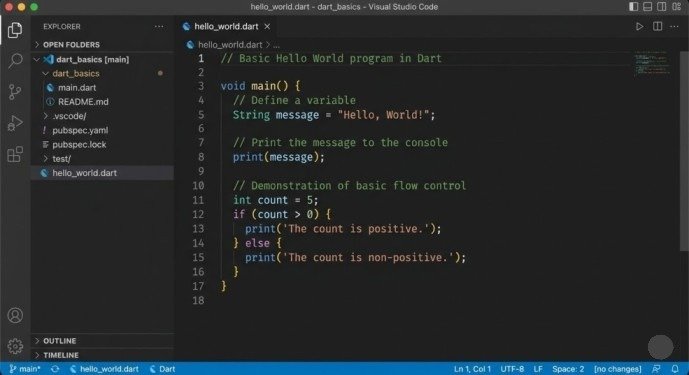
For this tutorial, we’ll use VS Code due to its simplicity and widespread adoption.
Step 3: Create Your First Dart Program
Now comes the exciting part—actually writing and running your first Dart code.
Creating the Project Directory
Open VS Code and create a new folder named dart_basics on your Desktop or Documents folder. Open this folder in VS Code using File > Open Folder.
Inside the dart_basics folder, create a new file named hello_world.dart. The .dart extension identifies this as a Dart source code file.
Writing the Hello World Program
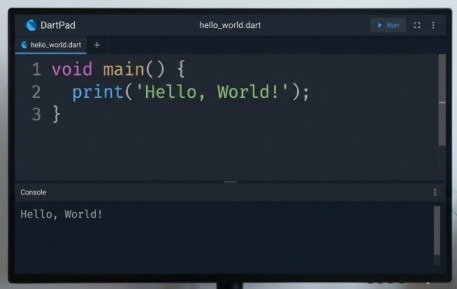
Type the following code exactly as shown into your hello_world.dart file:
void main() {
print(‘Hello, World!’);
}
Let’s understand what each part means:
void main():
Every Dart program requires a main() function. This is the entry point where program execution begins. The void keyword means this function doesn’t return any value.
Curly braces {}:
These define the beginning and end of the function’s code block. Everything between { and } belongs to the main() function.
print(‘Hello, World!’);:
The print() function displays text to the console. The text inside single quotes is called a string. The semicolon ; marks the end of the statement—every Dart statement must end with a semicolon.
Running Your Program
Save your file (Ctrl+S or Cmd+S). Open the integrated terminal in VS Code by pressing Ctrl+` (backtick) or selecting View > Terminal.
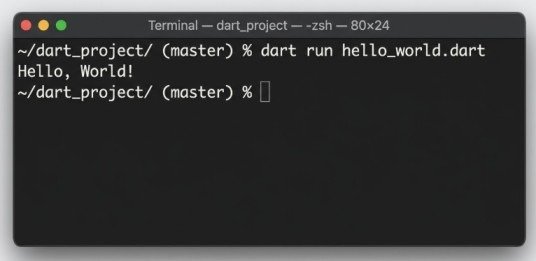
In the terminal, navigate to your project folder if not already there, then run:
dart run hello_world.dart
You should see the output:
Hello, World!
Congratulations! You successfully created and ran your first Dart program.
Understanding Basic Dart Syntax
Now that you know how to create the first Dart program, let’s explore fundamental syntax elements you’ll use constantly.
Variables and Data Types
Variables store data that your program can use and modify. Dart supports several data types:
void main() {
// String – stores text
String name = ‘John Doe’;
// int – stores whole numbers
int age = 25;
// double – stores decimal numbers
double height = 5.9;
// bool – stores true/false
bool isStudent = true;
print(‘Name: $name’);
print(‘Age: $age’);
print(‘Height: $height’);
print(‘Student: $isStudent’);
}
The $variableName syntax inside strings is called string interpolation—it inserts variable values directly into text.
Type Inference with var
Dart can automatically detect variable types using the var keyword:
void main() {
var name = ‘Alice’; // Dart infers this is String
var age = 30; // Dart infers this is int
var price = 19.99; // Dart infers this is double
print(‘$name is $age years old’);
}
Basic Arithmetic Operations
Dart supports standard mathematical operations:
void main() {
int num1 = 10;
int num2 = 3;
int sum = num1 + num2; // Addition: 13
int difference = num1 – num2; // Subtraction: 7
int product = num1 * num2; // Multiplication: 30
double quotient = num1 / num2; // Division: 3.333…
int remainder = num1 % num2; // Modulo: 1
print(‘Sum: $sum’);
print(‘Difference: $difference’);
print(‘Product: $product’);
print(‘Quotient: $quotient’);
print(‘Remainder: $remainder’);
}
Notice that division (/) returns a double even when dividing integers, preserving decimal precision.
Creating Your Second Program: User Input Simulation
Let’s create a slightly more complex program demonstrating multiple concepts:
void main() {
// Simulating a simple calculator
String operation = ‘addition’;
int number1 = 15;
int number2 = 7;
int result = 0;
if (operation == ‘addition’) {
result = number1 + number2;
} else if (operation == ‘subtraction’) {
result = number1 – number2;
} else if (operation == ‘multiplication’) {
result = number1 * number2;
}
print(‘Operation: $operation’);
print(‘$number1 and $number2’);
print(‘Result: $result’);
}
This program introduces conditional logic using if statements—execute different code based on conditions.
Common Beginner Mistakes to Avoid
Forgetting Semicolons
Every Dart statement must end with a semicolon. Forgetting one causes compilation errors:
print(‘Hello’) // ERROR – missing semicolon
print(‘World’); // Correct
Mismatched Quotes
Strings must use matching quotes—either both single quotes or both double quotes:
String wrong = ‘Hello”; // ERROR – mixed quotes
String right1 = ‘Hello’; // Correct
String right2 = “Hello”; // Also correct
Case Sensitivity
Dart is case-sensitive. print() works, but Print() causes an error because it doesn’t exist.
Missing main() Function
Every executable Dart file requires a main() function. Programs without one won’t run.
Next Steps After Your First Program
Once you master how to create the first Dart program, progress to these intermediate topics:
Functions:
Learn to create reusable code blocks that accept parameters and return values.
Lists and Collections:
Store multiple values in organized data structures.
Loops:
Repeat code efficiently using for, while, and for-in loops.
Classes and Objects:
Master object-oriented programming concepts that power complex applications.
Asynchronous Programming:
Handle network requests, file operations, and time-consuming tasks without freezing your application.
Conclusion
Learning how to create the first Dart program establishes your foundation for Flutter app development and modern programming. The process requires installing the Dart SDK, choosing an appropriate code editor like VS Code, writing a simple main() function with a print() statement, and running your code using the dart run command.
The Hello World program introduces essential concepts—the main() function as the execution entry point, the print() function for output, and the semicolon requirement for statement termination. From this foundation, you can explore variables, data types, arithmetic operations, conditional logic, and gradually build more complex programs.
Start this week. Install the Dart SDK on your computer, set up VS Code with the Dart extension, create your Hello World program following this guide, then modify it to print different messages or perform basic calculations. Each small experiment reinforces syntax understanding and builds the muscle memory necessary for fluent Dart programming.
Frequently Asked Questions
Do I need to know other programming languages before learning Dart?
No. Dart is beginner-friendly enough for complete programming novices. However, experience with languages like JavaScript, Java, or C# accelerates learning due to similar syntax.
Can I use Dart for web development?
Yes. Dart compiles to JavaScript, enabling web development. However, Dart’s primary strength lies in Flutter mobile app development.
What’s the difference between var and specific types like int?
var lets Dart infer the type automatically from the assigned value. Explicit types like int or String make code more readable and catch type-related errors during development.
How long does it take to learn Dart basics?
Dedicated beginners can understand fundamental Dart syntax within 1-2 weeks of daily practice. Building practical applications takes 1-3 months depending on prior programming experience.
Meta Description
Learn how to create the first Dart program step-by-step! Complete 2026 beginner’s guide with installation, Hello World example, and essential Dart syntax explained.