
Have you ever noticed that some websites keep you engaged for a long time while others make you leave quickly? The difference is often not just content, but how that content is connected. This is where internal linking in SEO becomes powerful.
In simple words, internal links in SEO is not just about adding links—it is about guiding users and search engines through your website in a smart way. When your pages are connected properly, your site becomes easier to understand and more valuable in the eyes of search engines.
Moreover, a strong internal links in SEO strategy can increase your rankings, improve user experience, and drive more traffic. So, in this guide, you will learn everything in a clear and practical way.
What is Internal Linking in SEO?
Internal linking means connecting one page of your website to another page on the same domain. These links help users move from one topic to another without leaving your site.
For example, if you are reading an article about blogging and you see a link to “SEO tips,” clicking that link takes you to another page within the same website. This is called internal links in SEO.
In addition, search engines like Google use these links to discover new pages. If your content is not connected properly, some pages may remain hidden. Therefore, internal links act like pathways that guide both users and search engines.
Internal Links vs External Links
To understand better, let’s compare both types of links.
Internal Links
- Connect pages within the same website
- Help users explore more content
- Improve site structure
- Support SEO growth
External Links
- Link to another website
- Provide additional information
- Increase credibility
However, internal links in SEO is more important for controlling how your website is structured and how authority flows between pages.
Why Internal Links in SEO is Important
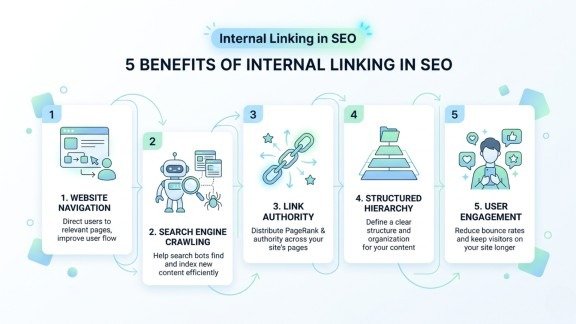
Now let’s go deeper into why internal linking in SEO is so important.
1. Improves Website Navigation
First of all, internal links make your website easy to navigate. When users can easily find related content, they stay longer on your site.
For example, if a visitor reads one blog and finds links to related topics, they are more likely to continue exploring. As a result, user engagement increases.
2. Helps Search Engines Crawl Your Website
Search engines use bots to scan websites. These bots follow links to discover pages. Without proper internal linking in SEO, some pages may not be found.
Therefore, adding internal links ensures that all your important pages are indexed quickly.
3. Passes Link Authority (Link Juice)
Every page has some SEO value. When you link one page to another, you pass some of that value.
For instance, if your homepage is strong and you link it to a new blog post, that post gets a boost. This is a key benefit of internal linking in SEO.
4. Builds Strong Website Structure
Internal links help create a clear structure. This structure tells search engines which pages are important.
For example:
- Homepage → Category → Blog Post
This hierarchy improves understanding and ranking.
5. Increases User Engagement
When users click internal links, they visit more pages. This increases time on site and reduces bounce rate.
As a result, search engines see your site as helpful and rank it higher.
Different Types of Internal Links
Understanding types of links helps you use internal linking in SEO more effectively. Each type plays a different role in improving user experience and helping search engines understand your website structure.
1. Navigation Links
These are found in menus. They help users access main pages quickly.They are usually placed at the top of the website and remain visible on all pages.Because of this, they guide both users and search engines toward your most important content.
2. Contextual Links
These are inside your content. They are the most powerful because they connect related topics naturally.They are added within paragraphs, making them more relevant and useful for readers.
As a result, they improve engagement and pass strong SEO value between pages.
3. Footer Links
These are placed at the bottom. They usually link to important pages like policies or contact pages.They help users find essential information even when they reach the end of a page.
Although they are less powerful than contextual links, they still support overall site structure.
4. Sidebar Links
These show related or popular posts. They help users discover more content easily.They are often displayed beside the main content area for quick access.Because of this, they increase page views and keep visitors engaged on your website.
How to Create Internal Links in SEO (Step-by-Step Guide)
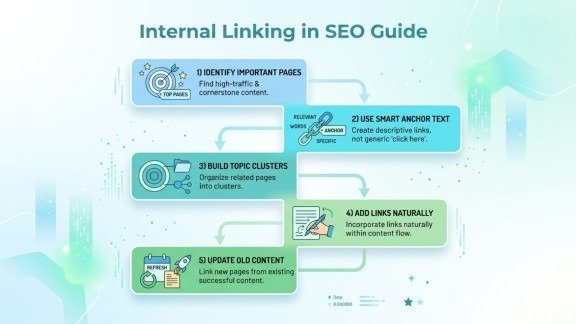
Now, let’s understand how to actually implement internal linking in SEO.
Step 1: Identify Your Important Pages
Start by selecting your main pages. These can be:
- Homepage
- Service pages
- High-ranking blog posts
Then, support them with other related pages.
Step 2: Use Smart Anchor Text
Anchor text is the clickable text of a link.
Instead of writing “click here,” use meaningful text like:
- “SEO tips guide”
- “keyword research methods”
This improves clarity and SEO.
Step 3: Build Topic Clusters
Create a main page (pillar content) and link it with related articles.
For example:
- Main topic: SEO
- Subtopics: keyword research, on-page SEO, internal linking
This strengthens internal linking in SEO.
Step 4: Add Links Naturally
Do not force links. Instead, add them where they make sense in the content.
If links feel natural, users are more likely to click them.
Step 5: Update Old Content
Whenever you publish new content, go back to old posts and add links.
This keeps your website fresh and improves indexing.
Common Mistakes to Avoid
Many beginners make mistakes in internal linking in SEO.
Avoid These:
- Too many links on one page
- Linking unrelated content
- Ignoring important pages
- Using weak anchor text
- Not fixing broken links
Because of these mistakes, your SEO performance may drop.
Advanced Internal Linking Strategies
If you want better results, try advanced methods. These strategies help you strengthen internal linking in SEO and improve your website performance over time.
1. Use Hub Structure
Create one main page and connect multiple related pages to it.This structure is also known as a pillar and cluster model in SEO.It helps search engines understand your topic deeply and boosts your authority.
2. Focus on Important Pages
Give more internal links to pages you want to rank.These pages can be your services, products, or high-converting blog posts.More links signal to search engines that these pages are valuable and important.
3. Use Breadcrumbs
These help users understand where they are on your site.They also improve navigation by allowing users to move back easily.In addition, breadcrumbs help search engines better understand your site structure.
4. Track Performance
Use tools to check which pages get more clicks and improve accordingly.You can analyze user behavior and identify weak pages that need more links.This way, you can continuously improve your internal linking in SEO strategy.
How Internal Linking Improves Website Traffic
Now let’s connect everything.
When you apply internal linking in SEO properly:
- Users explore more pages
- Bounce rate decreases
- Rankings improve
- New content gets indexed faster
As a result, your website traffic grows steadily.
Conclusion
In conclusion, internal links in SEO is a powerful strategy that many people ignore. However, it can make a huge difference in your website performance.
By connecting your pages smartly, you help both users and search engines. Furthermore, a strong internal linking structure improves rankings, engagement, and overall site authority.
So, instead of focusing only on content, also focus on how your content is connected. Because in SEO, smart linking means long-term success.
FAQs
1. What is the best way to start internal linking in SEO?
The best way is to connect your important pages with relevant content using clear anchor text. Start with your main pages and then link supporting articles to build a strong structure.
2. How many internal links should you use on a page?
You should use internal links naturally based on content length and relevance. Too many links can confuse users, while a balanced approach improves navigation and SEO.
3. Why is anchor text important in internal linking?
Anchor text helps search engines understand the topic of the linked page. Using descriptive and relevant keywords improves both rankings and user experience.
4. How does internal linking improve website traffic?
Internal links guide users to explore more pages on your site. This increases engagement, reduces bounce rate, and helps search engines rank your content higher.
5. What are common mistakes in internal linking in SEO?
Common mistakes include linking irrelevant pages, overusing links, ignoring important pages, and not updating old content with new links.
Meta Description
Learn how to use internal links in SEO to improve website traffic, boost rankings, and enhance user experience with simple and effective strategies.