
Imagine starting your day by opening your laptop and working with clients from different countries without leaving your home. This is the reality for many freelancers today. Online freelancing has created new opportunities for people who want to work independently and earn income from anywhere in the world.
However, before you begin working with international clients, the first step is creating a strong Upwork profile that gets approved. Many beginners sign up on Upwork but feel confused when their profiles do not pass the approval process. This usually happens because the profile is incomplete, unclear, or not optimized properly.
Therefore, understanding how to create a professional Upwork profile is extremely important in 2026. In this guide, you will learn the exact steps to build a profile that stands out, increases your approval chances, and helps you start your freelancing journey with confidence.
Understanding the Upwork Marketplace
Before building your Upwork profile, it is important to understand how the platform works.
Upwork is one of the largest freelancing marketplaces in the world. It connects businesses with talented freelancers who can provide digital services such as writing, graphic design, programming, marketing, and many others.
Every day, companies post thousands of new projects. Freelancers can search for these jobs and send proposals explaining how they can help the client complete the project successfully.
However, Upwork maintains high standards to protect both freelancers and clients. Because of this, every Upwork profile must go through a review process before it becomes active. Profiles that look incomplete or unprofessional may not be approved.
Why a Professional Upwork Profile Is Important
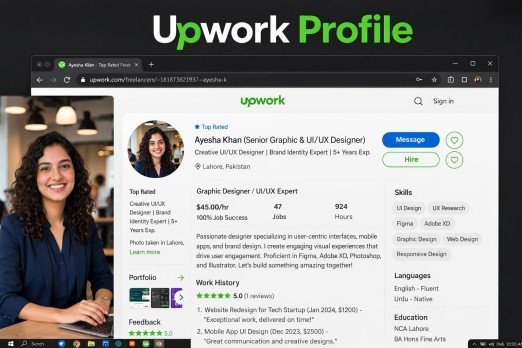
Your Upwork profile acts as your digital introduction to potential clients.
When clients search for freelancers, they usually review several profiles before making a hiring decision. A well-written profile helps them quickly understand your skills, experience, and the services you provide.
In addition, a professional Upwork profile increases your visibility in search results. This means clients can discover your profile even when you are not actively applying for jobs.
On the other hand, a weak profile may reduce your chances of approval and make it harder to get hired. That is why spending time to create a detailed and professional profile is essential.
Requirements Before Creating an Upwork Profile
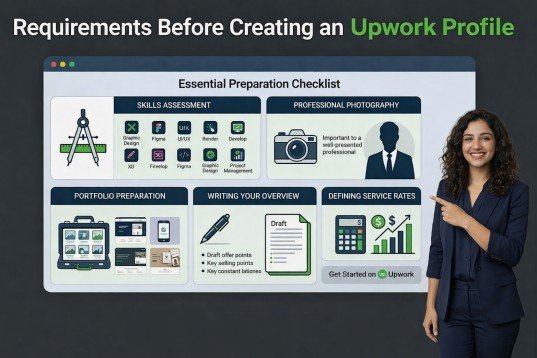
Before starting the registration process, it is helpful to prepare a few important details. Preparing your information in advance saves time, ensures accuracy, and increases the chances of your profile being approved quickly. Let’s break down the key requirements.
Personal Information
You will need to provide accurate personal information, including:
Your full legal name
Enter your name exactly as it appears on your government-issued ID. This ensures smooth identity verification and prevents any delays during the approval process. A mismatch can lead to automatic rejection of your profile.
Country and location
Specify your current country and city of residence. This information helps Upwork match you with clients in your region and ensures that payment and tax information are accurate.
Email address
Use a professional and accessible email address. Avoid using temporary or overly casual emails. Upwork will use this email for communication and account notifications, so it must be reliable.
Phone number
Add a valid phone number where you can be reached for verification or security alerts. This step helps maintain account security and ensures Upwork can contact you if needed.
Make sure all this information matches your official identification documents to avoid verification issues.
Identity Verification
Upwork may ask you to verify your identity during the approval process. This step confirms that you are a real freelancer and ensures trust between clients and the platform.
Uploading a government ID
You will need to upload a valid passport, driver’s license, or national ID. Ensure that the image is clear, all details are legible, and matches the personal information you entered.
Taking a selfie for verification
Upwork may require a selfie to confirm that you are the same person as shown on your ID. This helps prevent fraud and ensures profile authenticity.
Completing a short video verification call
- Some applicants may be asked to do a quick video call with an Upwork agent. This verifies identity in real-time and helps complete the account approval process efficiently.
These steps help ensure that freelancers on the platform are real and trustworthy, which is crucial for client confidence.
Professional Information
You should also prepare professional information before creating your profile. Well-prepared professional details make your profile look complete, credible, and attractive to clients.
Your key skills
Identify and list the skills most relevant to your services. Highlighting specialized skills increases your visibility and makes your profile more appealing to clients seeking experts in your niche.
Work experience
Gather details of your past jobs, freelance projects, internships, or volunteer work. Include job titles, companies, durations, and key responsibilities to show your professional competence.
Certifications
Collect certificates, diplomas, or any professional qualifications. Displaying verified credentials increases client trust and improves your chances of profile approval.
Educational background
List your degrees, courses, and educational achievements. Even if your education is not directly related to your freelance field, it shows commitment and competence.
Portfolio samples
Prepare 3–5 portfolio pieces that showcase your best work. Include project descriptions, outcomes, and visuals where possible. A strong portfolio significantly increases your approval chances and client interest.
Preparing these details in advance will make it easier to complete your Upwork profile quickly and professionally, ensuring a smoother application process.
Step-by-Step Guide to Creating an Upwork Profile
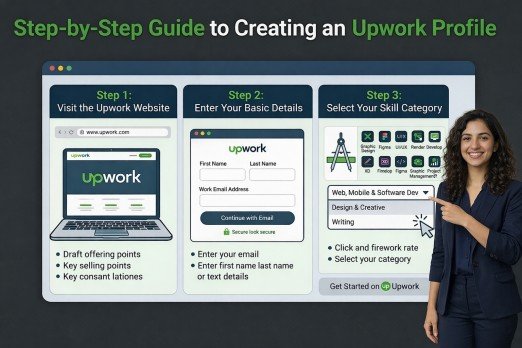
Step 1: Visit the Upwork Website
First, go to the official Upwork website and click the Sign Up button.
Next, select the Freelancer option. This allows you to create a profile and start offering services to potential clients.
You can register using your email address, Google account, or Apple account.
Step 2: Enter Your Basic Details
After registering, you will need to provide basic information such as your name, email address, and location.
It is important that the name you enter matches your government ID. This will make the identity verification process easier later.
Step 3: Select Your Skill Category
Upwork will ask you to choose your primary skill category.
Examples include:
- Content Writing
- Graphic Design
- Web Development
- Digital Marketing
Choosing the correct category helps clients find your profile when searching for freelancers with specific skills.
Writing a Strong Profile Title
Your profile title should clearly describe the service you offer.
Example:
Weak Title Freelancer
Strong Title SEO Content Writer for Blogs and Websites
A clear title helps clients immediately understand what you specialize in.
Writing a Professional Profile Overview
The overview section is one of the most important parts of your profile.
It should include:
- A short introduction
- Your key skills and experience
- The services you offer
- A friendly invitation for clients to contact you
For example:
“I help businesses improve their online presence through well-researched and engaging SEO content. My focus is on creating clear, informative articles that attract readers and improve search engine visibility.”
Adding Relevant Skills
Upwork allows freelancers to add several skills to their profile.
However, it is better to focus on skills that are directly related to your services.
For example, a writer might include:
- SEO Writing
- Blog Writing
- Content Marketing
- Keyword Research
Relevant skills help clients discover your profile more easily.
Uploading a Professional Profile Photo
Your profile photo creates the first impression.
A good photo should:
- Have clear lighting
- Show your face clearly
- Use a simple background
Avoid using filters, group photos, or casual selfies.
Adding Portfolio Samples
Portfolio samples demonstrate your abilities.
You can include:
- Previous client work
- Personal projects
- Practice assignments
Each portfolio item should include a short explanation describing the project and its results.
Common Mistakes That Lead to Rejection
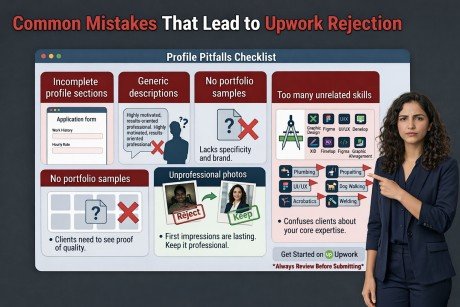
Many profiles get rejected because of simple mistakes.
Some common problems include:
- Incomplete profile sections
- Generic descriptions
- No portfolio samples
- Unprofessional photos
- Too many unrelated skills
Avoiding these mistakes will significantly improve your approval chances.
Tips to Improve Your Approval Chances
Here are a few helpful tips:
Choose a specific niche instead of offering many unrelated services.
Write a clear and client-focused profile overview.
Upload at least three portfolio samples.
Use a professional profile photo.
Proofread your profile to remove spelling or grammar mistakes.
What to Do After Your Profile Is Approved
Once your profile is approved, your freelancing journey officially begins.
Start by searching for jobs that match your skills. Then write personalized proposals explaining how you can help the client complete the project.
Deliver high-quality work and communicate professionally. Positive reviews will strengthen your reputation and help you attract more opportunities.
Conclusion
Creating a successful freelancing career begins with a strong Upwork profile. By following the steps explained in this guide, you can build a professional profile that increases your chances of approval and attracts potential clients.
Remember that your profile represents your skills and professionalism. Therefore, take the time to write a clear overview, select relevant skills, and showcase your best work through portfolio samples.
With dedication and consistent effort, your Upwork profile can become the foundation of a successful online career.
Frequently Asked Questions
1. Is it difficult to get an Upwork profile approved?
Not necessarily. If your Upwork Profile is complete, professional, and focused on a specific skill, your chances of approval are much higher.
2. How long does Upwork profile approval take?
Usually, Upwork reviews a profile within 24 to 72 hours. However, sometimes it may take longer depending on the verification process.
3. Can beginners create an Upwork profile?
Yes. Beginners can create an Upwork Profile even without professional experience. You can add personal projects or practice work to your portfolio.
4. What skills are best for Upwork in 2026?
Popular skills include:
- Content Writing
- Graphic Design
- Web Development
- Digital Marketing
- Video Editing
Choosing in-demand skills can help your Upwork Profile get more opportunities.
5. Can I edit my Upwork profile after approval?
Yes. You can update your Upwork Profile anytime to add new skills, portfolio items, or experience.
Meta Description
Learn how to create a professional Upwork Profile that gets approved in 2026. This step-by-step guide explains profile setup, optimization tips, approval strategies, and how beginners can start freelancing successfully.
- Understanding the Upwork Marketplace
- Why a Professional Upwork Profile Is Important
- Requirements Before Creating an Upwork Profile
- Step-by-Step Guide to Creating an Upwork Profile
- Writing a Strong Profile Title
- Writing a Professional Profile Overview
- Adding Relevant Skills
- Uploading a Professional Profile Photo
- Adding Portfolio Samples
- Common Mistakes That Lead to Rejection
- Tips to Improve Your Approval Chances
- What to Do After Your Profile Is Approved
- Conclusion
- Frequently Asked Questions
- Meta Description