
You add your website to Google Search Console but miss 40% of your search traffic because you chose the wrong property type.
Understanding domain vs URL prefix properties determines whether you see complete search data or fragmented reports with critical blind spots. This choice affects everything from keyword tracking to technical issue detection. The domain property vs URL prefix decision shapes your entire Search Console setup.
Most website owners default to URL prefix properties because they’re easier to verify. However, this convenience often creates data gaps that distort your SEO decision-making. If your site runs on multiple subdomains or you’ve migrated from HTTP to HTTPS, choosing between domain vs URL prefix becomes even more consequential.
This complete 2026 guide reveals which property type suits your website, how each one works, and how to avoid the configuration mistakes that cause incomplete data reporting.
Understanding Domain Properties: Complete Coverage Explained
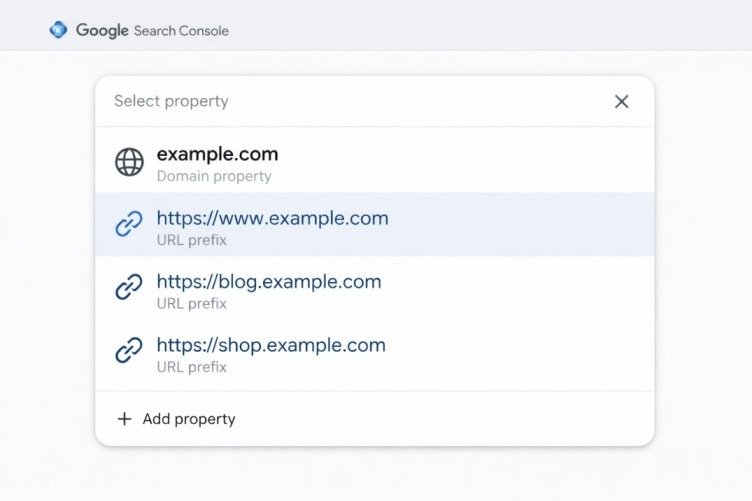
A domain property aggregates search performance data from every variation of your website under a single root domain. When you create a domain property, Google Search Console captures data across all subdomains, all protocols (HTTP and HTTPS), and all URL paths associated with your domain.
For example, if your root domain is example.com, a domain property consolidates data from:
- www.example.com
- blog.example.com
- shop.example.com
- http://example.com
- https://example.com
- https://www.example.com
This makes domain properties the most comprehensive option in Google Search Console. You get a complete view of your entire web presence in one dashboard, eliminating the need to switch between multiple properties to understand total performance.
How Domain Property Verification Works
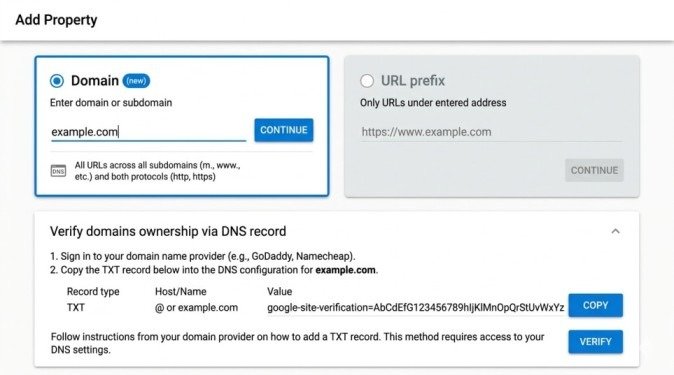
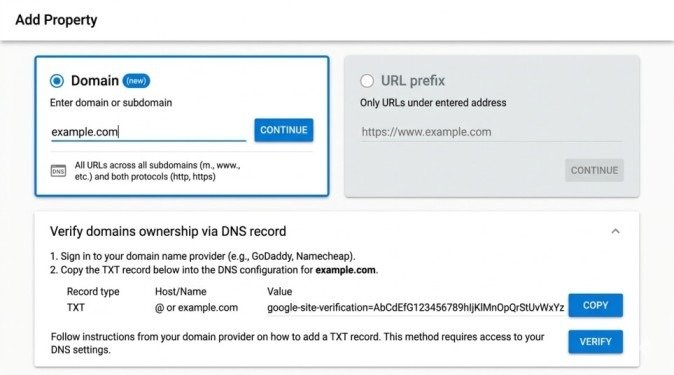
Domain properties require DNS verification exclusively. You must add a specific TXT record to your domain’s DNS settings through your domain registrar or hosting provider.
Verification Steps:
- Access your domain registrar’s DNS management panel
- Create a new TXT record
- Copy the verification code from Google Search Console
- Paste the code into the TXT record value field
- Save the DNS record changes
- Go back to Google Search Console and complete the verification process
DNS propagation typically takes 5-15 minutes, though it can occasionally take up to 48 hours. Once verified, the domain property tracks all subdomains and protocol variations automatically.
What Data Does a Domain Property Include?
Domain properties pull together impressions, clicks, average position, and click-through rates from all versions of your domain. If you operate both HTTP and HTTPS versions simultaneously or recently migrated between subdomain configurations, the domain property ensures no historical data gets lost or siloed.
Google treats all these variations as part of the same unified property, providing accurate total performance metrics.
Understanding URL Prefix Properties: How They Work
A URL prefix property tracks data only for the exact URL prefix you specify. It includes all pages and paths that begin with that precise URL string but does not automatically extend to subdomains or alternative protocols.
For instance, if you add https://www.example.com as a URL prefix property, Google Search Console only tracks pages beginning with exactly that string. It will not capture data from:
- http://www.example.com (different protocol)
- https://example.com (missing www subdomain)
- https://blog.example.com (different subdomain)
Each variation requires a separate URL prefix property if you want complete coverage.
URL Prefix Property Verification Methods
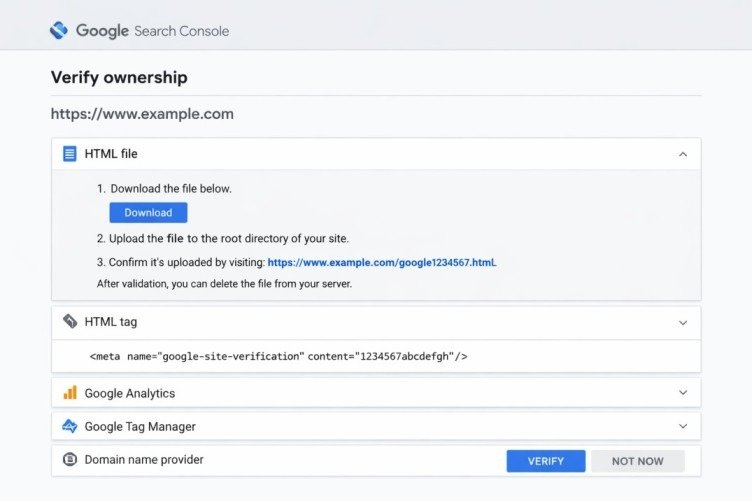
URL prefix properties offer multiple verification options, making them more accessible for users without DNS access:
Available Verification Methods:
- HTML File Upload: Upload a Google-provided HTML file to your website’s root directory
- HTML Meta Tag: Add a verification meta tag to your homepage’s <head> section
- Google Analytics: Use existing Google Analytics tracking code for verification
- Google Tag Manager: Verify through your GTM container snippet
- DNS Record: Add a TXT or CNAME record via your domain registrar
This flexibility makes URL prefix properties easier to set up for developers working within CMS environments or marketing teams without server-level access.
When URL Prefix Properties Make Sense
URL prefix properties work well when you need to track a specific subdirectory or section independently. For example, if you manage a company blog at https://www.example.com/blog and want isolated performance data, a URL prefix property provides focused visibility into that segment without mixing data from unrelated sections.
They also make sense when you lack DNS access or need quick verification using methods like HTML tags or Google Analytics.
Domain vs URL Prefix: Key Differences Explained
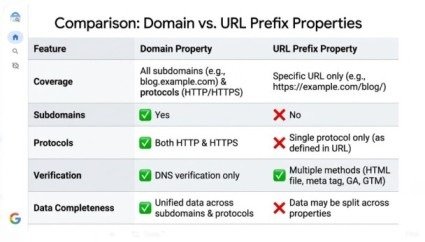
Understanding domain vs URL prefix properties comes down to four core dimensions: data scope, verification complexity, subdomain handling, and use case alignment. This Google Search Console domain vs URL prefix comparison reveals which property type suits your needs.
1. Data Coverage Scope
Domain Property:
Captures the widest possible dataset. Every URL under your root domain—regardless of subdomain, protocol, or path—appears in reporting. This eliminates gaps caused by fragmented property configurations.
URL Prefix Property:
Scoped to a precise URL string. Any URL not beginning with that exact string gets excluded. If your site has multiple subdomains or operates on both HTTP and HTTPS, you need separate URL prefix properties for each variation to achieve the same coverage a single domain property provides.
2. Verification Requirements
Domain Property:
Requires DNS-level verification exclusively. You must access your DNS management panel and add a TXT record. While straightforward for most hosting environments, this can create barriers if DNS is managed by a third party or you lack necessary permissions.
URL Prefix Property:
Offers five different verification pathways. This flexibility is why many users default to URL prefix properties initially. However, the convenience trades off against data completeness.
3. Subdomain Handling
This represents one of the most critical distinctions in the domain vs URL prefix comparison.
Domain Property:
Automatically includes all subdomains—www, blog, shop, support, and any others. You get unified performance across your entire domain structure.
URL Prefix Property:
Completely blind to subdomains unless you add each one as a separate property. For businesses running eCommerce stores on subdomains, regional sites on country-code subdomains, or support portals on dedicated subdomains, URL prefix properties create data silos.
4. Protocol and Migration Tracking
Domain Property:
Tracks both HTTP and HTTPS simultaneously. During migrations from HTTP to HTTPS or from non-www to www configurations, domain properties provide historical continuity without requiring multiple property management.
URL Prefix Property:
Shows data only for the specific protocol version you added. If your site has both http://example.com and https://www.example.com active simultaneously (even during migration), you could miss significant impressions or clicks without realizing it.
Domain vs URL Prefix: Which One Should You Use?
The answer depends on your specific goals, site architecture, and DNS access level. Here’s a practical framework:
Choose a Domain Property If:
- You want the most complete and accurate picture of search performance
- Your site operates on multiple subdomains or has historically used both HTTP and HTTPS
- You recently completed or are planning a site migration
- You have full access to your domain’s DNS settings
- You manage a large site where data completeness is critical for decision-making
- You need to track blog.example.com, shop.example.com, and www.example.com together
Choose a URL Prefix Property If:
- You need to isolate data for a specific section or subdirectory
- You don’t have access to your domain’s DNS panel
- You’re setting up Google Search Console for a single, consistent HTTPS version with no subdomains
- You need to verify quickly using HTML meta tags or Google Analytics
- You’re managing a specific subdomain independently from the main site
- You want granular tracking of https://www.example.com/blog separate from the main site
Can You Use Both Simultaneously?
Yes. Google Search Console allows multiple properties for the same website. Many SEO professionals add a domain property for holistic reporting while maintaining URL prefix properties for specific segments requiring independent monitoring.
This layered approach provides both the big-picture view and granular, section-level insights needed for informed optimization decisions.
Common Mistakes to Avoid When Choosing Between Domain vs URL Prefix
Understanding the domain vs URL prefix distinction helps you avoid several configuration errors that distort data and lead to misguided SEO decisions. This GSC domain vs URL prefix guide reveals the most common setup mistakes.
Mistake 1: Using Only URL Prefix for Multi-Subdomain Sites
If you add only https://www.example.com as a URL prefix property but your blog lives at blog.example.com, all blog search performance data becomes invisible in that property. Many site owners discover this gap only after noticing Google Search Console data doesn’t align with Google Analytics organic traffic figures.
Mistake 2: Not Verifying All URL Variations
If you use URL prefix properties exclusively but fail to add both www and non-www versions, plus both HTTP and HTTPS versions, you create blind spots. Google Search Console treats each as a distinct property—data from one doesn’t automatically appear in others.
Mistake 3: Overlooking Domain Properties During Migrations
During site migrations—whether HTTP to HTTPS or one domain structure to another—tracking performance across all URL variations becomes essential. Without a domain property, you struggle to accurately attribute ranking changes to migration decisions versus external factors like algorithm updates.
Mistake 4: Assuming URL Prefix is “Good Enough”
Many websites lose 20-40% of their search data visibility by defaulting to URL prefix properties without understanding the trade-offs. If your site has any complexity beyond a single HTTPS www version, URL prefix properties create incomplete reporting.
Mistake 5: Not Setting Up Both Property Types
The domain vs URL prefix decision isn’t always either/or. Setting up both gives you comprehensive domain-level data plus the ability to drill down into specific sections when needed.
Step-by-Step: Setting Up Both Property Types
For maximum visibility and flexibility, set up both property types:
Domain Property Setup:
- Go to Google Search Console
- Click “Add Property”
- Select “Domain” property type
- Enter your domain (example.com)
- Copy the TXT record verification code
- Add the TXT record to your DNS settings
- Wait 5-15 minutes for propagation
- Click “Verify” in Google Search Console
URL Prefix Property Setup:
- Click “Add Property” again
- Select “URL prefix” property type
- Enter your exact URL (https://www.example.com)
- Choose verification method (HTML tag recommended)
- Add verification code to your site
- Click “Verify”
Both properties now track your site, giving you comprehensive and focused data simultaneously.
Conclusion
Understanding domain vs URL prefix properties determines whether you see complete search performance data or fragmented reports with critical blind spots. The domain property offers unmatched comprehensiveness, consolidating data from every subdomain and protocol variation into a single, unified view. The URL prefix property offers verification flexibility and precise, scoped reporting for specific site sections.
For most website owners and SEO professionals seeking accurate, complete, and actionable data, the domain property is the recommended choice when DNS access is available. It eliminates data gaps, simplifies reporting, and provides the full reality of your site’s presence in Google Search.
However, the domain vs URL prefix decision doesn’t have to be binary. Setting up both property types gives you comprehensive domain-level insights while maintaining the ability to drill down into specific sections requiring independent analysis.
Start this week. If you currently use only URL prefix properties, add a domain property to see the complete picture. If you use only a domain property, consider adding URL prefix properties for key sections like your blog or eCommerce store. Compare the data between both property types to identify any blind spots in your current configuration.
Choosing correctly between domain vs URL prefix properties ensures the data driving your SEO decisions reflects your entire search presence, not just fragments of it. Your competitors relying on incomplete data are making decisions based on partial information. Don’t join them.
Frequently Asked Questions
Does a domain property include all subdomains?
Yes. A domain property automatically includes all subdomains (www, blog, shop) and all protocols (HTTP and HTTPS) under your root domain. This is one of its primary advantages over URL prefix properties.
How do I verify a domain property in Google Search Console?
Domain properties require DNS verification exclusively. Log into your domain registrar or DNS management panel and add the TXT record provided by Google Search Console. Once Google detects the record, the domain property is verified.
Can I have both a domain property and URL prefix property for the same site?
Yes. Google Search Console allows multiple properties for the same website simultaneously. Many SEO professionals maintain both for comprehensive monitoring plus focused analysis of specific sections.
Which property type is better for tracking HTTPS migration?
A domain property is better for HTTPS migrations because it automatically tracks both HTTP and HTTPS versions, providing complete before-and-after data without managing multiple properties.
Meta Description
Confused about domain vs URL prefix in Google Search Console? Complete 2026 guide reveals which property type is better for SEO, verification methods, and setup tips.
- Understanding Domain Properties: Complete Coverage Explained
- What Data Does a Domain Property Include?
- Understanding URL Prefix Properties: How They Work
- URL Prefix Property Verification Methods
- When URL Prefix Properties Make Sense
- Domain vs URL Prefix: Key Differences Explained
- Domain vs URL Prefix: Which One Should You Use?
- Common Mistakes to Avoid When Choosing Between Domain vs URL Prefix
- Step-by-Step: Setting Up Both Property Types
- Conclusion
- Frequently Asked Questions
- Meta Description