

Sarah spent three months applying to 47 freelance jobs on Guru.com. Zero responses. Not a single interview. Frustrated, she almost quit freelancing entirely. Then a mentor reviewed her profile and revealed the problem: her profile looked exactly like thousands of other beginners—generic, incomplete, and forgettable.
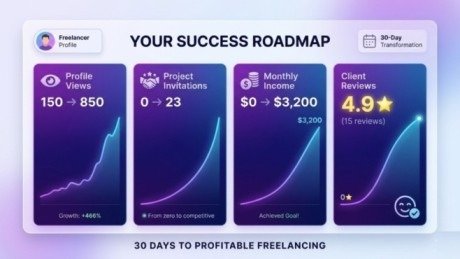
After one weekend rebuilding her profile using proven strategies, everything changed. Within two weeks, clients started inviting her to projects. Within a month, she landed her first $1,200 contract. Three months later, she earned a consistent $3,000+ monthly income—all because she finally understood how to create a Guru.com profile for freelancing success.
This exact scenario plays out constantly. Talented freelancers struggle not because they lack skills but because their profiles fail to communicate value effectively. Meanwhile, others with similar abilities win project after project simply by optimizing how they present themselves.
The difference between profiles that attract clients and those that get ignored comes down to specific, implementable strategies. This guide reveals exactly how to create a Guru.com profile for freelancing success using techniques that consistently work in 2026.
Whether you are brand new to Guru.com or rebuilding an existing profile that is not generating results, these proven steps will transform your freelancing outcomes. By learning how to create a Guru.com profile for freelancing success, you position yourself ahead of 90% of competitors who never optimize their profiles. Let’s begin.
Understanding What Makes a Guru.com Profile for Freelancing Success
Before diving into creation steps, understanding what clients actually look for saves hours of wasted effort.
Guru.com hosts over 2 million freelancers competing for projects. The platform processes thousands of job postings weekly across categories like writing, design, development, marketing, and virtual assistance. Clients reviewing applicants face overwhelming choices—dozens or even hundreds of profiles for popular projects.
Your profile must accomplish three goals simultaneously:
Establish Immediate Credibility:
Within 5-10 seconds, clients decide whether you seem professional and capable. Visual presentation, completeness, and professionalism determine this snap judgment.
Communicate Specific Value:
Generic profiles saying “I can do anything” lose to specialists who clearly solve specific problems. Clients need to understand exactly how you help them instantly.
Provide Social Proof:
Reviews, completed projects, skill tests, and portfolio samples transform claims into evidence. Clients trust demonstrated results over promises.
Profiles achieving these three goals consistently win projects regardless of experience level or competition.
Step 1: Complete Your Basic Profile Information
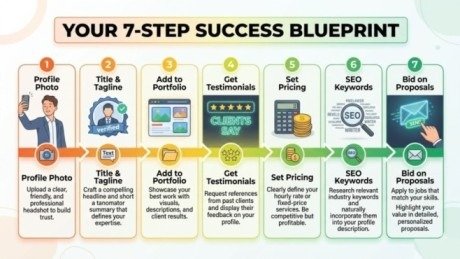
Start with foundational elements that establish professionalism immediately.
Professional Profile Photo
Upload a clear, professional headshot showing your face directly. Avoid:
- Group photos or cut-out images
- Sunglasses or hats hiding your face
- Casual selfies or party photos
- Low-resolution or blurry images
Profiles with professional photos receive 40% more views than those without photos. Clients subconsciously associate quality photos with quality work.
Compelling Profile Title
Your title appears in search results and determines whether clients click through. Avoid generic titles like “Freelance Writer” or “Web Developer.”
Instead, create specific, benefit-focused titles:
- “SEO Content Writer | 500+ Published Articles | Tech & Finance Specialist”
- “WordPress Developer | E-commerce Sites | 50+ Happy Clients”
- “Graphic Designer | Brand Identity Expert | 7 Years Experience”
Include your specialty, quantifiable results, and years of experience when possible.
Professional Overview
Write 150-300 words explaining:
- What services you provide
- Who you help (target clients)
- Unique value you deliver
- Relevant experience or credentials
Write in second person addressing clients directly: “I help small businesses…” rather than third person “John helps businesses…”
Focus on benefits clients receive rather than listing tasks you perform.
Step 2: Build Your Skills Section Strategically
Guru.com allows listing multiple skills that appear in client searches. However, listing 50+ random skills dilutes your expertise.
Strategic Approach:
List 8-15 specific, searchable skills directly related to your core services. Research job postings in your category to identify keywords clients actually use when searching.
Complete Skill Tests:
Guru imports skill assessments from ExpertRating.com. Completing tests in your primary skills adds verification badges to your profile and sends notifications to relevant employers. These badges significantly increase profile credibility, especially for new freelancers without project history.
Step 3: Create a Compelling Portfolio to Build Your Guru.com Profile for Freelancing Success
Your portfolio provides the evidence clients need to trust hiring you. Even without previous Guru.com projects, you can showcase work.
What to Include:
Work Samples: Upload 5-10 of your absolute best work examples. Quality beats quantity—showing three excellent samples outperforms showing fifteen mediocre ones.
Case Studies: For complex projects, create brief case studies explaining:
- Client problem or need
- Your solution or approach
- Specific results achieved
Demonstrations: For developers, link to live websites or applications. For designers, show before/after transformations. For writers, link to published articles.
Organize by Category: If you offer multiple services, group portfolio items by service type for easy client navigation.
Step 4: Gather and Display Testimonials
Even before securing Guru.com reviews, you can add testimonials from previous clients, colleagues, or managers.
How to Gather Testimonials:
Reach out to 5-10 people you have worked with professionally asking for brief testimonials highlighting:
- Specific skills or strengths
- Quality of your work
- Reliability and professionalism
- Results you delivered
Make it easy by providing a template they can customize. Most people happily provide testimonials when you make the process simple. Add these to your Guru.com profile testimonials section. As you complete Guru projects, actual client reviews will replace these initial testimonials.
Step 5: Set Competitive Pricing
Pricing strategy significantly impacts your success, especially initially. Understanding how to create a Guru.com profile for freelancing success includes pricing yourself appropriately.
For Beginners: Start 10-20% below market rates for your skill level. This competitive pricing helps you secure initial projects and gather reviews.
After 5-10 Projects: Gradually increase rates as your Guru.com reputation strengthens. Every 3-5 completed projects, raise prices 10-15%.
Check Competitor Pricing: Review profiles of freelancers with similar skills and experience. Price competitively but never drastically undercut—extremely low prices signal poor quality.
Display your hourly rate clearly. Also offer fixed-price options for common deliverables to provide clients flexibility.
Step 6: Optimize for Guru.com Search
Clients find freelancers through a search. Optimizing your profile for discoverability directly impacts the number of project invitations you receive.
Use Keywords Naturally: Include relevant keywords throughout your profile overview, skills section, and portfolio descriptions. However, write naturally for humans first—avoid keyword stuffing.
Complete Every Section: Guru.com’s algorithm favors complete profiles. Fill out education, employment history, certifications, and all optional fields.
Stay Active: Regular login activity signals availability. Log in daily, even briefly, to maintain visibility in search results.Update Regularly: Add new portfolio pieces, skills, or certifications every 4-6 weeks. Fresh updates boost search rankings.
Step 7: Craft Winning Project Proposals
Creating an excellent profile is only half the equation. Understanding how to create a Guru.com profile for freelancing success also requires mastering proposal writing.
Proposal Template Structure:
Opening: Reference the specific project and demonstrate you read the full description.
Relevant Experience: Briefly mention 1-2 similar projects you have completed successfully.
Approach: Explain your process for completing this specific project.
Deliverables: Clarify exactly what the client receives.
Call to Action: Invite questions and express enthusiasm for the opportunity.
Keep proposals 150-250 words. Longer proposals rarely get read completely. Personalize every proposal—never send generic copy-paste responses.
Common Profile Mistakes to Avoid
Learning what not to do prevents months of frustration.
Incomplete Profiles: Missing photos, empty portfolio sections, or vague overviews signal unprofessionalism. Complete every available section.
Generic Descriptions: Profiles saying “I do quality work” without specifics blend into the background. Quantify achievements and specify expertise.
Spelling/Grammar Errors: Even one typo damages credibility, especially for writers. Proofread thoroughly or use tools like Grammarly.
Outdated Information: Profiles mentioning skills you no longer offer or showing outdated work samples confuse clients. Keep information current.
Overpromising: Claiming expertise in 30+ unrelated skills appears desperate rather than versatile. Focus on genuine strengths.
Maximizing Your Guru.com Success
Beyond profile creation, these strategies accelerate results:
Respond Quickly: Reply to project invitations within 2-4 hours. Quick responses demonstrate professionalism and availability.
Start Small: Apply for 5-10 smaller projects initially to build reviews. Early success creates momentum.
Deliver Excellence: Every project builds your reputation. Exceeding expectations generates positive reviews and repeat clients.
Request Reviews: After successful project completion, politely ask clients to leave feedback. Most will if you deliver quality work.
Upgrade Membership: Free Guru.com accounts limit monthly proposals. If applying to many projects, paid memberships ($8.95-$39.95 monthly) increase proposal limits and provide additional visibility features.
Conclusion
Understanding how to create a Guru.com profile for freelancing success transforms your freelancing career from frustrating inconsistency to reliable income.
Remember Sarah from the beginning? Her transformation did not result from developing new skills—she already possessed the abilities clients needed. Success came from finally communicating her value effectively through an optimized profile.
The strategies in this guide work because they address what clients actually seek when hiring freelancers. A professional presentation establishes credibility. Specific positioning communicates value clearly. Portfolio evidence and testimonials provide social proof. Together, these elements create profiles that attract projects consistently.
Your Guru.com profile represents your digital storefront. Just as physical stores invest in appealing displays to attract customers, successful freelancers invest time creating profiles that attract ideal clients.
The difference between struggling and thriving on Guru.com often comes down to profile optimization. You possess the skills clients need. Make sure your profile effectively showcases them.
Start implementing these strategies today. Optimize your profile this week. Within 30 days, you will notice increased client interest and project opportunities.
Learning how to create a Guru.com profile for freelancing success is not complicated—it simply requires applying proven principles consistently. Your profitable freelancing career is waiting. Make your profile impossible to ignore.
Frequently Asked Questions
How long does it take to create a Guru.com profile?
Creating a profile takes 2–4 hours, but building a successful profile may take 30–60 days with portfolio updates and client reviews.
Do I need freelancing experience to start on Guru.com?
No. Many freelancers start with zero experience. Showcase your skills through personal projects or portfolio samples.
How much should beginners charge on Guru.com?
Start 10–20% below market rates. Increase your prices after completing 5–10 successful projects.
How can I get my first Guru.com project?
Apply to small projects ($50–$200) and send personalized proposals that address the client’s needs.
Should I offer free work to build my portfolio?
No. Instead, take low-budget projects to gain reviews and build credibility.
Meta Description:
Learn how to create a Guru.com profile for freelancing success in 2026. Follow this step-by-step guide to attract clients, win projects, and grow your freelance career.
- Understanding What Makes a Guru.com Profile for Freelancing Success
- Step 1: Complete Your Basic Profile Information
- Step 2: Build Your Skills Section Strategically
- Step 3: Create a Compelling Portfolio to Build Your Guru.com Profile for Freelancing Success
- Step 4: Gather and Display Testimonials
- Step 5: Set Competitive Pricing
- Step 6: Optimize for Guru.com Search
- Step 7: Craft Winning Project Proposals
- Common Profile Mistakes to Avoid
- Maximizing Your Guru.com Success
- Conclusion
- Frequently Asked Questions
- Meta Description: