
Facebook has become one of the most influential social media platforms in the digital world. Millions of people use it daily to connect with friends, share memories, promote businesses, and communicate globally. However, along with these advantages come serious concerns about online privacy and security. Privacy Issues on Facebook have become a major topic of discussion because users often share personal information without realizing how exposed they may become. From identity theft to data misuse, Facebook users face many risks that can affect their personal and professional lives.
As technology continues to evolve, cybercriminals are also becoming smarter in targeting social media users. Many people are unaware of how much information they reveal through posts, comments, photos, location sharing, and third-party apps. Privacy Issues on Facebook can lead to hacking attempts, online scams, cyberbullying, and misuse of personal data by advertisers or malicious individuals. Understanding these risks and learning practical safety strategies is essential for every user. This article explores the most common Privacy Issues on Facebook, their challenges, and the best ways to stay safe while using the platform.
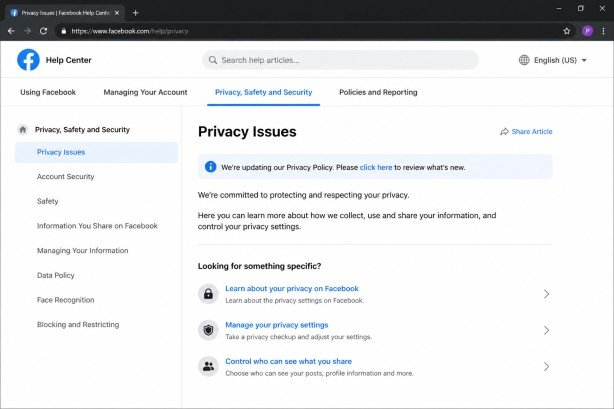
Understanding Facebook Privacy
Facebook privacy refers to the control users have over the information they share on the platform. Every profile contains personal data such as names, birthdays, photos, education history, workplace details, and contact information. While Facebook provides privacy settings, many users either ignore them or do not understand how they work.
The platform collects a massive amount of user data to personalize experiences and advertisements. This data may include browsing habits, location information, interests, and interactions. Although Facebook claims to protect user data, several controversies have raised concerns about how securely this information is stored and shared.
Many users mistakenly believe that only their friends can see their content. In reality, public posts, weak privacy settings, and third-party applications can expose information to strangers, advertisers, and even cybercriminals.
Major Privacy Challenges on Facebook
Data Collection and Tracking
One of the biggest concerns regarding Facebook is extensive data collection. Facebook tracks user behavior both on and off the platform. It monitors likes, comments, searches, clicks, visited websites, and even online purchases.
This information is used primarily for targeted advertising. While personalized ads may seem convenient, they also raise ethical concerns about how much personal information companies can collect.
Data tracking can make users feel constantly monitored. Many people are uncomfortable knowing that their online activities are analyzed to predict behavior and preferences.
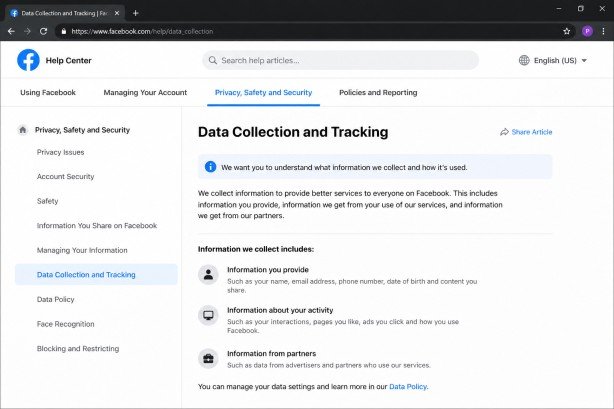
How Facebook Tracks Users
- Monitoring browsing activity
- Tracking app usage
- Collecting location data
- Recording interactions with advertisements
- Following website visits through cookies
Risks of Excessive Data Collection
- Loss of privacy
- Targeted scams
- Manipulative advertising
- Unauthorized sharing of personal data
- Increased vulnerability to identity theft
Third-Party App Risks
Facebook allows users to connect games, quizzes, and applications to their accounts. While these apps may seem harmless, many request access to personal information.
Some third-party apps collect more data than necessary. In certain cases, apps can access profile details, friend lists, email addresses, and photos. This creates opportunities for misuse of user data.
The Cambridge Analytica scandal is one of the most famous examples where user data from Facebook was collected without proper consent and used for political advertising.
Common Problems with Third-Party Apps
- Unauthorized access to personal information
- Sharing data with advertisers
- Account hacking risks
- Spam posting on profiles
- Privacy breaches involving friend information
How to Reduce App Risks
- Remove unused apps regularly.
- Check app permissions carefully.
- Avoid suspicious quizzes and games.
- Use trusted applications only.
- Disable unnecessary access permissions
Identity Theft and Fake Profiles
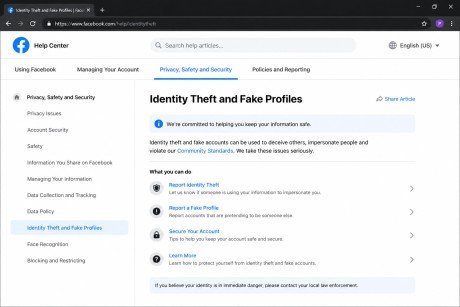
Identity theft is a growing problem on social media platforms. Cybercriminals may create fake Facebook profiles using stolen photos and personal details.
Fake accounts are often used to scam friends, spread misinformation, or collect sensitive information. Victims may face emotional stress, financial loss, or reputational damage.
Some scammers pretend to be trusted friends or family members and ask for money or confidential information.
Warning Signs of Fake Profiles
- Few photos or posts
- Recently created accounts
- Suspicious friend requests
- Poor grammar and unusual messages
- Requests for money or personal details
Protection Tips
- Accept requests only from known people.
- Report fake accounts immediately.
- Limit public profile visibility.
- Avoid sharing sensitive information.
- Use profile picture guards where available.
Location Sharing Dangers
Many Facebook users share their locations through check-ins, stories, or live videos. While this may seem fun, it can create serious safety concerns.
Sharing real-time locations can inform strangers about your whereabouts, travel plans, or home absence. Criminals may misuse this information for stalking, robbery, or harassment.
Parents should be especially careful about posting children’s school locations, routines, or travel details.
Risks of Location Sharing
- Stalking
- Burglary risks while away from home
- Exposure to strangers
- Personal safety threats
- Tracking by cybercriminals
Safe Practices
- Turn off location services when unnecessary.
- Avoid public check-ins
- Share travel photos after returning home.
- Restrict audience settings
- Review app location permissions.
Privacy Issues Related to Photos and Videos
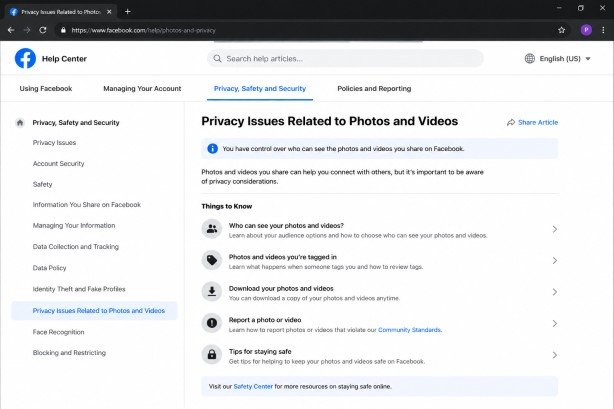
Photos and videos shared on Facebook can remain online permanently. Even deleted content may still exist through screenshots or backups.
Users often underestimate how easily images can be copied, edited, or misused. Personal photos may be stolen for fake profiles or manipulated maliciously.
Tagged photos can also expose users to unwanted attention.
Common Photo Privacy Problems
- Unauthorized sharing
- Fake account creation using images
- Cyberbullying through edited photos
- Exposure of personal locations
- Embarrassing content is becoming public.
Ways to Protect Media Privacy
- Adjust tagging settings
- Approve tags before they appear.
- Avoid posting sensitive photos.
- Use custom audience settings.
- Remove unwanted tags quickly.
Privacy Issues on Facebook and Online Scams
Online scams are becoming increasingly common on Facebook. Fraudsters use fake advertisements, phishing links, and deceptive messages to steal information.
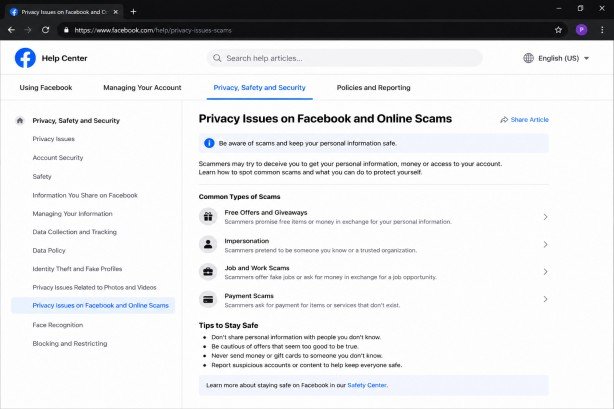
Romance Scams
Scammers often build emotional relationships with victims before asking for money. These scams may continue for months before victims realize the truth.
Marketplace Scams
Fake buyers and sellers misuse Facebook Marketplace for fraud. Common scams include fake payment confirmations and overpayment tricks.
Phishing Attacks
Cybercriminals send fake login pages pretending to be Facebook. Once users enter their passwords, scammers gain access to accounts.
Investment and Crypto Scams
Fraudulent investment schemes promoted through fake celebrity endorsements can trick users into losing money.
Scam Prevention Tips
- Never share passwords
- Avoid suspicious links
- Verify profiles before transactions.
- Enable two-factor authentication
- Be cautious of deals that seem too good to be true.
The Role of Facebook Privacy Settings
Facebook offers several privacy tools that help users control their information. However, many people fail to configure these settings properly.
Audience Control
Users can decide who sees their posts.
Available Audience Options
- Public
- Friends
- Friends except specific people
- Only Me
- Custom groups
Choosing “Friends” instead of “Public” significantly improves privacy.
Timeline and Tagging Controls
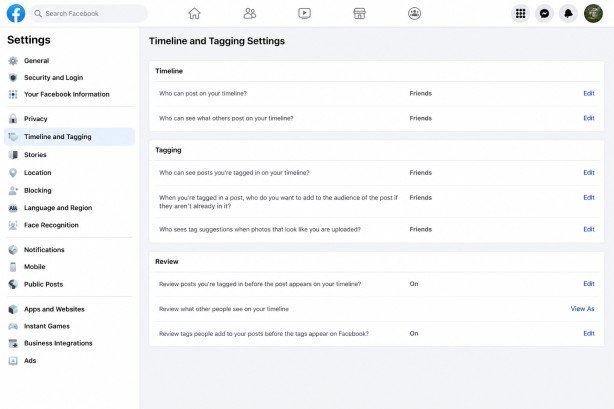
Facebook allows users to review tags before they appear publicly.
Benefits of Timeline Review
- Prevents embarrassing tags
- Reduces spam content
- Improves profile management
- Protects personal reputation
Users should enable tag review settings for better control.
Blocking Features
Facebook provides blocking tools for dealing with harassment and unwanted contact.
What Blocking Can Do
- Stop messages
- Prevent profile viewing
- Restrict tagging
- Block invitations
- Improve online safety
Blocking toxic or suspicious users can improve the overall Facebook experience.
Importance of Strong Passwords
Weak passwords are one of the main reasons Facebook accounts get hacked. Many users choose simple passwords that are easy to guess.
A strong password should include:
- Uppercase and lowercase letters
- Numbers
- Special characters
- Long phrases
- Unique combinations
Password Mistakes to Avoid
- Using birth dates
- Reusing passwords on multiple sites
- Sharing passwords with others
- Writing passwords publicly
Password managers can help users create and store secure passwords.
Two-Factor Authentication for Better Security
Two-factor authentication adds an extra layer of security to Facebook accounts. When enabled, users must verify their identity through a second step, usually a code sent to their phone.
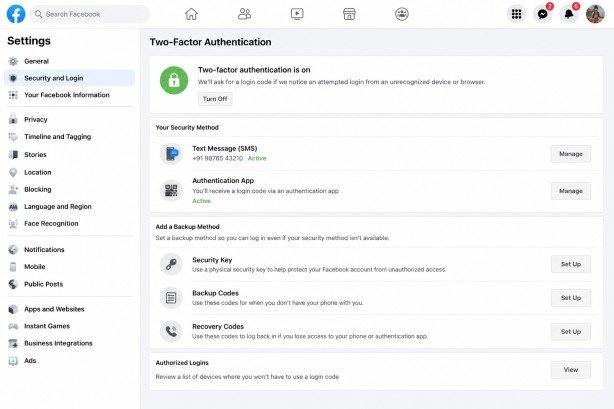
Benefits of Two-Factor Authentication
- Prevents unauthorized access
- Protects against password theft
- Improves account security
- Reduces hacking risks
Ways to Use Two-Factor Authentication
- SMS codes
- Authentication apps
- Security keys
- Backup recovery codes
Every Facebook user should enable this important security feature.
Cyberbullying and Harassment on Facebook
Cyberbullying is another major concern on social media platforms.
Users may face:
- Offensive comments
- Threatening messages
- Fake rumors
- Public humiliation
- Online harassment
Young users are especially vulnerable to emotional harm caused by cyberbullying.
How to Handle Cyberbullying
- Block abusive users
- Report harmful content
- Save evidence of harassment
- Limit profile visibility
- Talk to trusted individuals
Facebook also provides reporting tools for abusive behavior.
Risks of Public Wi-Fi While Using Facebook
Logging into Facebook using public Wi-Fi networks can expose accounts to hackers.
Cybercriminals may intercept login information on unsecured networks.
Safety Tips for Public Wi-Fi
- Avoid logging into sensitive accounts
- Use VPN services
- Enable HTTPS browsing
- Log out after use
- Avoid public computers
Users should prioritize secure internet connections when accessing social media accounts.
How Advertisers Use Facebook Data
Facebook generates revenue through advertising. Advertisers use collected user data to create targeted ads.
This includes information such as:
- Age
- Gender
- Interests
- Online behavior
- Shopping habits
- Location
While targeted advertising improves marketing efficiency, many users worry about excessive surveillance.
Managing Ad Preferences
Facebook allows users to:
- Remove ad interests
- Control ad topics
- Limit advertiser access
- Adjust ad personalization
Managing these settings can reduce intrusive advertising.
Privacy Concerns for Teenagers and Children
Teenagers and children often use Facebook without fully understanding privacy risks.
Young users may accidentally share personal details, communicate with strangers, or become victims of scams.
Common Risks for Young Users
- Online predators
- Cyberbullying
- Identity theft
- Exposure to inappropriate content
- Social pressure
Tips for Parents and Guardians
- Discuss online safety regularly
- Monitor privacy settings
- Encourage responsible posting
- Teach scam awareness
- Limit public sharing
Digital education plays a crucial role in protecting younger users.
Facebook Messenger Privacy Issues
Messenger is widely used for communication, but it also comes with privacy concerns.
Risks on Messenger
- Phishing links
- Scam messages
- Malware sharing
- Unauthorized account access
- Fake customer support messages
Messenger Safety Tips
- Avoid opening suspicious links
- Enable message request filtering
- Use disappearing messages carefully
- Verify unknown contacts
- Report spam accounts
Users should remain cautious while communicating online.
How Businesses Handle Customer Privacy on Facebook
Businesses use Facebook pages for marketing, customer support, and advertising. However, companies must protect customer information responsibly.
Business Privacy Responsibilities
- Secure customer data
- Avoid spam marketing
- Protect user conversations
- Use trusted applications
- Follow data protection laws
Failure to protect customer information can damage a business’s reputation and trust.
Facebook Data Breaches and Controversies
Several controversies have increased public concern about Facebook’s privacy practices.
Cambridge Analytica Scandal
This scandal revealed that millions of Facebook users’ data had been collected without proper consent.
The incident raised questions about:
- Data misuse
- Political influence
- User consent
- Third-party access
- Corporate accountability
Other Data Breach Concerns
- Password leaks
- Unauthorized data exposure
- Security vulnerabilities
- Weak data management
These incidents remind users to remain cautious online.
Best Practices to Stay Safe on Facebook
Regularly Review Privacy Settings
Facebook updates its settings frequently. Users should review them regularly.
Limit Personal Information Sharing
Avoid posting:
- Home addresses
- Phone numbers
- Financial information
- Travel schedules
- Sensitive documents
Use Trusted Devices
Avoid accessing Facebook from unknown devices.
Log Out from Shared Computers
Always sign out after using public or shared systems.
Stay Updated About Scams
Awareness is one of the best forms of protection.
Monitor Account Activity
Check login history regularly for suspicious access.
Keep Software Updated
Updated browsers and devices reduce security vulnerabilities.
Think Before Posting
Remember that online content can spread quickly and remain online permanently.
Future of Facebook Privacy
As digital privacy concerns continue growing, Facebook faces increasing pressure to improve security and transparency.
Governments worldwide are introducing stricter data protection laws. Users are becoming more aware of how companies collect and use personal data.
Future improvements may include:
- Stronger encryption
- Better privacy controls
- Improved transparency
- Advanced scam detection
- More user-friendly security settings
Despite these improvements, users must remain responsible for protecting their own online privacy.
Conclusion
Social media has transformed communication, entertainment, and business opportunities worldwide. However, users must also recognize the dangers associated with online platforms. Privacy Issues on Facebook continue to affect millions of people through scams, identity theft, cyberbullying, excessive data collection, and unauthorized access to personal information. By understanding these risks, users can make smarter decisions while using Facebook and reduce their chances of becoming victims of online threats.
Protecting personal information requires awareness, caution, and proper security habits. Users should regularly review privacy settings, avoid oversharing sensitive details, enable two-factor authentication, and stay alert for suspicious activities. Although Facebook provides various security tools, personal responsibility remains essential. Addressing Privacy Issues on Facebook is not only the responsibility of the platform but also of every individual using it. Staying informed and practicing safe online behavior can help users enjoy social media while protecting their privacy and digital security.
Frequently Asked Questions
What are the biggest privacy risks on Facebook?
The biggest risks include identity theft, hacking, fake profiles, data tracking, phishing scams, and oversharing personal information.
How can I make my Facebook account more secure?
You can improve security by using a strong password, enabling two-factor authentication, reviewing privacy settings, and avoiding suspicious links.
Can Facebook track my online activity?
Yes, Facebook tracks user behavior through cookies, app activity, likes, searches, and interactions for advertising and personalization purposes.
Is it safe to use Facebook Marketplace?
Facebook Marketplace can be safe if users verify buyers and sellers, avoid suspicious payment requests, and never share sensitive financial information.
How do I stop strangers from seeing my Facebook posts?
Change your audience settings from Public to Friends or Only Me in Facebook privacy settings.
Meta Description
Learn about Privacy Issues on Facebook, common risks, scams, and practical ways to protect your account, data, and online privacy safely.
- Understanding Facebook Privacy
- Major Privacy Challenges on Facebook
- Third-Party App Risks
- Identity Theft and Fake Profiles
- Location Sharing Dangers
- Privacy Issues Related to Photos and Videos
- Privacy Issues on Facebook and Online Scams
- Investment and Crypto Scams
- Audience Control
- Timeline and Tagging Controls
- Blocking Features
- Importance of Strong Passwords
- Two-Factor Authentication for Better Security
- Risks of Public Wi-Fi While Using Facebook
- Managing Ad Preferences
- Facebook Messenger Privacy Issues
- How Businesses Handle Customer Privacy on Facebook
- Facebook Data Breaches and Controversies
- Best Practices to Stay Safe on Facebook
- Future of Facebook Privacy
- Conclusion
- Frequently Asked Questions
- Meta Description