

Is your internet stopping again and again while you are working or watching videos? This problem can be very frustrating, especially when you are in the middle of something important. Many users face the issue where their PC keeps disconnecting from WiFi, and it can happen without any warning.
However, the good thing is that this issue is not very hard to fix. In most cases, it happens because of small problems like wrong settings, outdated drivers, or weak signals. So, if you follow the right steps, you can solve it quickly.
In this article, you will learn easy and practical solutions. Moreover, all methods are simple and beginner-friendly. So, let’s fix the PC keeps disconnecting from WiFi issue step by step.
Why Does Your WiFi Keep Disconnecting?
Before fixing the issue, it is important to know why it happens. When your PC keeps disconnecting from WiFi, there can be many reasons behind it.
Sometimes, your computer turns off the WiFi adapter to save power. On the other hand, outdated drivers can also cause connection problems. In addition, a weak signal or too many connected devices can make your internet unstable.
Therefore, understanding the problem helps you choose the right solution.
1. Restart Your PC and Router
Restarting your devices is the first and easiest step. It may look simple, but it often fixes many problems.
First, turn off your PC. Then unplug your router and wait for about one minute. After that, turn everything back on. This refreshes your network and removes temporary bugs. As a result, the PC keeps disconnecting from the WiFi issue may disappear.
2. Disable Power Saving Mode
Sometimes your system tries to save battery by turning off the WiFi adapter. Because of this, your PC keeps disconnecting from WiFi.
To fix this, open Device Manager and go to Network Adapters. Then select your WiFi device and open its properties. After that, go to the Power Management tab and uncheck the option that allows the computer to turn off the device.
This will keep your WiFi active all the time.
3. Update Network Drivers
Outdated drivers are a common reason why your PC keeps disconnecting from WiFi. So, updating them is very important.
You can update drivers from Device Manager or Windows Update. When your drivers are up to date, your system works better, and your internet becomes more stable.
4. Change Scan Settings
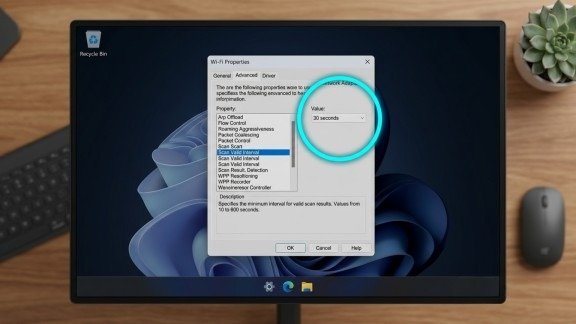
Your PC keeps scanning for better networks. Because of this, your connection may drop again and again.
To fix the PC keeps disconnecting from WiFi problem, go to your adapter settings and open the Advanced tab. Then find the scan interval option and increase its value.
This reduces unnecessary scanning and improves connection stability.
5. Repair System Files
Sometimes, corrupted system files can create network issues. As a result, your PC keeps disconnecting from WiFi.
You can fix this by running a system scan. Open Command Prompt as administrator and type “sfc /scannow”. Then press Enter. This tool will automatically repair damaged files.
6. Check Your Distance from the Router
Distance plays an important role in WiFi strength. If you are far from the router, the signal becomes weak.
Because of this, your PC keeps disconnecting from WiFi. So, try to stay closer to the router. Also, avoid walls and metal objects between your PC and router.
A stronger signal means a better connection.
7. Limit Connected Devices
If too many devices are connected to your network, your internet speed becomes slow. As a result, your PC keeps disconnecting from WiFi.
You should disconnect devices that are not in use. You can also change your WiFi password to control access.
This will reduce network load and improve performance.
8. Change WiFi Band or Channel
WiFi signals can interfere with each other. Therefore, your PC keeps disconnecting from WiFi when networks overlap.
You can fix this by switching to a different WiFi band like 5GHz. Also, changing the channel can help reduce interference.
This makes your connection more stable.
9. Reset Network Settings
If the problem still exists, you can reset your network settings. This will remove all old configurations.
Go to network settings and select network reset. Then restart your PC and reconnect your WiFi.
This often solves deep issues causing the PC keeps disconnecting from WiFi problem.
10. Upgrade Your Router
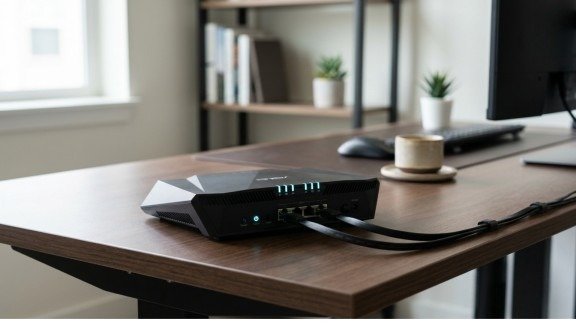
If your router is old, it may not support modern devices properly. Because of this, your PC keeps disconnecting from WiFi.
You can update your router software or replace it with a new one. A better router provides a stronger and more stable connection.
Extra Tips for Better WiFi
Here are some additional tips to avoid the PC keeps disconnecting from WiFi issue:
- Place your router in the center of your home
- Keep it away from electronic devices
- Restart it regularly
- Use a WiFi extender if needed
These small steps can improve your internet quality.
Conclusion
The PC keeps disconnecting from WiFi problem can be annoying, but it is easy to fix if you follow the right steps. First, try simple solutions like restarting your devices. Then move to advanced fixes like updating drivers or resetting settings.
In addition, maintaining your network and reducing load helps a lot. If needed, upgrading your router is also a good option.
Now you have all the solutions in one place. Follow them carefully, and you will enjoy a stable and smooth internet connection without interruptions.
FAQs
1. Why does my PC keep disconnecting from WiFi?
This usually happens due to weak signals, outdated drivers, power-saving settings, or network interference affecting connection stability.
2. How can I fix PC keeps disconnecting from WiFi quickly?
You can restart your router, update network drivers, and disable power-saving mode to restore a stable connection.
3. Can outdated drivers cause WiFi disconnection issues?
Yes, old or missing network drivers can interrupt communication between your PC and WiFi network, causing frequent drops.
4. Does router placement affect WiFi connection stability?
Router location plays a big role, as walls, distance, and obstacles can weaken signals and lead to disconnections.
5. How do I make my WiFi connection more stable on PC?
You can reduce connected devices, switch WiFi bands, and keep your system updated to improve overall performance.
Meta Description
PC keeps disconnecting from WiFi? Learn 10 easy fixes to solve connection issues, improve stability, and boost your internet performance quickly.