
You’re searching for the URL Parameters tool in Google Search Console to fix duplicate content issues from tracking parameters, but the tool completely disappeared—and you have no idea Google deprecated it back in April 2022.
Understanding how URL parameters work in Google Search Console in 2026 requires knowing that the classic URL Parameters tool no longer exists. Google removed it because improved crawling algorithms automatically handle parameter variations, making manual configuration unnecessary for 99% of websites. However, this doesn’t mean parameters stopped causing problems—you just need different methods to manage them effectively in 2026.
Most website owners discover the tool’s disappearance only when duplicate content issues surface from UTM tracking parameters, session IDs, or ecommerce sorting filters creating dozens of URL variations that Google indexes separately. Without understanding modern alternatives to the deprecated URL Parameters tool, they search fruitlessly for controls that vanished four years ago.
This comprehensive 2026 guide explains what happened to URL parameters in Google Search Console, why Google deprecated the tool, what modern alternatives handle parameter management more effectively, and practical step-by-step methods for preventing duplicate content from URL parameters without the discontinued tool.
What Happened to the URL Parameters Tool?
Google officially deprecated the URL Parameters tool in April 2022 after announcing its removal one month earlier. This tool, which originally launched in 2009 within Google Webmaster Tools (Search Console’s predecessor), allowed website owners to manually specify how Google should treat URLs containing specific parameters.
Why Google Removed the Tool
Google’s official announcement explained that only approximately 1% of URL parameter configurations actually provided useful crawling guidance. The remaining 99% either duplicated what Google’s algorithms already understood automatically or incorrectly configured parameters in ways that harmed rather than helped indexing.
Over the years between 2009 and 2022, Google’s crawling intelligence evolved dramatically. Modern Google algorithms automatically identify whether parameters change page content meaningfully or simply track user sessions, filter results, or sort listings. This automated detection proved far more reliable than manual human configuration, which frequently contained errors.
Current Status in 2026
As of 2026, the URL Parameters tool remains completely removed from Google Search Console. There are no plans to restore it. Google’s position is clear: their crawlers handle URL parameter interpretation automatically, and manual intervention rarely provides value worth the complexity it introduces.
Understanding URL Parameters in 2026
URL parameters are additions appended to URLs after a question mark that modify page behavior, track analytics, or pass information between systems. Understanding how they function helps determine which management approach prevents duplicate content issues.
Common URL Parameter Types
Tracking Parameters:
Analytics tools like Google Analytics use UTM parameters to identify traffic sources. A URL like example.com/article?utm_source=facebook&utm_medium=social helps track that visitors arrived from Facebook, but the page content remains identical regardless of parameter values.
Sorting and Filtering Parameters:
Ecommerce sites use parameters to sort products or apply filters. URLs like example.com/products?sort=price&filter=blue display the same products arranged differently or filtered to specific criteria.
Session IDs:
Some platforms append session identifiers to URLs for tracking user sessions: example.com/page?sessionid=abc123. These parameters change with every visit but display identical content.
Pagination Parameters:
Parameters like ?page=2 or ?start=20 divide long content lists across multiple pages, with each URL displaying different content subsets.
How Parameters Create Duplicate Content
When Google discovers multiple URL variations of the same page through internal links, external backlinks, or sitemap submissions, it may index them as separate pages. This creates duplicate content issues—multiple URLs competing in search results when only one should rank.
For example, if your product page exists at these URLs:
- example.com/product-name
- example.com/product-name?utm_source=email
- example.com/product-name?sessionid=xyz789
- example.com/product-name?sort=default
Google might index all four versions separately, diluting ranking signals across duplicates rather than consolidating them to your preferred canonical URL.
Modern Alternatives for Managing URL Parameters
Without the URL Parameters tool, managing parameters in 2026 requires using canonical tags, robots.txt rules, or ensuring your CMS generates clean URLs by default.
Method 1: Canonical Tags (Recommended for Most Sites)
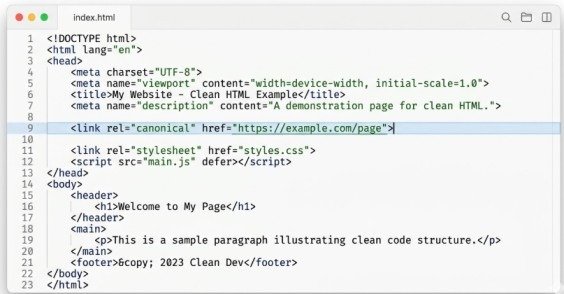
Canonical tags tell Google which URL version you prefer indexed when multiple variations exist. Add this tag to pages with parameters, pointing to your clean URL:
<link rel=”canonical” href=”https://example.com/product-name”>
This tag belongs in the <head> section of every page containing tracking or non-content-changing parameters. For the product example above, all four URL variations would include the same canonical tag pointing to example.com/product-name, consolidating indexing signals to your preferred version.
When to use:
Tracking parameters (UTM), sorting parameters that don’t change content meaningfully, session IDs, or any parameter where the page content remains essentially identical across parameter variations.
Method 2: Robots.txt Rules for Parameter Blocking
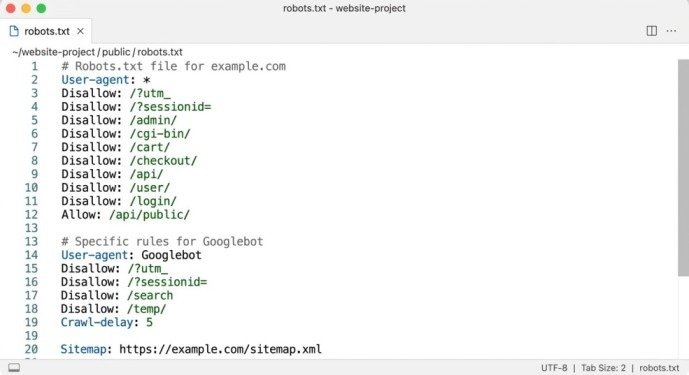
For parameters creating truly unnecessary crawl load—like infinite calendar date combinations or session ID variations—robots.txt can prevent Google from crawling parameter-based URLs entirely:
User-agent: Googlebot
Disallow: /*?sessionid=
Disallow: /*?utm_
This syntax tells Google to ignore any URL containing ?sessionid= or ?utm_ parameters. The asterisk wildcards match any characters before the parameter.
When to use:
Session IDs generating thousands of duplicate URLs, tracking parameters you prefer Google never crawl, or calendar/date parameters creating infinite URL combinations.
Critical warning:
Only block parameters in robots.txt when you’re certain Google should never crawl those URLs. Blocking pages that are already indexed prevents Google from seeing canonical tags or noindex directives, potentially trapping pages in the index indefinitely.
Method 3: Use URL Fragments Instead of Parameters
For functionality that doesn’t require server-side processing, replace URL parameters with fragment identifiers (the # symbol). Google typically ignores content after # symbols, treating example.com/page#filter=blue identically to example.com/page.
This approach works perfectly for client-side filtering, sorting, or tab selection implemented with JavaScript. Users see different content based on fragment values, but Google indexes only the base URL.
When to use:
Client-side filtering, sorting, or content variations handled entirely with JavaScript without requiring server requests.
Method 4: Configure Your CMS Properly
Modern content management systems like WordPress, Shopify, and Wix handle URL parameters intelligently by default. Ensure your platform:
Uses clean URLs without unnecessary parameters for primary navigation Implements canonical tags automatically for filtered or sorted versions Generates sitemaps containing only canonical URL versions Avoids session IDs in URLs altogether through cookie-based session management
When to use:
This should be your first step regardless of other methods. Proper CMS configuration prevents parameter problems from occurring rather than cleaning them up afterward.
How Google Automatically Handles Parameters in 2026
Google’s 2026 crawling algorithms automatically identify and handle URL parameters through several sophisticated techniques that made the manual URL Parameters tool obsolete.
Automatic Parameter Detection
Google analyzes patterns across your site to identify parameters that don’t change content meaningfully. When Google crawls example.com/page?utm_source=facebook and example.com/page?utm_source=twitter, it compares the content. Finding identical content except for tracking-related differences, Google automatically recognizes UTM parameters as non-content-affecting and consolidates indexing accordingly.
Canonical URL Selection
Even without explicit canonical tags, Google chooses a preferred URL version when discovering duplicates. This selection considers which URL appears in sitemaps, which receives more internal links, and which version users share most frequently. While Google’s automatic selection often works correctly, explicit canonical tags ensure predictable outcomes.
Crawl Budget Optimization
Google automatically reduces crawl frequency for parameter combinations it identifies as duplicates, preserving crawl budget for unique content. Sites with millions of parameter combinations no longer need to manually configure crawl behavior—Google adapts automatically based on observed patterns.
Checking for URL Parameter Issues in 2026
Without the dedicated URL Parameters tool, identifying parameter-related problems requires using other Google Search Console reports.
Using the Pages Report
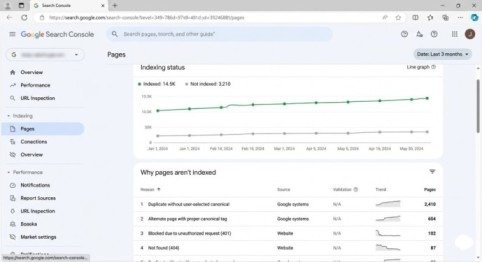
Navigate to Indexing > Pages in Google Search Console. Look for patterns in the “Not indexed” section under reasons like “Duplicate without user-selected canonical” or “Alternate page with proper canonical tag.”
Click these categories to see affected URLs. If you notice many URLs differing only by parameters, your site has parameter-related duplicate content requiring canonical tag implementation or robots.txt adjustments.
Using URL Inspection Tool
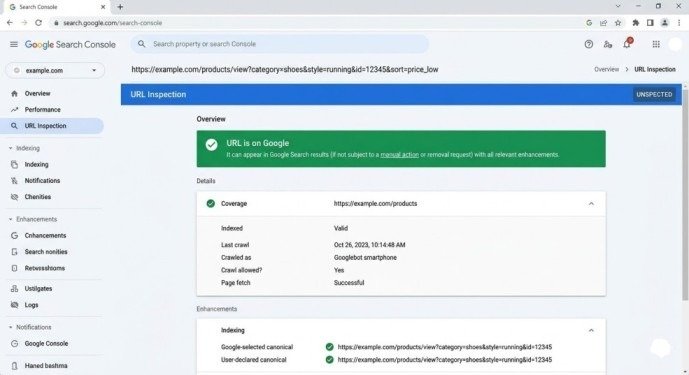
Inspect individual URLs containing parameters through the URL Inspection Tool. Check the “Google-selected canonical” field under the Indexing section. If Google selected a different canonical than your preferred version, your canonical tags may be missing or incorrectly implemented.
Monitoring Indexed Page Count Trends
Sudden increases in indexed page counts often signal parameter-based duplicate content entering the index. Monitor your total indexed pages in the Pages report. Unexpected growth suggests Google is discovering and indexing parameter variations you haven’t properly consolidated.
Best Practices for URL Parameters in 2026
Implement canonical tags on all pages containing tracking parameters pointing to your clean URL version. This single implementation prevents 90% of parameter-related duplicate content issues.
Use robots.txt parameter blocking sparingly and only for truly unnecessary crawl load like session IDs. Never block pages already indexed—this prevents Google from discovering your canonical tags or noindex directives.
Audit your internal linking to ensure you link to clean URLs without parameters rather than parameter-heavy variations. Internal links to example.com/page?utm_source=internal unnecessarily create duplicate indexing signals.
Configure your sitemap generator to exclude parameter-based URLs, listing only canonical versions. This guides Google toward indexing your preferred URLs from the start.
Set up 301 redirects from common parameter variations to clean URLs when parameters serve no functional purpose. For example, redirect example.com/page?source=homepage to example.com/page to eliminate duplicates entirely.
Common URL Parameter Mistakes to Avoid
Never block parameterized URLs in robots.txt while simultaneously trying to use canonical tags for consolidation. Robots.txt blocking prevents Google from ever seeing those canonical tags, making consolidation impossible.
Don’t assume Google’s automatic parameter handling works perfectly for your specific site. Verify through the Pages report and URL Inspection Tool that Google correctly identifies your canonical preferences.
Avoid creating separate URL versions with parameters when fragments could accomplish the same functionality client-side without SEO complications.
Never add noindex tags to parameterized pages while setting canonicals to clean versions. These conflicting signals confuse Google about your intentions—choose canonical consolidation or noindex removal, not both.
Conclusion
Understanding URL parameters in Google Search Console in 2026 means accepting the URL Parameters tool is gone permanently and won’t return. Google removed it because improved algorithms made manual configuration unnecessary—and often counterproductive—for 99% of websites.
The modern approach relies on canonical tags consolidating parameter variations to preferred URLs, robots.txt blocking for truly unnecessary parameter crawling, and proper CMS configuration preventing parameter problems from occurring initially. These methods prove more reliable than the old manual tool ever was.
Start this week. Audit your site for parameter-based duplicate content using the Pages report in Google Search Console. Implement canonical tags on pages with tracking or sorting parameters. Configure robots.txt to block session IDs if they create crawl inefficiencies. Verify your changes through the URL Inspection Tool, confirming Google recognizes your preferred canonical versions.
The URL Parameters tool disappeared, but parameter management remains essential. Modern methods just work better than manual configuration ever did.
Frequently Asked Questions
Where did the URL Parameters tool go in Google Search Console?
Google deprecated and removed the URL Parameters tool in April 2022. It no longer exists in Search Console and won’t return. Google’s crawlers now handle URL parameters automatically without manual configuration.
How do I handle URL parameters without the Parameters tool?
Use canonical tags pointing to your preferred URL version, robots.txt rules for blocking unnecessary parameters, or URL fragments for client-side functionality. Most sites only need properly implemented canonical tags.
Will Google automatically fix my parameter duplicate content issues?
Sometimes, but not always reliably. Google’s automatic handling works better in 2026 than ever before, but explicit canonical tags ensure predictable outcomes rather than hoping Google guesses correctly.
Can I still block parameters in robots.txt?
Yes. Robots.txt parameter blocking remains effective for preventing crawling of session IDs or infinite parameter combinations. However, use it carefully and never block URLs you want consolidated through canonical tags.
Meta Description
URL Parameters tool in Google Search Console was deprecated! Learn the 2026 update on managing URL parameters with robots.txt, canonical tags, and modern alternatives.
Pingback: How to Fix Crawl Status Issues in Google Search Console