

Learning app development is now easier than ever. Today, many people want to build mobile apps, but they don’t know where to start. That’s where this guide helps you. It gives you a simple path to learn coding and create apps step by step.
First of all, you don’t need to be an expert to begin. Even if you are new, you can still learn quickly. With the right tools and clear guidance, you can understand how apps work and how to build them. This journey becomes even better when you learn both Dart and Flutter together.
In this article, you will explore everything from basics to advanced concepts. You will also learn how to build real apps, fix errors, and grow your skills. So, if you are ready, let’s begin your journey into app development.
Why Learn Dart Before Building Apps
Before you start creating apps, it is important to understand the language behind them. Dart is simple and easy to learn. It helps you write clean and fast code.
First, Dart teaches you how to use variables, loops, and conditions. These are the building blocks of programming. Then, you learn about functions and classes. As a result, your coding skills become strong.
Moreover, Dart is designed for speed. It works well with modern tools. Because of this, developers prefer it for building mobile apps. Once you understand Dart, learning Flutter becomes much easier.
Getting Started with App Development
Now that you know the basics, the next step is setting up your environment. This includes installing tools and preparing your system.
First, install a code editor like VS Code. Then, set up Flutter SDK and required extensions. After that, create your first project. This process is simple and takes only a few steps.
Next, you run your first app. It may look basic, but it is a big step. From here, you start building more features. Slowly, your confidence grows.
Understanding How Apps Are Built
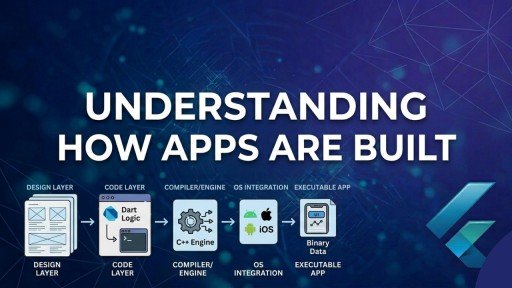
Every app has a structure. It is important to understand how different parts work together.
Apps are made using small components. These components control design and function. For example, buttons, text, and images are all parts of an app.
In Flutter, these parts are called widgets. Widgets help you design the user interface. You can combine them to create beautiful layouts.
As you move forward, you will learn how to arrange these widgets. This makes your app look clean and professional.
Building Your First Application
Now comes the exciting part—building your first app.
Start with a simple idea. For example, a notes app or a counter app. These projects help you understand the basics.
First, design the layout. Then, add functionality. After that, test your app. If something goes wrong, fix it step by step.
With Flutter, this process becomes fast and smooth. You can see changes instantly. This helps you learn quickly.
Working with User Input and Navigation
Apps are not just for display. They also respond to user actions.
For example, users can type text, click buttons, or move between screens. You need to handle all these actions.
First, learn how to take input from users. Then, understand navigation between screens. This makes your app interactive.
As a result, your apps feel more real and useful.
Connecting Apps to the Internet
Modern apps often use the internet. They fetch data from servers and show it to users.
First, learn how to send requests. Then, receive data and display it. This is called API integration.
With Flutter, this process is simple. You can connect your app to online services easily.
Because of this, you can build apps like news apps, social apps, and more.
Debugging and Fixing Ezrors
Every developer makes mistakes. But fixing them is an important skill.
First, learn how to read error messages. Then, find the problem in your code. After that, correct it.
Debugging helps you improve your logic. It also makes your code stronger.
Over time, you will become better at solving problems quickly.
State Management Made Simple
As your app grows, managing data becomes important.
State management helps you control how data changes in your app. It keeps everything organized.
At first, it may seem difficult. However, with practice, it becomes easy.
Using Flutter, you can manage state in different ways. This makes your apps more powerful and scalable.
Designing Beautiful User Interfaces
A good app must look nice and feel smooth.
First, focus on layout and colors. Then, add animations and effects. These small details make a big difference.
Flutter allows you to create modern designs easily. You can customize everything.
As a result, your app stands out and attracts users.
Building Real-World Projects
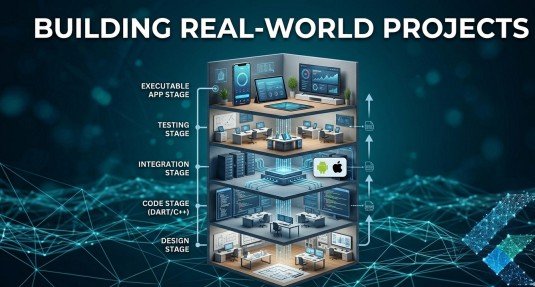
Practice is the key to success. That’s why building real projects is very important.
Start with small apps. Then, move to bigger ones like chat apps or eCommerce apps.
You can also build a social media app or a clone project. This helps you understand real-world development.
With Flutter, you can create apps that work on multiple platforms. This saves time and effort.
Deploying Your Application
After building your app, the next step is launching it.
First, prepare your app for release. Then, upload it to app stores.
You need to follow some rules for publishing. But don’t worry—it becomes easy with practice.
Once your app is live, people can download and use it.
Advanced Skills for Developers
If you already know the basics, you can go deeper.
Learn advanced concepts like architecture and testing. These improve your app quality.
You can also learn performance optimization. This makes your app faster.
With Flutter, advanced development becomes more structured and efficient.
Best Practices for Success
To become a good developer, follow some simple rules:
- Write clean code
- Practice daily
- Build projects
- Learn from mistakes
Also, keep learning new updates. Technology changes fast. So, stay updated.
Final Thoughts
Learning app development is a great decision. It opens many opportunities.
With the right approach, you can go from beginner to advanced level. Step by step, your skills will grow.
Dart gives you a strong base. Flutter helps you build amazing apps. Together, they create a powerful combination.
So, start today. Keep learning, keep building, and never stop improving.
FAQs
What is Flutter and why should I learn it?
Flutter is a powerful UI toolkit that helps you build apps for Android and iOS using one codebase. It is fast, easy, and in high demand.
Is Dart necessary for Flutter development?
Yes, Dart is the main language used in Flutter. Learning Dart is important to understand how apps are built and function.
Can beginners learn Flutter easily?
Yes, beginners can easily start learning Flutter. It has simple syntax and many learning resources that make app development easy to understand.
How long does it take to learn Flutter?
It depends on your practice. However, with daily learning, you can understand basics in a few weeks and build apps within 1–2 months.
What can I build with Flutter?
You can build mobile apps, web apps, and even desktop applications using Flutter. It is widely used for cross-platform development.
Is Flutter good for freelancing in 2026?
Yes, Flutter is a high-demand skill. Many clients look for Flutter developers for mobile app projects, making it great for freelancing.
Meta Description
Learn Flutter with this complete Dart course from beginner to advanced. Build real apps fast—start your app development journey today.