

Do you want your products to show more details in Google search In this case, Product Schema becomes a powerful tool to enhance your product visibility and improve how it appears in search results. It tells search engines what your product is and shows useful info like price, rating, and stock.
Today, ranking is not only about keywords. Search engines also need clear data. That is why Product Schema is very important. It helps your product look better and get more clicks. In this guide, you will learn a simple way to add Product Schema in WordPress using plugins. You will also understand why it matters and how to do it step by step without coding.
What is Product Schema
Product Schema is a type of structured data. It gives clear details about your product to search engines. For example, it shows the product name, price, brand, and reviews.
Because of this, search engines can display rich results. These results look more attractive and give more information to users.
In simple words, Product Schema helps search engines understand your product better.
Why Product Schema is Important for SEO
When you use Product Schema, your product pages become stronger for SEO. It does not directly increase ranking, but it improves how your page looks in search results. As a result, more people notice your product and click on it.
It also helps Google understand your content clearly. Therefore, your product can appear in advanced results like rich snippets or AI-based answers.
What Information You Can Add in Product Schema
You can add many useful details inside Product Schema. This makes your product listing more complete.
For example, you can include product name, description, price, image, brand, and availability. You can also add reviews and ratings.
However, it is important to use correct and real data. If your data is wrong, then your Product Schema may not work properly.
Before You Add Product Schema
Before adding Product Schema, you should prepare your website. This step is important to avoid problems later.
First, make a backup of your website. After that, check if any schema is already added. Then choose the correct schema type for your product.
Also, make sure your page content matches your schema. This is important because Google checks this carefully.
Easy Way to Add Product Schema in WordPress Using Plugins
Adding Product Schema with plugins is very simple. You do not need coding skills. Follow these easy steps.
This method saves time and reduces errors. It also ensures your schema is added correctly across your website.
Step 1: Install a Plugin
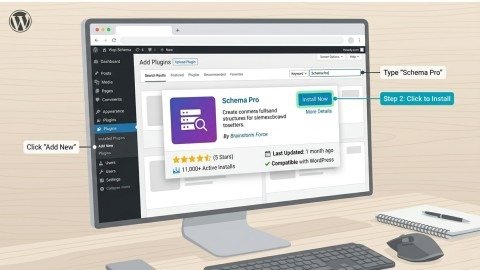
First, go to your WordPress dashboard. Then install a plugin like AIOSEO, Rank Math, or Schema Pro.
These plugins help you add Product Schema quickly.
Step 2: Open Schema Settings
After installing the plugin, open the page where you want to add schema. Then scroll down and find the schema option.
Now click on the schema generator button. This will open different schema types.
Step 3: Select Product Schema
Next, choose Product Schema from the list. This step is very important. If you select the wrong type, your data may not show correctly.
Step 4: Add Product Details
Now you need to fill in product details. Add all important information carefully.
For example:
• Product name
• Price
• Description
• Image
• Brand
Make sure everything is correct. Because accurate Product Schema gives better results.
Step 5: Save and Apply
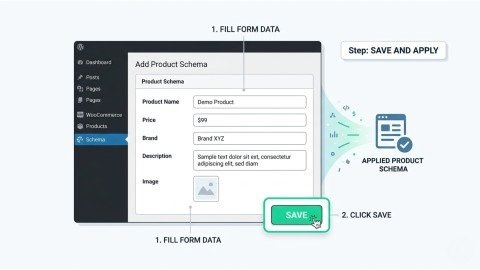
After adding details, click save. The plugin will automatically apply Product Schema to your page.
This is why plugins are very helpful. They do all the technical work for you.
Step 6: Test Your Schema
Finally, you should test your Product Schema. This step is very important.
You can use Google Rich Results Test. It will show if your schema has any errors.
If everything is correct, then your product is ready to appear in rich results.
Testing also helps you fix issues early. As a result, your schema performs better in search results.
Why Plugins Are the Best Option
Using plugins is the easiest way to add Product Schema. You do not need to write code or worry about errors.
Plugins also update your schema automatically. So whenever you change your product details, your schema updates too.
Because of this, most beginners and even experts prefer plugins.
Common Mistakes to Avoid
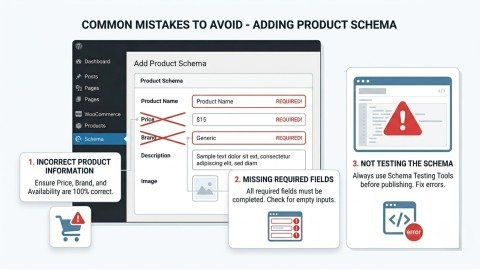
While adding Product Schema, some people make simple mistakes. These mistakes can affect results and reduce your chances of showing rich snippets.
For example, using incorrect product data, missing important fields, or not testing the schema can cause problems.
Therefore, always check your data and test your schema before publishing.
Incorrect Product Information
Adding wrong details like price, brand, or availability can confuse search engines. As a result, your Product Schema may not show in search results.
Missing Required Fields
Some fields are necessary for Product Schema to work properly. If you skip important data, your schema may become invalid or incomplete.
Not Testing the Schema
Many users forget to test their schema before publishing. Because of this, errors remain unnoticed and affect performance in search results.
.
Tips to Improve Product Schema Results
If you want better results, you should follow some simple tips.
Always use real and clear product details. Add high-quality images. Also include ratings and reviews if possible.
Keep your data updated. Because updated Product Schema performs better in search.
Product Schema and Modern Search
Search engines are now smarter. They use AI to understand content. That is why Product Schema is more important than before.
It helps your product appear in rich results, featured snippets, and AI answers.
So, using Product Schema is not just helpful, it is necessary.
Conclusion
Adding Product Schema is an essential step for modern SEO. It improves how your products appear in search results and makes them more attractive to users. As a result, it increases visibility and drives more clicks to your website.
Using plugins is the easiest and most effective method. They simplify the process, reduce errors, and automatically manage your structured data without coding.
In the long run, a well-implemented Product Schema helps search engines understand your content better. This leads to stronger performance, better user engagement, and consistent growth in search rankings.
FAQs
1. What is Product Schema in WordPress?
Product Schema is structured data that helps search engines understand product details like price, reviews, and availability.
2. How does Product Schema improve SEO?
It enhances search appearance with rich results, which increases visibility and improves click-through rates.
3. Which plugin is best for adding Product Schema?
Popular plugins like AIOSEO, Rank Math, and Schema Pro provide easy schema implementation.
4. How can I test Product Schema in WordPress?
You can use Google Rich Results Test to check errors and preview how your schema appears in search results.
5. What details should be included in Product Schema?
Important details include product name, price, description, image, brand, and availability for better accuracy.
SEO Meta Description
Add Product Schema in WordPress easily using plugins. Improve search visibility, boost CTR, and show rich snippets without coding.
- What is Product Schema
- Why Product Schema is Important for SEO
- What Information You Can Add in Product Schema
- Before You Add Product Schema
- Easy Way to Add Product Schema in WordPress Using Plugins
- Why Plugins Are the Best Option
- Common Mistakes to Avoid
- Tips to Improve Product Schema Results
- Conclusion
- FAQs
- SEO Meta Description