
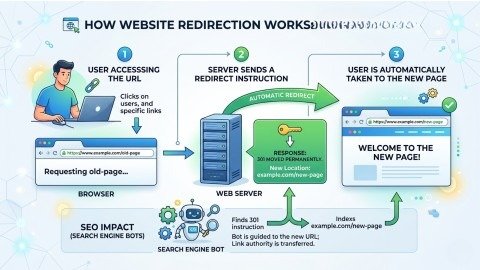
Have you ever clicked on a link and ended up on a completely different page automatically? This process is known as redirection. It works behind the scenes, yet it plays a crucial role in how websites operate and rank in search engines.
As websites grow over time, pages are often updated, removed, or moved to new URLs. Without proper redirection, users would face broken pages, and search engines would struggle to track these changes. That’s why using redirects correctly is very important.
However, many beginners find it difficult to understand 301 vs 302 redirects. Although they appear similar, their functions are different. In this guide, you will learn what redirection is, why it is important, and how to use 301 vs 302 redirects effectively.
What is Redirection?
Redirection is the method of automatically sending users and search engines from one URL to another.
Simple Example
• Old URL → example.com/old-page
• New URL → example.com/new-page
When someone visits the old URL, they are instantly redirected to the new one. This helps avoid errors and ensures a smooth browsing experience.
Why Redirection is Important for SEO
Redirection is more than just a technical setup. It has a direct impact on both SEO and user experience.
Key Benefits
• Improves User Experience
Users are not exposed to broken or missing pages.
• Preserves SEO Value
Using 301 vs 302 redirects properly helps protect your rankings.
• Fixes Broken Links
Redirects guide visitors to active and relevant pages.
• Supports Website Changes
Useful when updating content or changing domains.
In short, redirection helps maintain a smooth experience for both users and search engines.
Types of Redirects
There are multiple types of redirects, but not all are equally important for SEO.
Common Redirect Types
• 301 Redirect (Permanent)
• 302 Redirect (Temporary)
• 307 Redirect
• Meta Refresh
However, when it comes to SEO, the primary focus remains on 301 vs 302 redirects.
What is a 301 Redirect? (Permanent Redirect)
A 301 redirect tells search engines that a page has been moved permanently to a new URL.
When to Use 301 Redirect
- When a URL is permanently changed
- When migrating to a new domain
- When merging or removing pages
Why 301 is Important
- Transfers SEO value (link equity)
- Helps maintain rankings
- Allows search engines to update URLs
That’s why in the comparison of 301 vs 302 redirects, 301 is the best option for long-term SEO.
What is a 302 Redirect? (Temporary Redirect)
A 302 redirect is used when a page is moved for a short period of time.
When to Use 302 Redirect
- During website maintenance
- For temporary promotions
- For A/B testing
Important Note
- Does not transfer full SEO value
- The original page usually stays indexed
This is one of the main differences between 301 vs 302 redirects.
301 vs 302 Redirects – Key Differences
| Feature | 301 Redirect | 302 Redirect |
| Type | Permanent | Temporary |
| SEO Value | Fully transferred | Not fully transferred |
| Use Case | Long-term changes | Short-term changes |
| Ranking Impact | Strong | Limited |
Simple Rule:
- Permanent = 301
- Temporary = 302
When to Use 301 vs 302 Redirects
Selecting the correct redirect type is essential for SEO success.
Use 301 Redirect When:
- You permanently change URLs
- You migrate your website
- You remove old pages
Use 302 Redirect When:
- You are testing different pages
- Content is temporarily unavailable
- You run short-term campaigns
Using the wrong redirect type in 301 vs 302 redirects can negatively affect your SEO.
How to Create Redirects (Step-by-Step Guide)
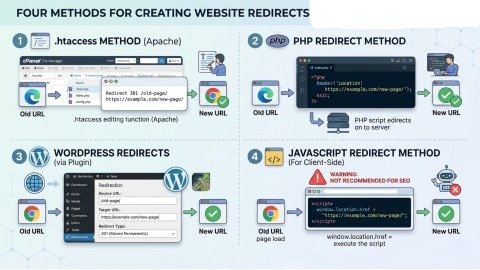
There are several ways to create redirects depending on your platform and server access. Below are the most commonly used methods explained in a simple way.
1. Using .htaccess (Apache Server)
This method is ideal if you have access to your hosting account (such as cPanel). It is powerful and widely used for SEO purposes.
Step-by-Step Process:
- Sign in to your hosting account using cPanel or the File Manager.
- Locate the .htaccess file
- Enable “Show Hidden Files” if needed
- Right-click and edit the file
- Add the following code at the end:
Redirect 301 /old-page/ https://example.com/new-page/
- Save the file
How It Works:
- /old-page/ = old URL path
- New URL = destination page
Now, visitors to the old page will automatically be redirected to the new page.
2. Using PHP Redirect
This method works well for websites built with PHP.
Step-by-Step Process:
- Open the PHP file (e.g., index.php)
- Add this code at the top:
<?php
header(“Location: https://example.com/new-page/”, true, 301);
exit();
?>
- Save and upload the file
Important Notes:
- Make sure the code is placed before any HTML is rendered.
• You can switch 301 to 302 if needed
Although simple, server-level redirects are generally better for SEO.
3. Using WordPress Plugins (Easiest Method)
For WordPress users, this is the simplest method.
Step-by-Step Process:
- Log in to your WordPress dashboard
- Go to Plugins → Add New
- Search for RankMath or Yoast SEO
- Install and activate the plugin
Create a Redirect:
- Go to the redirect section
- Click “Add New Redirect”
- Enter:
• Source URL (old)
• Destination URL (new) - Choose redirect type (301 or 302)
- Save
Your redirect is now active.
4. JavaScript Redirect (Not Recommended for SEO)
This method works on the browser side but is not ideal for SEO.
Example Code:
<script>
window.location.href = “https://example.com/new-page/”;
</script>
Why Avoid It:
- Search engines may not process it properly
- SEO value may not transfer
- Can affect page speed
For best results, always use server-side redirects like 301 vs 302 redirects.
Quick Tips After Creating Redirects
After setting up redirects, always test them:
- Open the old URL
- Confirm it redirects correctly
- Use Google Search Console for verification
This ensures everything is working properly.
Common Redirect Mistakes
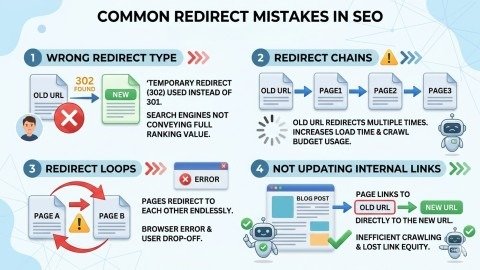
Redirects are helpful, but small mistakes can cause big SEO problems. They can slow down your website, confuse search engines, and create a poor user experience. That’s why it is important to use redirects in the right way.
Using the Wrong Redirect Type
Sometimes people use a 302 redirect when the change is permanent. This is not correct. It can stop SEO value from passing to the new page. Always choose the right redirect type.
Creating Redirect Chains
A redirect chain happens when one page redirects to another, and then again to another. This makes your site slow and hard for search engines to follow. Always link directly to the final page.
Redirect Loops
Redirect loops happen when pages keep sending users back and forth. This creates an endless loop, and the page does not open. It also causes a bad user experience.
Not Updating Internal Links
Many people forget to update their internal links. They depend only on redirects. This can slow down your site. It is better to update links to the new URL directly.
Best Practices for Redirects
Follow these tips for better results:
- Use 301 for permanent changes
- Keep redirects simple
- Avoid unnecessary redirects
- Update internal links
- Monitor redirects regularly
These practices help you use 301 vs 302 redirects effectively.
Conclusion
Redirection might seem simple, but it has a strong impact on SEO and user experience. It ensures users always reach the correct content while helping search engines understand your site structure.
The key is choosing the right type of redirect. Understanding 301 vs 302 redirects allows you to avoid mistakes and make smarter SEO decisions.
When used properly, redirects help maintain rankings, improve user experience, and support long-term website growth.
FAQs
1. What is a redirect in SEO?
A redirect in SEO automatically sends users and search engines from one URL to another to prevent errors and maintain site structure.
2. What is the difference between 301 and 302 redirects?
A 301 redirect is permanent and passes SEO value, while a 302 redirect is temporary and keeps the original page indexed.
3. When should I use a 301 redirect?
A 301 redirect is used when a page is permanently moved, deleted, or replaced to preserve rankings and link equity.
4. Does a 302 redirect affect SEO rankings?
A 302 redirect may limit SEO value transfer because search engines treat it as temporary and keep the original URL indexed.
5. How do I create a 301 redirect?
You can create a 301 redirect using .htaccess, WordPress plugins, or server settings by linking the old URL to a new one.
Meta Description:
Learn what redirection is and understand the difference between 301 vs 302 redirects. Discover when to use each type and how to create redirects step-by-step for better SEO and user experience.
- What is Redirection?
- Why Redirection is Important for SEO
- Types of Redirects
- What is a 301 Redirect? (Permanent Redirect)
- What is a 302 Redirect? (Temporary Redirect)
- 301 vs 302 Redirects – Key Differences
- When to Use 301 vs 302 Redirects
- How to Create Redirects (Step-by-Step Guide)
- Quick Tips After Creating Redirects
- Common Redirect Mistakes
- Not Updating Internal Links
- Conclusion
- FAQs
- Meta Description: