
Every website owner wants to rank higher on Google. However, small technical mistakes often stop that growth. One of the most common issues is related to Canonical Pages, and many people ignore it without realizing its impact. Because of this, websites can lose rankings, traffic, and visibility in search results.
Now think about this: your website has two or more pages with the same content. For users, it looks fine, but for Google, it creates confusion. Search engines cannot decide which page should rank. As a result, the wrong page may appear in search results or your main page may not perform well.
That is why understanding Canonical Pages is very important. In this guide, you will learn what they are, why they matter, common mistakes, and how to fix canonical issues step by step.
What are Canonical Pages?
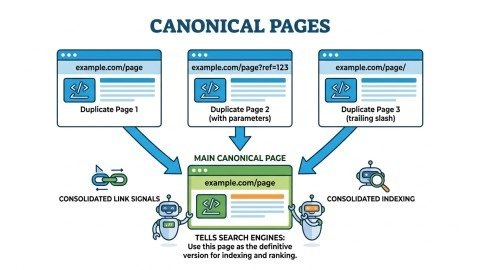
In simple terms, Canonical Pages are the main version of a webpage that you want search engines to index and rank.
Sometimes, a single page exists in multiple URL versions. For example:
- example.com/page
- example.com/page?ref=123
- example.com/page/
Even though these URLs show the same content, search engines treat them as separate pages. This creates duplication and confusion.
To solve this, you tell Google: “This is my main page.”
That selected version is called the Canonical Page, and it becomes the preferred version for search engines. This helps Google focus on one page instead of multiple duplicates.
What Are Canonical Issues in SEO?
Canonical issues happen when Canonical Pages are not set properly.
This usually happens in situations like:
- Multiple URLs showing the same content
- Missing canonical tags
- Wrong page selected as canonical
Because of these issues, search engines become confused. They may index the wrong page or ignore your main page completely. This leads to lower rankings and reduced traffic, which directly affects your SEO performance.
Common Causes of Canonical Issues
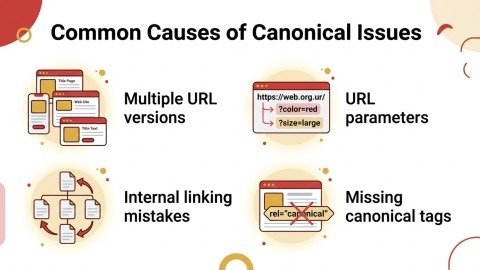
Canonical issues happen when search engines get confused about which page to index. This usually occurs because a website has multiple versions of the same page, missing or incorrect canonical tags, or internal links pointing to different URLs. Other causes include URL parameters, duplicate content, and pages blocked from crawling. These problems can reduce rankings, split SEO value, and make your site harder for Google to understand.
1. Multiple URL Versions
A single page can exist in different formats:
- HTTP vs HTTPS
- www vs non-www
- With slash vs without slash
👉 Each version looks the same to users, but search engines see them as different pages. Because of this, your content gets divided into many URLs. This creates duplicate content and weak SEO signals. So, you must choose one version and make it your main Canonical Page.
2. URL Parameters
E-commerce websites often generate URLs with filters like:
- ?color=red
- ?size=large
👉 These filters create many URLs for one product. Even if content is the same, Google sees them as new pages. This can confuse search engines and spread your ranking power. So, you should use canonical tags to point all versions to one main Canonical Page.
3. Internal Linking Mistakes
If your internal links point to different versions of a page, it sends mixed signals to Google.
👉 For example, one link goes to HTTP and another to HTTPS. This makes it hard for Google to understand which page is correct. Because of this, your canonical setup becomes weak and your rankings may drop.
4. Missing Canonical Tags
If no canonical tag is used, Google decides on its own which page to index.
This is risky because Google may choose the wrong page. Your main page may not rank at all. That is why adding canonical tags is very important for better control.
Top Canonical Tag Mistakes (You Must Avoid)
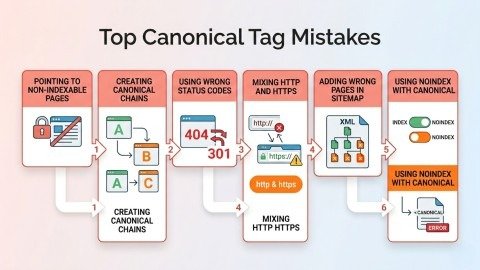
Many sites make mistakes with canonical tags. They point to wrong pages, mix HTTP/HTTPS, use noindex with canonical, or create long chains. These errors confuse Google and can hurt your page rankings.
1. Pointing to Non-Indexable Pages
If your canonical page is blocked or marked “noindex,” search engines cannot access it.
This means Google cannot see your main page. So your canonical tag will not work. As a result, your page may not appear in search results.
2. Creating Canonical Chains
This happens when:
- Page A → Page B
- Page B → Page C
This creates a chain that is hard to follow. Instead of one clear signal, Google gets confused. It may ignore your setup or pick the wrong page.
3. Using Wrong Status Codes
Canonical URLs must return a 200 status code.
- 404 (Not Found) ❌
- 301 Redirect ❌
If your page is broken or redirected, it sends a bad signal. Google may not trust it. Always make sure your canonical page is working properly.
4. Mixing HTTP and HTTPS
Using different protocols can confuse search engines.
If some pages use HTTP and others use HTTPS, Google may treat them as separate pages. This creates duplication issues. Always use HTTPS for all your Canonical Pages.
5. Adding Wrong Pages in Sitemap
Your sitemap should include only main Canonical Pages.
If you add duplicate pages, it sends wrong signals to Google. This can affect indexing and ranking. Keep your sitemap clean and simple.
6. Using Noindex with Canonical
This sends mixed signals:
- Canonical → “Index this page”
- Noindex → “Do not index”
This confuses Google because you are giving opposite instructions. As a result, your page may not be indexed correctly.
How to Check Canonical Pages
You can check canonical pages using tools or manually. Google Search Console shows which page you set and which page Google picked. SEO tools and site searches help find duplicates or broken tags.
1. Google Search Console
Google Search Console is one of the easiest ways to check Canonical Pages. You can use the URL Inspection tool to analyze any page on your website. It shows two important values:
- User-declared canonical
- Google-selected canonical
👉 If both are the same, your setup is correct. However, if they are different, it means Google is ignoring your canonical tag. This usually happens when your signals are weak or confusing. In that case, you should review your canonical setup and fix the issue to avoid ranking problems.
2. Website Audit Tools
Website audit tools help you scan your entire website and find technical SEO issues. These tools are very useful for identifying canonical problems quickly. They can show issues like:
- Duplicate pages
- Broken canonical tags
- Redirect errors
Instead of checking each page manually, these tools save time by highlighting problems automatically. They also give clear insights so you can fix issues faster. Regular audits help keep your Canonical Pages strong and your SEO performance stable.
3. Manual Check
You can also check your canonical setup manually using Google. Simply search:
site:yourdomain.com
This will show all indexed pages of your website. If you see multiple URLs with the same or similar content, it means your Canonical Pages are not set properly. This method is simple but effective for finding basic issues, especially for beginners.
How to Fix Canonical Issues (Step-by-Step)
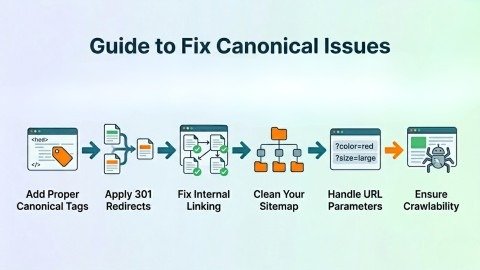
1. Add Proper Canonical Tags
The first step is to add the correct canonical tag in your page’s <head> section:
<link rel=”canonical” href=”https://example.com/main-page/” />
This tag clearly tells search engines which page is the main version. It removes confusion and helps Google focus on one page. Every important page on your site should have a proper canonical tag to improve indexing and rankings.
2. Apply 301 Redirects
If your website has multiple versions of the same page, you should redirect them to one main version. Common examples include:
- http → https
- www → non-www
A 301 redirect is permanent and passes SEO value to the main page. It ensures that all duplicate versions are merged into one. This helps strengthen your SEO and avoids confusion for search engines.
3. Fix Internal Linking
Internal links should always point to your main Canonical Pages. If your links point to different versions of the same page, it creates confusion for search engines. This weakens your SEO signals. By using consistent URLs in your internal links, you improve site structure and make crawling easier.
4. Clean Your Sitemap
Your sitemap should only include main Canonical Pages, not duplicates.
If duplicate URLs are added, search engines may get mixed signals. This can affect indexing and rankings. A clean sitemap helps Google understand which pages are important and improves overall SEO performance.
5. Handle URL Parameters
Websites, especially e-commerce stores, often create many URLs using filters.
These parameter URLs can create duplicate content issues. By using canonical tags, you can point all variations to one main page. This ensures that your SEO value is not split across multiple URLs.
6. Ensure Crawlability
Your Canonical Pages must be accessible to search engines.
If a page is blocked by robots.txt or marked as noindex, Google cannot crawl it. This means it will not rank. Always make sure your pages are open and crawlable so search engines can index them properly.
Conclusion
To sum up, Canonical Pages are a powerful part of SEO. They help search engines understand which page is the main version and prevent confusion caused by duplicate content.
The good news is that canonical issues are easy to fix if you follow the right steps. By using proper tags, fixing links, and maintaining a clean structure, you can improve your rankings and traffic.
Always remember:
One page = One clear signal to Google
If you manage your Canonical Pages correctly, your website will achieve better visibility, stronger rankings, and long-term success.
FAQs
1. What is a canonical page?
A canonical page is the main version of a webpage that search engines should index and rank.
2. How do canonical tags help SEO?
They prevent duplicate content problems and ensure all link value goes to the main page.
3. Can duplicate URLs affect my website ranking?
Yes, multiple URLs with the same content can confuse search engines and reduce your site’s ranking.
4. How can I find canonical issues on my site?
Use tools like Google Search Console, SEO audit tools, or check manually by searching site:yourdomain.com.
5. What is the easiest way to fix canonical problems?
Add proper canonical tags, fix internal links, clean your sitemap, and use 301 redirects for duplicate pages.
Meta Description:
Learn what canonical pages are, why they are important for SEO, and how to fix canonical issues step by step. Improve your website rankings, avoid duplicate content, and boost traffic with easy-to-follow tips.