
Imagine waking up tomorrow to find your bank account drained, your social media accounts posting spam, and strangers accessing your private emails. All because your password was “Password123.”
This nightmare becomes reality for thousands of people every single day. Weak passwords remain the number one reason cybercriminals succeed in breaking into accounts, stealing identities, and causing financial devastation.
Here is the uncomfortable truth: most people still use terrible passwords. Studies show that “123456,” “password,” and “qwerty” continue dominating the most-used password lists year after year. Hackers knoaw this. They exploit this. And they profit from this.
Creating a strong password is not complicated rocket science requiring a computer degree. It simply demands understanding a few core principles and applying them consistently across all your accounts.
This guide reveals ten practical, easy-to-follow tips for building bulletproof passwords in 2026. These strategies protect your digital life from evolving cyber threats while remaining simple enough that anyone can implement them immediately.
Your online security starts here. Let’s begin.
Why Strong Password Security Matters More Than Ever
The digital landscape has transformed dramatically. Twenty years ago, the average person managed maybe five online accounts. Today? That number exceeds one hundred for most people.
Every account represents a potential entry point for cybercriminals. Your email unlocks password resets for banking. Your social media connects to countless other services. Your work accounts contain sensitive business information.
Modern hacking techniques have evolved far beyond simple guessing. Cybercriminals now deploy:
Automated Brute Force Attacks:
Software programs systematically try millions of password combinations per second until finding the right one.
Dictionary Attacks:
These target common words, names, and predictable patterns people use in passwords.
Credential Stuffing:
Hackers take username-password pairs leaked from one breach and automatically test them across hundreds of other websites, betting you reused the same credentials.
AI-Powered Cracking:
Artificial intelligence now recognizes human password patterns and predicts variations with frightening accuracy.
The consequences of weak password security extend beyond inconvenience. Identity theft destroys credit scores. Financial theft drains savings accounts. Privacy violations expose intimate personal information. Career damage occurs when work accounts get compromised.
Strong password habits represent your primary defense against these threats. When implemented correctly, they make you an exponentially harder target—causing most attackers to simply move on to easier victims.
Tip 1: Prioritize Length Over Everything Else
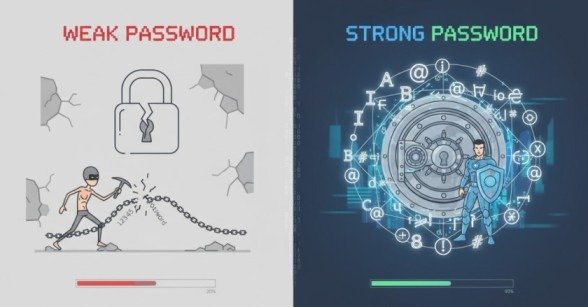
Password strength fundamentally comes down to one principle: length beats complexity every single time.
A sixteen-character password containing only lowercase letters remains significantly stronger than an eight-character password stuffed with uppercase letters, numbers, and symbols.
Why? Mathematics. Every additional character exponentially increases the total number of possible combinations hackers must try. Going from eight to sixteen characters does not double the difficulty—it multiplies it by billions.
Practical application:
Aim for minimum sixteen characters whenever possible. Many security experts now recommend twenty characters or more for critical accounts like email and banking.
Password length creates time barriers. While an eight-character password might crack in hours or days, a twenty-character password could take centuries with current technology.
Tip 2: Embrace Passphrases for Memorable Security
Remembering random character strings proves nearly impossible for human brains. That is where passphrases revolutionize password security.
A passphrase combines multiple unrelated words into a single long password. Instead of “Tr0ub4dor&3” you might use “correct-horse-battery-staple” or “purple-elephant-dance-moonlight.”
These longer phrases offer multiple advantages:
Easier Memory:
Four random words stick in your mind far better than twelve random characters.
Greater Length:
Passphrases naturally achieve the length needed for strong security.
Unexpected Combinations:
Random word pairings remain unpredictable to both humans and algorithms.
Practical application:
Choose four to seven completely unrelated words. Avoid common phrases, song lyrics, or quotes. Add numbers or symbols between words if desired, but prioritize making the passphrase long first.
Tip 3: Never Reuse Passwords Across Different Accounts
Password reuse represents the single most dangerous security habit people maintain. Yet studies show over sixty percent of people reuse the same password across multiple accounts.
Here is why this destroys security: when one website suffers a data breach, criminals immediately test those stolen credentials everywhere else. Your Netflix password becoming compromised suddenly gives hackers access to your email, banking, shopping accounts, and more.
Every account deserves its own unique password. No exceptions. Not even for “unimportant” accounts—because those often link to more critical services through password resets.
Practical application:
Conduct a password audit today. Identify every account using duplicate passwords and change them immediately to unique alternatives.
Tip 4: Leverage Password Managers for Effortless Security
Remembering sixteen-character unique passwords for one hundred accounts exceeds human capability. Attempting this guarantees either password reuse or weak passwords written on sticky notes.
Password managers solve this completely. These programs generate, store, and automatically fill strong unique passwords for every account you own.
You remember one master password. The password manager remembers everything else.
Modern password managers offer:
Automatic Password Generation:
Create complex twenty-character passwords with one click.
Secure Encrypted Storage:
Military-grade encryption protects your password vault.
Cross-Device Syncing:
Access passwords seamlessly across computers, phones, and tablets.
Breach Monitoring:
Receive alerts when any saved password appears in data breaches. Popular options include Bitwarden, 1Password, Dashlane, and LastPass. Many browsers also include basic built-in password managers, though dedicated applications typically offer superior security features
Practical application:
Choose a reputable password manager today. Start by adding your most critical accounts, then gradually migrate everything else.
Tip 5: Add Numbers and Symbols Strategically
While length matters most, incorporating numbers and symbols still strengthens passwords—when done thoughtfully.
The key word is “strategically.” Common substitutions like replacing “o” with “0” or “a” with “@” fool nobody. Hackers programmed these patterns into their tools years ago.
Instead, place numbers and symbols unpredictably throughout longer passphrases.
Weak example:
P@ssw0rd123 (predictable substitutions)
Strong example:
orbit47$lantern#ocean92jazz (random placement in longer phrase)
Practical application:
When creating passphrases, insert numbers and symbols randomly between or within words rather than following predictable patterns.
Tip 6: Enable Multi-Factor Authentication Everywhere Possible
Multi-factor authentication (MFA) adds a second verification step beyond passwords. Even if hackers steal your password, they cannot access your account without this additional factor.
Common MFA methods include:
Authenticator Apps:
Google Authenticator, Microsoft Authenticator, or Authy generate time-based codes on your phone.
Hardware Security Keys:
Physical devices like YubiKey provide the strongest protection available.
Biometric Verification:
Fingerprint or face recognition on trusted devices.
SMS Codes:
Text message codes offer basic protection, though they remain vulnerable to sophisticated attacks.
Practical application:
Enable MFA immediately on email accounts (these unlock password resets for everything else), banking, social media, and any account containing sensitive information.
Tip 7: Avoid Personal Information in Passwords
Birthdays, anniversaries, pet names, children’s names, favorite sports teams—these make terrible password components because they are easily discoverable.
Cybercriminals routinely scrape social media profiles gathering personal details. That cute Facebook post about your golden retriever named Max? It just helped someone guess your password.
Street addresses, phone numbers, and family member names all fall into this dangerous category.
Practical application:
Never include information someone could find on your social media, public records, or through basic internet searches. Choose completely random words or characters instead.
Tip 8: Change Passwords When Breaches Occur
Old security advice recommended changing passwords every ninety days. Modern guidance has evolved: frequent unnecessary changes often lead people to create weaker passwords or make minor predictable modifications.
However, you absolutely must change passwords immediately when:
Data Breaches Occur: If a service announces a breach affecting your account, change that password instantly—and change it everywhere else you used the same password.
Suspicious Activity Appears: Unexpected login notifications or unusual account activity demand immediate password updates.
Shared Access Ends: When relationships end or employees leave, change any passwords they knew.
Many password managers now include breach monitoring features that automatically alert you when your credentials appear in known data leaks.
Practical application: Sign up for Have I Been Pwned alerts to receive notifications when your email appears in new data breaches. Change affected passwords immediately.
Tip 9: Never Share Passwords Through Insecure Channels
Legitimate companies never ask for passwords via email, text message, or phone calls. If someone requests your password through these channels, it is a scam. Period.
Even sharing passwords with trusted friends or family members creates risks. People accidentally expose passwords through device theft, shoulder surfing, or their own security mistakes.
If you absolutely must share account access temporarily:
Use password manager sharing features designed for secure temporary access.
Create separate user accounts instead of sharing credentials when services allow.
Change the password immediately after the other person no longer needs access.
Practical application: Never type passwords into emails, text messages, or messaging apps. Never say them aloud on phone calls. Use secure sharing tools or create temporary access instead.
Tip 10: Verify Website Security Before Entering Passwords
Phishing attacks trick people into entering passwords on fake websites designed to look legitimate. These sophisticated scams steal millions of credentials annually.
Before entering any password, verify:
The URL is correct: Scammers create nearly identical domains like “amaz0n.com” instead of “amazon.com.”
HTTPS appears: Look for the padlock icon and “https://” in the address bar.
No suspicious redirects occurred: Legitimate sites do not redirect multiple times before login pages.
Email links are legitimate: Hover over links before clicking to see the actual destination. When in doubt, manually type the website address into your browser instead.
Practical application: Bookmark frequently used login pages. Access them through bookmarks rather than clicking email links. Train yourself to scrutinize URLs carefully before entering credentials.
Creating Your Strong Password Action Plan
Understanding strong password principles means nothing without implementation. Here is your step-by-step action plan:
Today: Install a reputable password manager and create a strong master password.
This Week: Add your ten most critical accounts (email, banking, work) to the password manager with unique strong passwords.
This Month: Migrate all remaining accounts to the password manager. Enable MFA everywhere possible.
Ongoing: Use the password manager to generate strong passwords for all new accounts. Never reuse passwords. Monitor breach alerts and respond immediately.
This systematic approach transforms password security from overwhelming to manageable.
Common Password Mistakes to Avoid
Even people trying to follow good security practices often fall into these traps:
Writing passwords on sticky notes taped to monitors or hidden under keyboards.
Saving passwords in unencrypted files on computers or phones.
Using “password hints” that essentially reveal the actual password.
Ignoring MFA because it seems inconvenient.
Trusting public computers at libraries or hotels with password entry.
Falling for fake security alerts requesting password verification.
Avoiding these mistakes matters just as much as implementing strong passwords.
The Future of Password Security
While passwords remain the dominant authentication method in 2026, alternatives continue emerging:
Passkeys use cryptographic keys instead of traditional passwords, offering superior security without memorization requirements.
Biometric authentication leverages fingerprints, face recognition, or other unique physical characteristics.
Hardware security keys provide physical two-factor authentication that cannot be phished remotely.
These technologies will gradually supplement and eventually replace traditional passwords. However, passwords will remain relevant for years to come, making strong password habits essential today.
Conclusion
Creating strong passwords is not complicated, but it requires conscious effort and smart tool usage. The ten tips covered in this guide provide a complete framework for bulletproof password security in 2026.
Length beats complexity. Passphrases beat random characters. Uniqueness beats reuse. Password managers beat human memory. Multi-factor authentication beats passwords alone.
Implementing these strategies does not require technical expertise or significant time investment. It simply demands making security a priority and using the right tools to make strong passwords effortless.
Your digital life—your finances, your privacy, your identity, your career—depends on the passwords protecting it. Start strengthening them today. Your future self will thank you.
Frequently Asked Questions
How long should my password be in 2026?
Aim for minimum sixteen characters, though twenty or more is ideal for critical accounts. Length provides exponentially more protection than complexity alone.
Are password managers safe?
Yes. Trusted password managers use strong encryption and regular security audits. They’re much safer than weak or reused passwords.
Should I change passwords regularly?
Only if there’s a data breach. Instead of frequent changes, focus on strong, unique passwords.
What makes a passphrase strong?
Use 4–7 random, unrelated words. Avoid common quotes or song lyrics.
Is multi-factor authentication necessary?
Yes. Even strong passwords can leak. MFA adds an extra security layer to protect your accounts.
Meta Description:
Wondering how to create a strong password? Discover 10 powerful tips to protect your accounts from hackers in 2026.
- Why Strong Password Security Matters More Than Ever
- Tip 1: Prioritize Length Over Everything Else
- Tip 2: Embrace Passphrases for Memorable Security
- Tip 3: Never Reuse Passwords Across Different Accounts
- Tip 4: Leverage Password Managers for Effortless Security
- Tip 5: Add Numbers and Symbols Strategically
- Tip 6: Enable Multi-Factor Authentication Everywhere Possible
- Tip 7: Avoid Personal Information in Passwords
- Tip 8: Change Passwords When Breaches Occur
- Tip 9: Never Share Passwords Through Insecure Channels
- Tip 10: Verify Website Security Before Entering Passwords
- Creating Your Strong Password Action Plan
- Common Password Mistakes to Avoid
- The Future of Password Security
- Conclusion
- Frequently Asked Questions
- Meta Description: