
Gone are the days when people needed expensive software to stay productive. In 2026, free online tools have become incredibly powerful, offering features that can easily compete with premium paid software. These modern tools deliver high performance, advanced functionality, and user-friendly designs, making productivity more accessible than ever. Now, anyone can work smarter without spending large amounts of money.
Whether you’re a student preparing for exams, a professional managing multiple projects, or a freelancer growing a business, the right free tools can make a huge difference. They help streamline workflows, improve organization, save time, and boost efficiency. Instead of investing in costly software, users can rely on free platforms that support collaboration, task management, content creation, and more — all while maintaining quality and performance.
This guide highlights the best free online tools for students and professionals in 2026. Each tool included is either completely free or offers a generous free plan that provides real value. From productivity apps and design tools to project management and communication platforms, these resources can help you work faster, smarter, and more effectively — without breaking your budget.
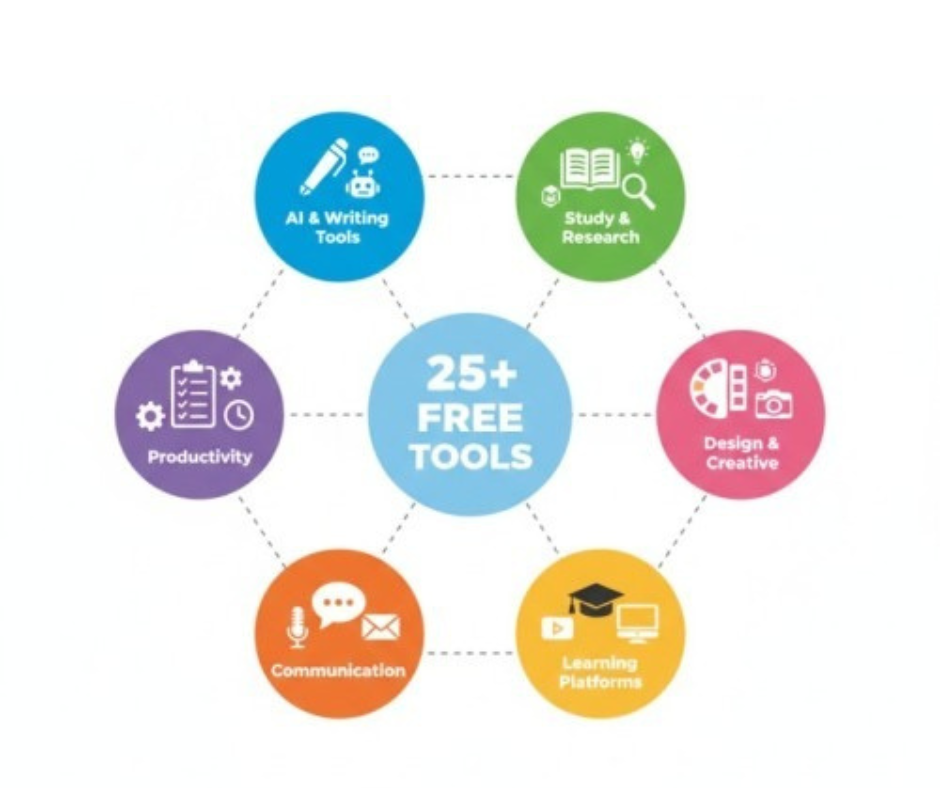
Best Free AI Tools for Writing and Content Creation
1. ChatGPT
ChatGPT remains the most popular AI assistant for students and professionals worldwide. The free version is powerful enough for
most daily tasks.
What it does:
- Helps write essays, emails, and reports
- Explains difficult concepts clearly
- Creates study materials and summaries
- Generates ideas and outlines
Free Features:
- Access to GPT-4o mini model
- Unlimited conversations (with rate limits)
- File uploads and data analysis
- Web browsing capability
Best for: General writing tasks, research help, brainstorming, and learning support.
2. Google Gemini
Google is offering university students a full year of Gemini Pro for free with a student email address. This includes 2TB of cloud storage
and advanced AI capabilities.
What it does:
- Analyzes massive documents quickly
- Integrates with Google Workspace
- Provides real-time information
- Supports multiple languages
Free Features:
- Full year of Gemini Pro access
- 2TB Google Drive storage
- Advanced document analysis
- YouTube video summarization
Best for: Students who use Google ecosystem, research papers, and document analysis.
3. Claude
Claude excels at long-form analysis and complex reasoning, making it perfect for academic work and professional documents.
What it does:
- Provides detailed explanations
- Analyzes research papers
- Helps with complex assignments
- Reviews and improves writing
Free Features:
- Access to Claude 3.5 Sonnet model
- Long conversation memory
- Document uploads
- Code generation
Best for: Research papers, complex analysis, detailed explanations, and thoughtful responses.
4. Grammarly
Grammarly helps millions of users write clear, mistake-free content in real-time.
What it does:
- Fixes grammar and spelling errors
- Suggests better word choices
- Improves sentence clarity
- Checks punctuation
Free Features:
- Real-time grammar checking
- Spelling corrections
- Basic punctuation fixes
- Tone detection (basic)
Best for: Writing emails, essays, reports, social media posts, and professional documents.
5. QuillBot
QuillBot is an AI-powered paraphrasing and summarizing tool popular with students and academic writers.
What it does:
- Rewrites text while keeping original meaning
- Summarizes long articles
- Checks grammar
- Generates citations
Free Features:
- 125 words paraphrasing per attempt
- 2 writing modes
- Basic grammar check
- Standard vocabulary changes
Best for: Paraphrasing content, avoiding plagiarism, and text summarization.
Best Free Research and Study Tools
6. Perplexity AI
Perplexity is an answer engine that searches the internet and provides answers with clickable source citations.
What it does:
- Searches live internet for current info
- Provides cited sources with links
- Answers complex questions
- Summarizes multiple sources
Free Features:
- Unlimited basic searches
- Source citations
- Follow-up questions
- Mobile app access
Best for: Research, fact-checking, finding credible sources, and academic writing
7. Google Scholar
Google Scholar is a free academic search engine that helps you find scholarly articles, papers, and research.
What it does:
- Searches academic papers and journals
- Finds citations and references
- Tracks research topics
- Creates citation alerts
Free Features:
- Unlimited searches
- PDF access (when available)
- Citation tracking
- Author profiles
Best for: Academic research, finding peer-reviewed articles, and literature reviews.
8. Wolfram Alpha
Wolfram Alpha is a computational engine perfect for STEM subjects. It solves problems step-by-step.
What it does:
- Solves math equations
- Shows step-by-step solutions
- Provides scientific calculations
- Analyzes data
Free Features:
- Unlimited basic queries
- Instant calculations
- Formula explanations
- Graph visualizations
Best for: Math homework, physics problems, chemistry calculations, and data analysis.
9. Khan Academy
Khan Academy offers free educational content for students of all ages with video lectures and practice exercises.
What it does:
- Provides video lessons
- Offers practice exercises
- Tracks learning progress
- Covers multiple subjects
Free Features:
- Completely free forever
- Personalized learning dashboard
- Practice questions with hints
- Progress tracking
Best for: Learning new subjects, exam preparation, and supplemental education
10. Quizlet
Quizlet helps students study smarter by turning notes into digital
flashcards, quizzes, and games.
What it does:
- Creates digital flashcards
- Generates practice tests
- Offers study games
- Shares study sets
Free Features:
- Unlimited flashcard sets
- Study modes (flashcards, learn, test)
- Search millions of existing sets
- Basic practice tests
Best for: Memorization, exam preparation, vocabulary learning, and quick reviews
Best Free Productivity and Organization Tools
11. Notion
Notion is an all-in-one workspace for notes, tasks, projects, and databases. It’s perfect for staying organized.
What it does:
- Creates notes and documents
- Manages tasks and projects
- Builds databases
- Organizes life and work
Free Features:
- Unlimited pages and blocks
- Basic AI features (limited)
- Collaboration with teammates
- Templates and customization
Best for: Note-taking, project management, personal organization, and knowledge management
12. Google Workspace
Google Workspace includes Docs, Sheets, Slides, Drive, and Calendar—all free and cloud-based.
What it does:
- Word processing (Docs)
- Spreadsheets (Sheets)
- Presentations (Slides)
- Cloud storage (Drive)
- Calendar management
Free Features:
- 15GB free storage
- Real-time collaboration
- Access from any device
- Automatic saving
Best for: Students and professionals who need office software, collaboration, and cloud storage.
13. Trello
Trello is a visual project management tool that uses boards, lists, and
cards to organize tasks.
What it does:
- Organizes projects visually
- Tracks task progress
- Manages team collaboration
- Sets deadlines and reminders
Free Features:
- Unlimited cards
- 10 boards per workspace
- Unlimited activity log
- Mobile apps
Best for: Project management, team collaboration, task tracking, and visual organization.
14. Microsoft Teams
Microsoft Teams is a collaboration platform for chat, video meetings, and file sharing.
What it does:
- Team chat and messaging
- Video and audio calls
- File sharing and collaboration
- Calendar integration
Free Features:
- Up to 100 meeting participants
- 60-minute group meetings
- 5GB cloud storage per user
- Chat and collaboration tools
Best for: Remote teams, group projects, online classes, and business communication.
15. Todoist
Todoist is a simple yet powerful task management app that helps you organize daily tasks and projects.
What it does:
- Creates task lists
- Sets priorities and deadlines
- Organizes projects
- Tracks productivity
Free Features:
- 5 active projects
- 5 collaborators per project
- Basic filters and labels
- 1 week activity history
Best for: Daily task management, to-do lists, habit tracking, and personal productivity.
Best Free Design and Creative Tools
16. Canva
Canva is the most popular free design tool for creating graphics, presentations, and marketing materials.
What it does:
- Creates social media graphics
- Designs presentations
- Makes posters and flyers
- Edits photos
Free Features:
- 250,000+ free templates
- 100+ design types
- Basic photo editing
- 5GB cloud storage
Best for: Non-designers, social media content, presentations, and marketing materials.
17. Figma
Figma is a professional UI/UX design tool perfect for web design and app prototyping.
What it does:
- Designs websites and apps
- Creates prototypes
- Collaborates in real-time
- Builds design systems
Free Features:
- 3 Figma files
- 3 FigJam files
- Unlimited collaborators
- Version history (30 days)
Best for: Web designers, UI/UX professionals, app developers, and design students.
18. Leonardo AI
Leonardo AI offers generous free image generation with professional quality results.
What it does:
- Generates AI images from text
- Creates art and illustrations
- Produces product mockups
- Designs marketing visuals
Free Features:
- 150 daily tokens
- Multiple AI models
- Upscaling and editing
- Commercial use allowed
Best for: Content creators, marketers, designers, and anyone needing AI-generated images
19. CapCut
CapCut dominates free video editing in 2026, perfect for social media content creators.
What it does:
- Edits videos quickly
- Adds effects and transitions
- Creates reels and shorts
- Removes backgrounds
Free Features:
- Unlimited video editing
- AI-powered tools
- Trending templates
- No watermark
Best for: TikTok, Instagram Reels, YouTube Shorts, and social media video editing.
20. GIMP
GIMP is a free, open-source alternative to Adobe Photoshop with professional features.
What it does:
- Photo editing and retouching
- Graphic design
- Image manipulation
- Custom plugins
Free Features:
- Completely free forever
- Advanced editing tools
- Layer support
- Custom brushes and filters
Best for: Professional photo editing, graphic design, and digital art without paying for Photoshop.
Best Free Communication Tools
21. Zoom
Zoom is the most popular video conferencing tool for online meetings and classes.
What it does:
- Video conferencing
- Screen sharing
- Recording meetings
- Chat messaging
Free Features:
- 40-minute group meetings
- Unlimited 1-on-1 meetings
- 100 participants
- Screen sharing
Best for: Online classes, team meetings, webinars, and virtual events.
22. Slack
Slack is a messaging platform for team communication and collaboration.
What it does:
- Team messaging
- File sharing
- Channel organization
- App integrations
Free Features:
- 90-day message history
- 10 app integrations
- 1-on-1 video calls
- Unlimited channels
Best for: Remote teams, project collaboration, and professional communication.
23. Discord
Discord is a communication platform perfect for study groups and team collaboration.
What it does:
- Voice and video calls
- Text chat
- Screen sharing
- Community building
Free Features:
- Unlimited servers
- Unlimited messages
- Voice channels
- Screen sharing
Best for: Study groups, gaming communities, project teams, and casual communication.
Best Free Learning Platforms
24. Coursera
Coursera offers thousands of free courses from top universities
worldwide.
What it does:
- University-level courses
- Professional certificates
- Skill development
- Career advancement
Free Features:
- Audit courses for free
- Watch video lectures
- Read course materials
- Take quizzes (some courses)
Best for: Professional development, learning new skills, and career advancement.
25. edX
edX provides free access to courses from MIT, Harvard, and other top institutions.
What it does:
- Academic courses
- Professional programs
- Tech skills training
- Business education
Free Features:
- Audit thousands of courses
- Access course materials
- Watch video lectures
- Participate in forums
Best for: Academic learning, professional certifications, and skill building.
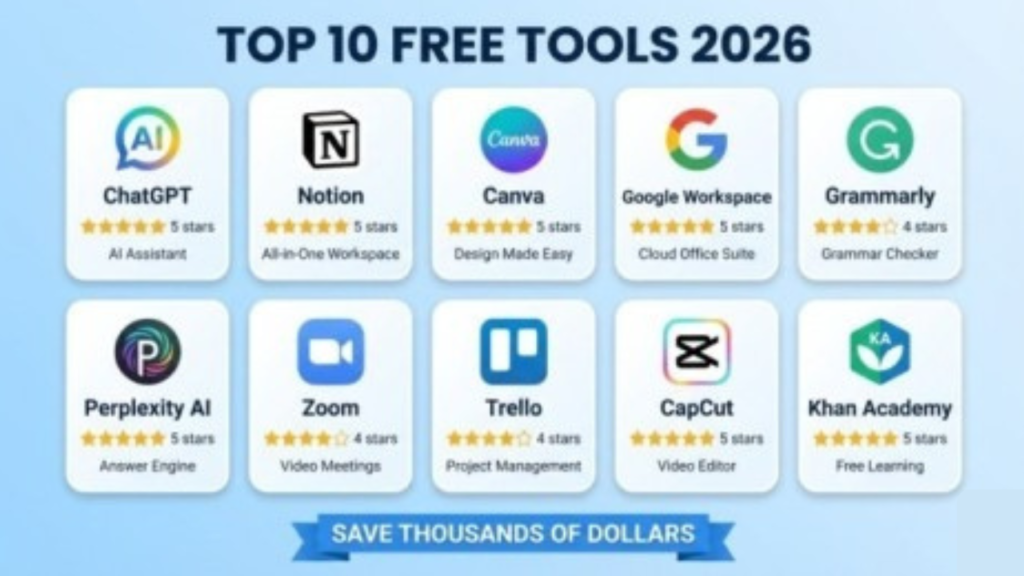
Comparison Table: Top Free Tools by Category
| Category | Tool | Best For | Rating |
| AI Writing | ChatGPT | General tasks | ⭐⭐⭐⭐⭐ |
| AI Writing | Google Gemini | Students | ⭐⭐⭐⭐⭐ |
| AI Writing | Claude | Complex analysis | ⭐⭐⭐⭐ |
| Grammar | Grammarly | Error correction | ⭐⭐⭐⭐ |
| Research | Perplexity AI | Finding sources | ⭐⭐⭐⭐⭐ |
| Research | Google Scholar | Academic papers | ⭐⭐⭐⭐⭐ |
| Study | Quizlet | Flashcards | ⭐⭐⭐⭐ |
| Study | Khan Academy | Video lessons | ⭐⭐⭐⭐⭐ |
| Productivity | Notion | Organization | ⭐⭐⭐⭐⭐ |
| Productivity | Google Workspace | Office suite | ⭐⭐⭐⭐⭐ |
| Design | Canva | Graphics | ⭐⭐⭐⭐⭐ |
| Design | Figma | UI/UX design | ⭐⭐⭐⭐⭐ |
| Video | CapCut | Social media | ⭐⭐⭐⭐ |
| Communication | Zoom | Video meetings | ⭐⭐⭐⭐ |
| Learning | Coursera | Online courses | ⭐⭐⭐⭐ |
How to Choose the Right Tools for You
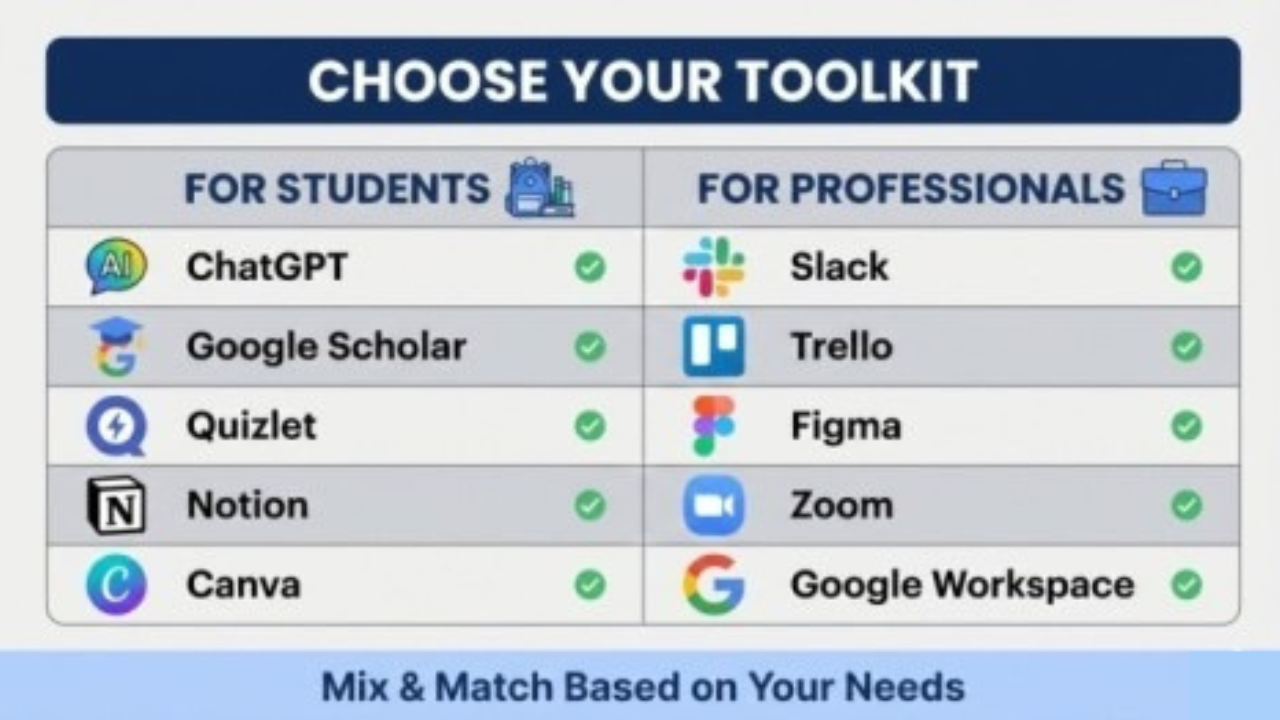
For Students:
- Writing: ChatGPT + Grammarly + QuillBot
- Research: Perplexity AI + Google Scholar + Wolfram Alpha
- Study: Quizlet + Khan Academy + Notion
- Organization: Google Workspace + Notion + Todoist
- Design: Canva + Figma (for advanced users)
For Professionals:
- Productivity: Notion + Google Workspace + Trello
- Communication: Slack + Zoom + Microsoft Teams
- Design: Canva + Figma + GIMP
- Content Creation: ChatGPT + Grammarly + CapCut
- Project Management: Trello + Notion + Todoist
For Freelancers:
- Client Communication: Zoom + Slack + Discord
- Project Delivery: Notion + Trello + Google Workspace
- Creative Work: Canva + Leonardo AI + CapCut + GIMP
- Time Management: Todoist + Google Calendar
- Learning: Coursera + edX + Khan Academy
Tips for Maximizing Free Tools
1. Use Student Email for Discounts
Many companies offer extended free trials or upgraded features for students with valid. edu email addresses.
2. Combine Tools Strategically
Don’t try to use every tool. Pick 3-5 tools that work together and master them.
3. Check for Free Trials
Many paid tools offer 30-day to 1-year free trials for students and professionals.
4. Join Free Communities
Many tools have Discord servers or Facebook groups where users share tips and
templates.
5. Export Your Data Regularly
Since free plans can change, always export important data and keep backups.
What Makes 2026 Different
1. More Powerful Free Tiers
Companies are competing for users, resulting in more generous free plans with advanced features.
2. AI Integration Everywhere
Almost every productivity tool now includes AI features, even in free versions.
3. Better Collaboration Features
Remote work has pushed companies to add collaboration features to free plans.
4. No Credit Card Required
Most tools in 2026 offer truly free plans without requiring credit card information.
5. Mobile-First Design
All tools now work seamlessly on smartphones and tablets, not just desktops.
Conclusion:
In 2026, there is no excuse for not being productive, as technology has made powerful tools accessible to everyone. Free online tools now offer advanced features that help people manage tasks, organize work, collaborate with teams, and improve efficiency without spending money. These tools are designed to simplify daily work, save time, reduce stress, and increase overall performance, making productivity easier than ever before.
Whether you are a student preparing for exams, a professional handling multiple projects, or a freelancer building and growing a business, free online tools provide everything you need to succeed. From study apps and project management platforms to design, communication, and financial tools, there are endless resources available to support your goals. By using the right tools, you can work smarter, stay organized, meet deadlines faster, and achieve better results while building a strong foundation for long-term success.
Frequently Asked Questions (FAQs)
Are these tools really completely free?
Yes! All listed tools have genuine free versions. Some offer paid features, but free plans provide real value.
Do I need a credit card to sign up?
Most don’t require a credit card. Some may ask, but you can skip or cancel before charges.
Can I use free tools for commercial purposes?
Most allow it (Canva, Notion, Google Workspace), but check each tool’s terms. Leonardo AI allows commercial use.
Will my data be safe with free tools?
Yes, reputable companies take security seriously. Avoid extremely sensitive data and enable two-factor authentication.
What’s the catch with free AI tools?
They may have usage limits, slower responses, or fewer features. Free versions are usually enough for students and professionals.
Can I upgrade to paid plans later?
Yes! Upgrades are seamless for more features, storage, or limits. Student discounts may also apply.
Meta Description
Discover the best free online tools for students and professionals in 2026. Explore top AI writing tools, research platforms, productivity apps, design software, communication tools, and learning resources that boost efficiency, save money, and improve work, study, and freelance success with powerful free features.
- Best Free AI Tools for Writing and Content Creation
- Best Free Research and Study Tools
- Best Free Productivity and Organization Tools
- Best Free Design and Creative Tools
- Best Free Communication Tools
- Free Features:
- Best Free Learning Platforms
- Comparison Table: Top Free Tools by Category
- How to Choose the Right Tools for You
- Tips for Maximizing Free Tools
- What Makes 2026 Different
- Conclusion:
- Frequently Asked Questions (FAQs)
- Meta Description